When I read this, my first thought was that the beta is still a long way off. That is definitely not good news.
We really need an Xojo version that compiles against SDK26 as soon as possible.
It’s already overdue.
Maybe access to the alpha versions for those who want to participate would be a ‘good’ solution.
They’ve already announced that r3 will be late, and likely the last of the year. However, I too would have been happy to see a beta or two by now. Presumably they’ve been working on this through the summer, and didn’t just start upon Tahoe’s release.
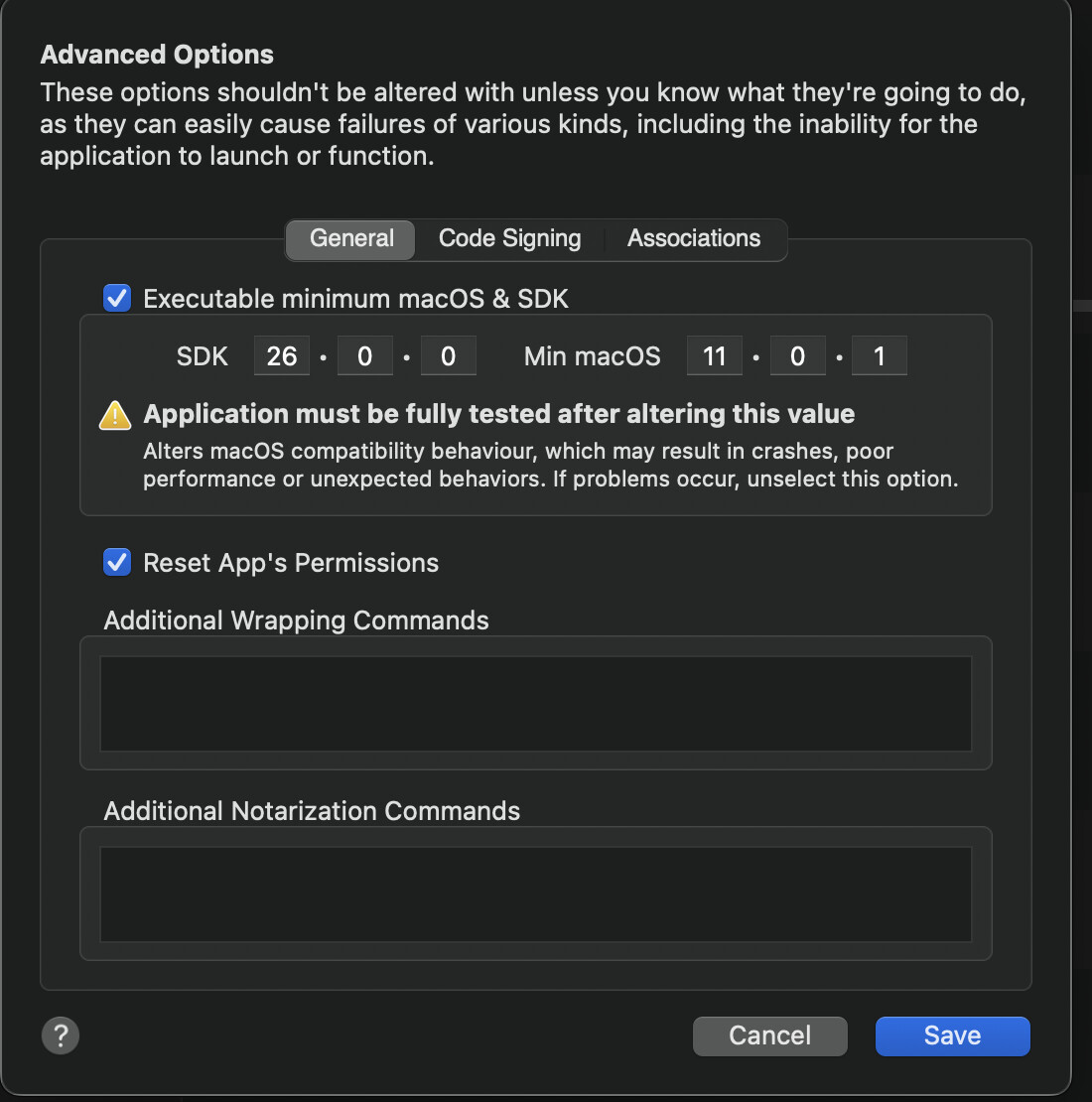
For my part, following Sam’s instructions with App Wrapper, in setting the 26 SDK, is working well. I do most of my signing/notarizing on my iMac Pro, which is stuck on Sequoia. However, I am again successful with App Wrapper when doing so on Tahoe, on my M1 MBP.
They are on Ohanaware’s site. I don’t have the link handy, but here is my own screenshot. Basically, make sure you’ve clicked the check box, and set your own minimum OS if different from mine.
Yes, but it does not work for me. I use this script in the build process to change the macOS build version.
Still I have several issues (crashing of the app etc..).
'Calculate the full path of the binary inside the bundle
Dim binarypath As String = CurrentBuildLocationNative
Dim binaryName As String = CurrentBuildAppName.Replace(“.app”, “”)
Dim bundlePath As String = binarypath + “/” + CurrentBuildAppName
Dim fullBinaryFolder As String = bundlePath + “/Contents/MacOS/”
Dim fullBinaryPath As String =  fullBinaryFolder + binaryName

// pull out the minimum version
Dim minVersion As String = getMinOSVersion(bundlePath)

// convert the binary so the sdk version is 26.0
Dim cmd As String = “cd “”%1"” && vtool -set-build-version macos %2 26.0 -output modified “”%3"" && mv -f modified “”%3"“”
Dim expandedcmd As String = Param(cmd, fullBinaryFolder, minVersion, binaryName)
Dim result As String = DoShellCommand(expandedcmd)

Function param(template As String, ParamArray values As String) As String
For i As Integer = ubound(values) DownTo 0
template = template.ReplaceAll(“%” + Str(i+1), values(i))
Next
Return template
End Function

Function getMinOSVersion(bundlePath As String) As String
Dim cmd As String = “/usr/libexec/PlistBuddy -c ““Print LSMinimumSystemVersion”” “”%1/Contents/Info.plist”“”
Dim result As String = DoShellCommand(param(cmd, bundlepath))
Return Trim(Result)
End Function
As I said when I published that code, you shouldn’t use it for production code. It was meant so that people could start looking at how their apps behaved in Tahoe. It is not a long term solution.
The thing you’re all missing here is that changing the SDK version is not the same as “compiling against the new SDK.” The Xojo IDE includes the hooks that are necessary to correctly connect into the new SDK and without that, your apps can crash because it makes calls to things that are not there.
So again… it really is best to wait until Xojo releases a build that includes the macOS 26 SDK.
If it were just simple and safe as a “just compile using SDK 26”, we probably would have it 15 days ago. Probably the “new design” and controls need offset and size “compensations”, maybe new events (in the runtime at least), etc. There are many missing or loose bolts in the machine right now. The only option is to wait. I can guarantee that everyday passing without a R3 release they are losing money, so it’s not a matter of lack of effort, they must be working hard in an unstable big project. And a half baked and crashing release is not what we will want to see… so… patience.
I find it very frightening that more than a month has passed since the OS26 release and we still don’t even have a beta. Does Xojo not care at all that we can no longer release updates for our apps on Apple systems because their stability can no longer be guaranteed? Truly frightening.
Are you suggesting that a newer operating system is having stability problems with older apps? Because that doesn’t sound like Xojo’s fault to me. Even if you’re forcing an SDK override, that doesn’t sound like Xojo’s fault to me either, since you’ve been told not to do it. You are not forced to have a liquid glass update ready yet.
The new control metrics is absolute chaos for Xojo. I don’t think they were anticipating having to solve this problem so quickly.
They could just use an offset for controls when used in macOS26. That can be implemented easy and fast. It may not be the perfect solution but will do fine for 99% use cases.
Yes, macOS users are picky on this. You do not want to know how many mails I already received asking when my apps will look/behave like it should in macOS26.
I can understand this behavior of customers. When a studio reacts slowly to OS updates, I, as a customer, often ask myself whether they’re the right partner for my important projects…