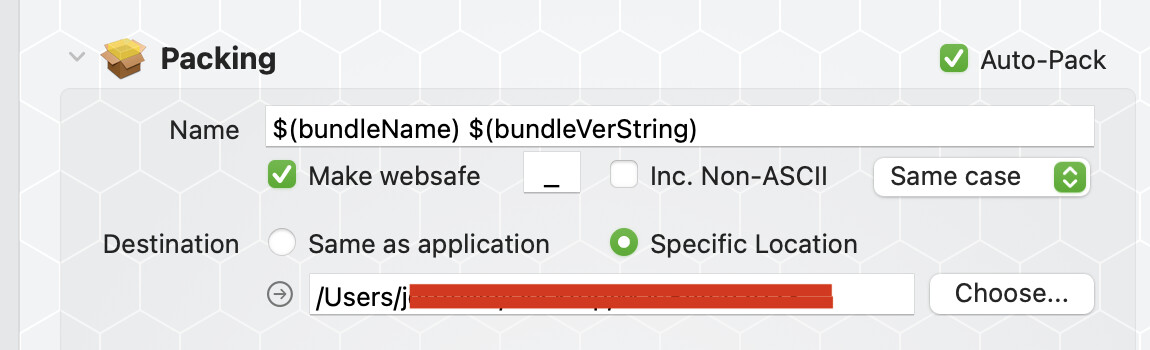
I have an issue using AppWrapper. When I choose “Wrap, pack & notarize”, the process starts normally and DropDMG creates and manages the dmg file, but when it finishes that step, the dmg file just vanishes. Then, AppWrapper complains “No such file or directory” and stops.
I’ve tried various combinations, changing the target folder, enabling/disabling options in AppWrapper, but the issue persists.
I have no idea which process removes the dmg file; I’ve checked using fs_usage and the Console, both don’t return anything interesting.
I’m starting to assume it’s some kind of new MacOS “feature” which would mistakenly detect “suspicious” dmg files creation and “clean” them, but I don’t have any clue that this has been implemented in MacOS.
I guess that your AppWrapper still the same, but have you updated DropDMG or your OS since the last time your “CI/CD” system was working? Or updated some processing script? Is this destination DMG place in an iCloud sync’d folder?
Do you have something like Acronis installed? I had some problems when Acronis decided that DefaultFolder was a threat. I tried to install a new version of DefaultFolder and Acronis “vanished” the app.
Because I’ve not yet spent time on that. And I’m not really interested in going to the complicated way right now, especially since I doubt it would solve my actual problem.
Yes for restarting the computer. As for trying on another one, dealing with the certificates is always a nightmare, so it would be time-consuming (it usually takes me around one week to set up the other computer I have).
I think what would help most is understanding how a file can vanish without user interaction.
AppWrapper is up to date, but I’ll check about DropDMG.
Usually, I try an OS beta on just one computer and only if I find no severe bugs, I install it on the other computer some weeks later (when it’s in the user-beta cycle). I’ve done so this time, too. Normally, there are always workarounds for the eventual bugs at this stage.
I’m wondering why AppWrapper, AppDMG or the OS would remove files without even telling it.
Possibly a good guess. If true, that’s a terrible decision, because this setting cannot be turned off (my Safari→Settings→General→“Automatically open safe files” (I’m translating, not sure about the exact spelling) is already unchecked); deleting files that easily would be a huge mistake concerning how we can trust the OS.
Well, I don’t even know if DropDMG is to blame.
Also, I’m not confident with writing a “professional” mail in English. So I’m looking at solutions using other ways.
On my computer, it’s 100% reproducible, but since I don’t know why, I can’t provide the steps.
Maybe App Wrapper or DropDMG do not have Full Disk Access?
macOS may allow the tool to write into a temporary path, but deny the permission needed to move it to the target folder, causing the temporary written file to get discarded upon exit.
Good guess, but no, it doesn’t change anything.
I’ve asked the author of DropDMG, who doesn’t believe the issue lies in his product. Now asked Sam and waiting for his answer…
Why on earth am I the only one getting this?
I now tried on my MacBook Pro and the result is exactly the same
Doesn’t look like that.
Well, I was ironic. I can suspect my configuration is rare if I’m the only one having this trouble. I just can’t understand there are behaviours like this which just don’t leave any tracks, on supposedly tested applications and operating systems, and just stop one from going on.
I asked Sam, the creator of AppWrapper, who couldn’t help me currently. Also, I tried to set the destination folder on an external disk.
Now that is unexpected. How do you use AppWrapper? First the dmg and then notarisation I will assume. What happens if you disable notarisation? Just for testing. Do you have any build script which moves the app around? Have you tried to make another AppWrapper document? Or use a script to make the dmg and then do manual notarisation in AppWrapper.