Dear XOJO. It has been 5 years now i have been asking. Can we PLEASE PLEASE PLEASE get a option to debug build to another folder then where the source code is living. PLEASE.
2 Likes
I agree this would be helpful. In the meantime, can you make a symbolic link to your desired location?
Is there an issue report already, so we can vote it up?
I found it: #17734 Specify Builds Folder
it should be given both path in the UI by default relativ in the project to be overwritten by own url / paths
There is a Debug Destination in the Shared Build Settings panel. Have you tried that?
2 Likes
Yes, that does exactly what OP wants.
ABSOLUTELY:

And that folder is here:

I also had to place the temporary support folders there (as you can see from reading Template xxxx on the three folders (I forget to move them in App Data…)
Note my folder name is App Applications.
My projects are in the Downloads folder and that folder list is sorted by date.
Now, you know why I have done that… My project folder move to the top of the list only when I save the project (modify that folder), otherwise it does not move.
There is a bug in 26.1.1
It will randomly build next to app, even with the path set.
Have you reported it on the tracker with steps to reproduce? What’s the issue number.
This is what I get when “Use Builds Folder” is disabled and the destination path selected (macOS / latest release):
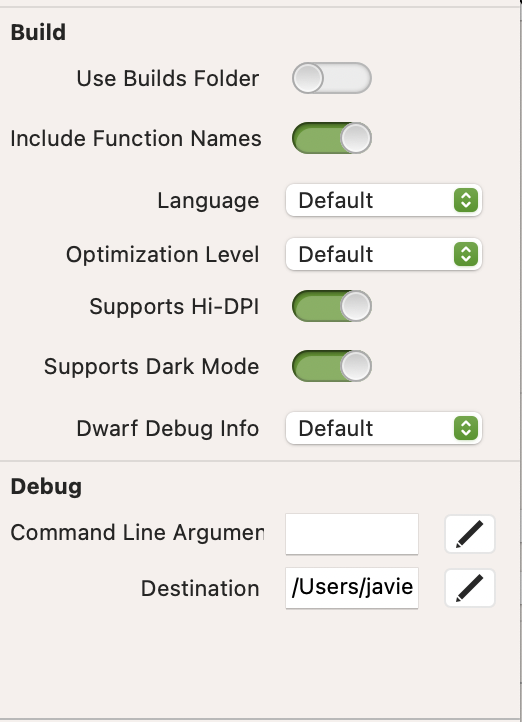

I use macOS 26.4.1 / Xojo 2026r1.1 / MBP13" m1 8/512 + Low SSD free space on boot disk and I do not have troubles (or show me how to do).
macOS 26.4.2 is too young here for me to say anything (even if the screen shots were doe with it.
I was searching where in Settings the Clear Cache button is and I noticed:

So this can be set in two different places 
What is the other one, please?
The first one is above (bottom of the Property pane) with screeen shots.
Yes, that’s the one I know. I was wondering what was the other one you’re referring to.
Sorry, same anwser (given above)
Menu Project → something like “set bilds folder” (I do not have a magnifying glass to read it and it is disabled in this project: but "convert to api 2” is greyed (and I do not know why, I have to investigate why ( I was persuaded it was converted alreedy)
I DO IT RIGHT NOW (that was also why a build copy files script do not work) and why I do ot find the build app at run time.
Script is working, Menu / Peoperty WORKS and the Project MenuItem is enabled AND I found (see) the debug application.
Is it OK for you (I may not be able to asnwer until early afternoon in my time zone (11:51 right now, 9minutes to mid-day).
Regards
Yes, thanks. The place you indicate is clear, albeit I don’t seem to have it on my Xojo release (2026r1) for whatever reason.
That is exactly what I see. I activated:

(Project Menu)
Save the project to disk (not Save As),
Then, the disabled MenuItem is now NOT Enabled:

I Saved As… the project after firing Convert to API 2 (two times), but I do not understand.
I will check my own screen shots above (I may have hallucinated…)
I checked my entry for what you asked (above)
The command is in Settings, Tab name is Building.
I do not hallucinated, after all ;).
Cheers.
Do I get it correctly that, when you wrote:
So this can be set in two different places
you were talking about clearing caches? (in accordance to the rest of your reply, it looks like that). I can’t see anything to clear caches in your own menu.