Even before you save it is changed in other open projects. The “ownership” of the shared item (which project is allowed to edit it) is somewhat mysterious - not necessarily the last one to save. Worst-case, if you want to edit a shared item in a specific project you have to close and reopen it.
That would be a monumental pain. I usually have at least three projects open.
This is absolutely not what I experience. I have a large Text format project with multiple sub apps, and they all share code. The code is shared using External items stored in XML format.
If I’m working in Projects A and B, and update shared item X from within project A, and then switch over to Project B, I find that X is automatically updated for me.
This works great.
The main complaint I have is that the shared external XML format is quite ugly, hard to read, and doesn’t work well with source-control tools.
Text format should be allowed in shared external items.
My setup is two (or more) Xojo projects (stored in the pure text format, which is called Xojo Project format).
Inside these projects, external shared items are imported as aliases. The external items are stored as Xojo XML Format
There are a few ways of doing this, but most commonly I would do this:
inside Project A, develop a new module or class.
once it’s working, convert it to an external item by right-clicking and choosing the Make External... command:
saving in XML format:
I save this in a location which is not inside project A or B’s folder trees (e.g., I have a “Shared Code” folder which both A and B make use of)
Then, in Project B, drag & drop this XML file into the project, while holding down the Option key. This brings the external code in as an alias (reference) to the XML item. If you don’t hold down the Option key, then instead it will create a Copy of the external item, which is not what you want.
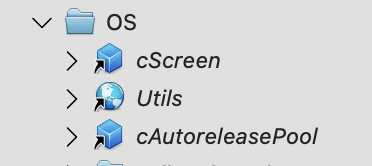
You can tell external items in the IDE as they are shown in Italics with the little “this is an alias” arrow:
In my experience, with this setup, you can have both Project A and Project B open in the IDE at the same time, and changes made to any of these shared external items are magically synced between the two projects.
I like the way this works a lot, but I greatly dislike the XML format as it’s barely human-readable.
Sorry for re-hijacking the thread, but are you sure you don’t need to hold down cmd-option (not just option) when dragging in order to add as external? This is certainly the case in older versions of Xojo.
A presentation of Zotto, either in person or via Team, at the MBS conference would be great, I think! Both to raise awareness of the product and to convince the Xojo team to add features to further improve Zotto’s integration. @Christian_Schmitz
I am very interested in Zotto. However, I used a product called Straico. It has tons of LLMs and it has the ability to be called and use with an AI API. My question is (since I was unclear from the docs) will Zotto work if I add my Straico API?
Yes Julien, that wouldn’t make a great deal of sense. You can use any of the Claude models with Zotto if you purchase Anthropic API credits and generate an API key.
Let me explain my point but maybe I am mistaken. It’s about the pricing model of Anthropic. I do currently use the max plan and getting an API key for Zotto requires credits (not included in the subscription).
I did ask a question using opus 4.6 and a key that cost me 25 cents and ended in a context window limited. I know the codebase of my Xojo is quite huge at the moment (10+ years project).
While asking question to Claude Code, everything is included in the subscription plan.
My point is that I do want to avoid having a big invoice from Anthropic at the end of the session.