Why doesn’t Xojo show the price of their products in the local currency when you purchase?
At least state that the displayed price is USD.
This has been going on for years. You don’t find out until you get your bank statement that you have been charged almost double what they quote. It’s entrapment.

The bank running the credit card will do the conversion.
Why is it in the fine print hidden in the contact information?
Sure does, but I’ve already committed to buy. So deceptive.
It is below the credit card icons, not far below some of the ‘Add to card’ buttons.
You have 90 days to request your money back:
I’m not sure which sites you visit that you get an automatic currency conversion or show USD next to the price, I’m not familiar with those. Usually when I visit a site in Mexico it doesn’t show that the price is in Pesos:
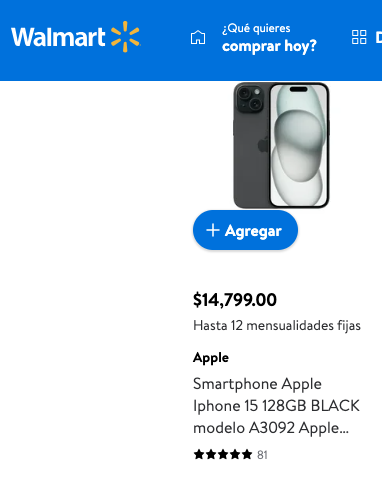
the same for US sites.
You are from Australia, so you expected AUD, right?
so the amount goes up by over 50%.
Almost every site. Country is determined by computer or browser settings automatically and the correct price is displayed. Did you take your own computer to Mexico or use a local one?
If you visit Walmart.com you see prices on your local currency?
The same if you visit Walmart.com.mx?
I can connect from the US or VPN to Mexico and the website is the same. When I visit Mexico I take my own computer and use local too.
I buy a lot of products from overseas and Xojo is the only one that displays the price on the invoice as $399 with no explanation of the currency and charges $610 to my bank.
Yes, walmart.com.mx Mexico is in Mexican but shows the prices in dollars not pesos when I visit it.
Most modern Ecommerce software has automatic conversion built in even the free ones.
If not the site normally allows you to select a country from a list to display local settings.
So you see the Iphone 15 128GB, I showed previously, instead of $14,799.00 (these are pesos) show $800.00 (US dollars) or so?
Don’t make jokes. It wouldn’t hurt if Xojo could change the invoice template and add US-Dollar on the invoice.
I had similar trouble with my accountant with various dollar names currencies.
No, it wouldn’t hurt.
You can create an Issue or email hello at xojo dot com if you need support for this.
As for Craig, there is 90 return window but maybe will be a difference with conversion to-from after receiving the refund.
Yes the invoice is the big problem. How can I claim a $610 tax deduction for expenses when my invoice clearly states only $399.
Walmart is not available here and I can’t create an account without a local phone number so I can’t give you the invoice price.
Oh sorry, now I understand (also by reviewing another site that uses FastSpring).
Looks like many sites show the product price at the site country price (say $129) and when you add to the cart or start the paying process the price either change to the client local currency or indicate the price is in USD if there is no local conversion.
Xojo just shows that the prices are in US dollars on the main page, then in the cart there is no indication that the price is US dollars or even on the invoice (I don’t have an invoice at hand but by your comments and Christian).
I just visited a site that sell to different countries and I can change the country (to Mexico for example) and the website prices change to MXN (Mexican Pesos). I’m sorry that I don’t have experience with those sites usually I buy from Mexico sites when I’m in Mexico and US sites when in the USA. My experience is different than yours and now I understand your expectation.
In Germany it is a little bit easier. The invoice is in $ but I simply file the amount that gets deducted in € from my bank account.
If I get audited I guess (hope) that explanation should be fine.
And yes: it sure would be nice if the invoice would be in local currency.