Hi everyone,
I’m releasing a free, open-source Xojo Web 2.0 control that displays PDF files with Mozilla PDF.js – the viewer built into Firefox. Drop it on a web page, set its properties in the Inspector, call LoadFromFile. No JavaScript to write, no Node.js, no build step: PDF.js ships inside the control.
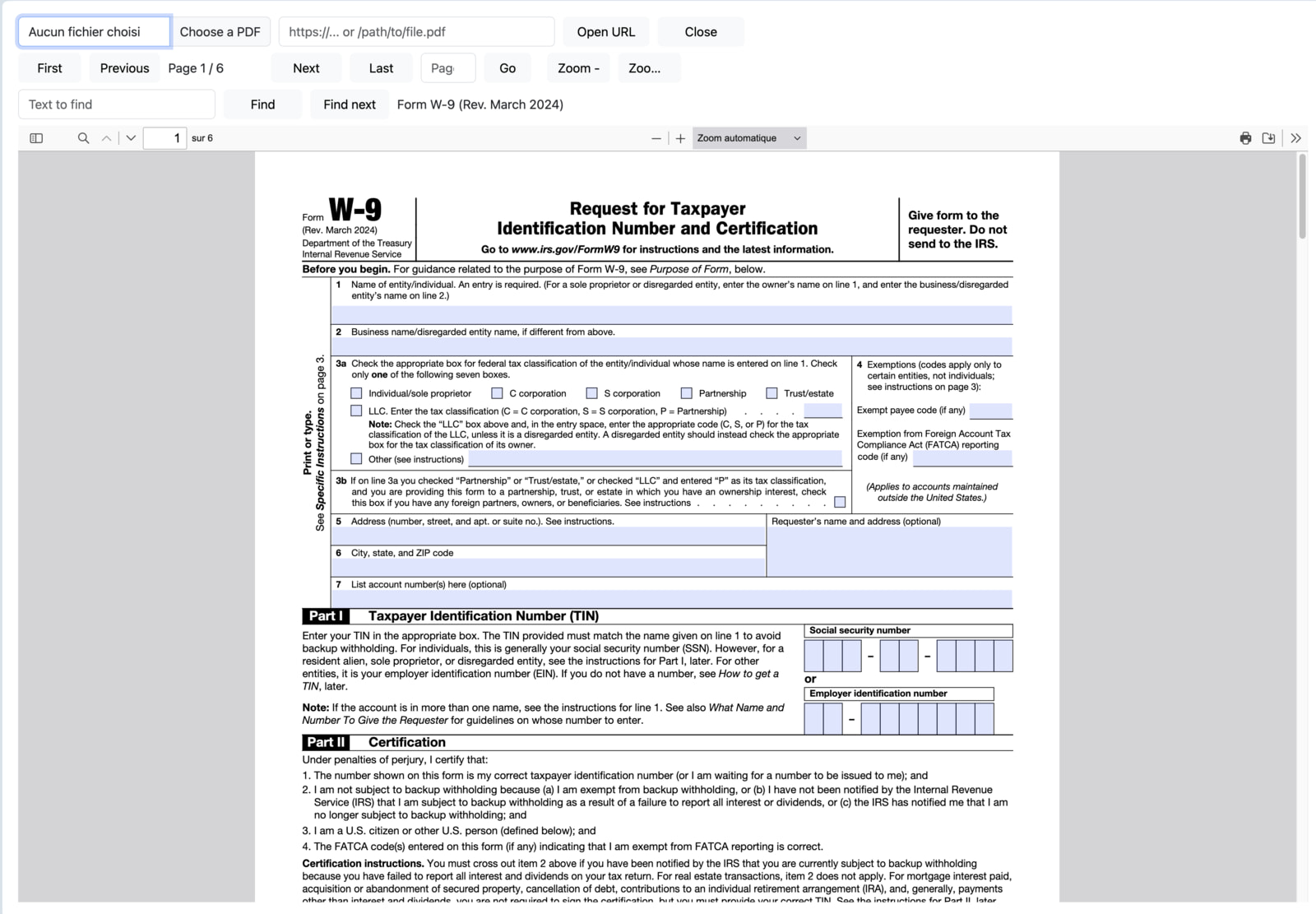
The same PDF display in every browser
Show a PDF in a WebHTMLViewer or through a link, and each browser uses its own viewer: Chrome and Edge one, Safari another, Firefox a third – each with its own toolbar, features and quirks, and some mobile browsers can’t show a PDF inside a page at all. With this control every browser displays the PDF with the same viewer: same look, same toolbar, same features, and the same settings you chose in Xojo.
Two files and one line
- Add
VNSPDFJSWebViewer.xojo_codeandVNSPDFJSEmbedded.xojo_codeto your project - In
App.HandleURL:
If VNSPDFJSWebViewer.HandleLibraryRequest(request, response) Then Return True
- Drag a
VNSPDFJSWebVieweronto a web page
PDFViewerMain.LoadFromFile(SpecialFolder.Documents.Child("report.pdf"))
PDFViewerMain.LoadFromData(pdfData, "invoice-2026-001.pdf")   // from VNS fPDF, a database, an upload...
PDFViewerMain.LoadFromURL("https://example.com/manual.pdf")
The full Firefox viewer
- Thumbnails, outline (bookmarks), attachments and layers sidebar
- Text search, zoom, rotation, scroll and two-page spread modes, presentation mode
- Printing, download, fillable forms, text selection
- CJK and right-to-left text, embedded fonts, JBIG2 / JPEG 2000 images
- Light, dark or automatic theme, 100+ interface languages
Set it up in the Inspector
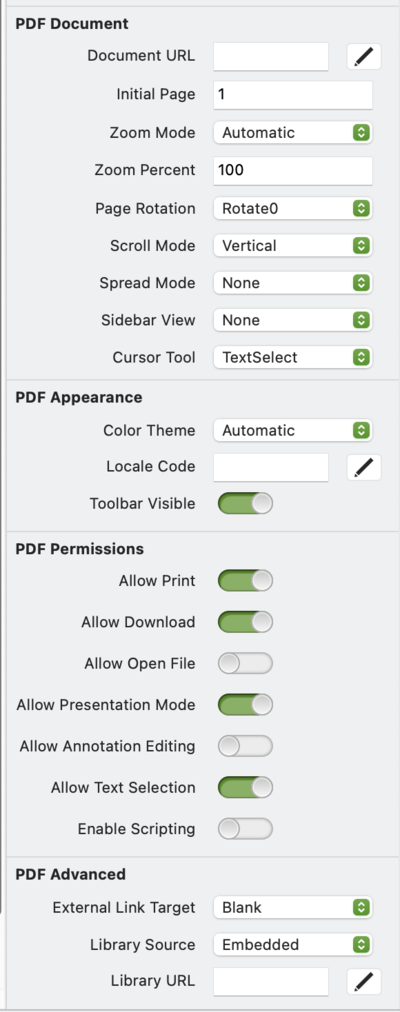
- 22 properties in four groups: Document, Appearance, Permissions, Advanced
- First page, zoom mode, rotation, scroll/spread mode, sidebar, cursor tool, theme, language, toolbar
- Permissions: hide/disable print, download, open file, presentation mode, annotation editing, text selection; PDF JavaScript off by default
- Change them at run time too
Drive it from Xojo
GoToPage,FirstPage,LastPage,NextPage,PreviousPage,ZoomIn,ZoomOut,Rotate...,Print,Download,Find,FindNext,FindPrevious- Events:
DocumentLoaded(pageCount, title),PageChanged,ZoomChanged,RotationChanged,FindResult(currentMatch, totalMatches),LoadFailed - Documents are served by the control itself, only to the session that shows them
Embedded, folder or CDN
- Embedded (default): PDF.js compressed into one module, works offline, nothing to deploy
- Resources folder: the
pdfjsfolder copied next to the app by a build step - CDN: the heavy engine from jsDelivr, the viewer UI from your app
A demo project is included (upload, URL, navigation, zoom, search), plus a developer guide with the full API and how it works inside.
It pairs nicely with VNS fPDF (GitHub - JYPochez/Xojo-VNS-fpdf-Library: A Xojo port of the popular FPDF library for PDF generation, supporting Desktop, Web, iOS, and Console applications. · GitHub): generate the PDF with fPDF, show it with LoadFromData – no temporary file.
Questions, feedback or bug reports? Post in this thread or open an issue on GitHub!
VNS PDF.js Web Viewer 1.0 - Xojo Web 2.0 - PDF.js 6.4.299 - MIT license
Tested with Xojo 2026r2.1 on macOS – needs Xojo 2024r3 or later