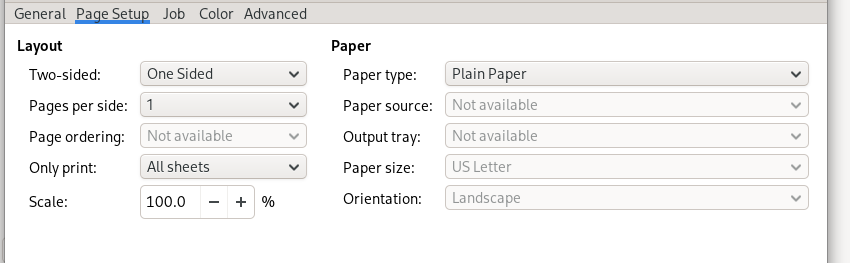
I am new to Xojo .. trying to learn it. I have just hit a a make or brake point .
Anyone have a fix for using a printer if I call printer setup, none of the printer setting are available…
they are all grayed out … I want to set paper size, orientation and paper source tray, those options are available while using any other programs, but not in Xojo
Welcome. Do you like to show some code?
normally you need a property of type PrinterSetup in the app or a window.
Then make a new PrinterSetup in open event.
And later call ShowPageSetupDialog on it when you want to show it.
The problem is that the xojo printer setup does not allow setting that all the other programs do .
things like paper size , orientation , paper source.
Without being able to print an envelope or label or a 4x6 post card ,The only thing I am able to print on is 8.5 x 11 paper, it would be nice if the printer setup could be edited, to put in the needed parameters, the only thing I have found is orientation can be set to landscape.
xojo is a bust for me.
Marvin,
please read Christian’s reply, he provided important information to hlep you with your issue. You call ShowPageSetupDialog the set printing settings. Christian also asked to see you code so we can pinpoint what is wrong.
my last post shows the ShowPageSetupDialog and as you can see paper size, orientation, and paper source can not be changed …. the only option is to print on 8.5 x 11 paper, can not even print a shipping label on a 4 x 6 inch label, or an envelope.
If you show the Page Setup dialog before the Printer dialog, you should be able to adjust the settings there. However, I agree that you should also be able to adjust these settings from the Printer dialog itself, which you currently cannot. I’d consider that a bug, and something we’ll take a look at it.
// This will work to adjust the paper settings
Var ps As New PrinterSetup
If ps.ShowPageSetupDialog Then
  Var g As Graphics = ps.ShowPrinterDialog
  // Your drawing code...
End If