For anyone that wants to start adopting their apps to macOS 26, it is possible to change the SDK version that your app claims to use. This will allow your app to show the more rounded corners and the now white window backgrounds.
To do that, you’ll need to add a build script, just before the Sign step like this:
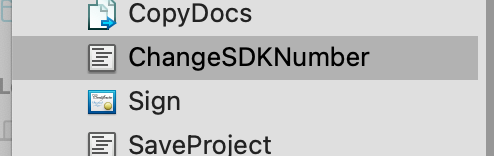
and paste in the following code:
// Calculate the full path of the binary inside the bundle
Dim binarypath As String = CurrentBuildLocationNative
Dim binaryName As String = CurrentBuildAppName.Replace(".app", "")
Dim bundlePath As String = binarypath + "/" + CurrentBuildAppName
Dim fullBinaryFolder As String = bundlePath + "/Contents/MacOS/"
Dim fullBinaryPath As String =  fullBinaryFolder + binaryName

// pull out the minimum version
Dim minVersion As String = getMinOSVersion(bundlePath)

// convert the binary so the sdk version is 26.0
Dim cmd As String = "cd ""%1"" && vtool -set-build-version macos %2 26.0 -output modified ""%3"" && mv -f modified ""%3"""
Dim expandedcmd As String = Param(cmd, fullBinaryFolder, minVersion, binaryName)
Dim result As String = DoShellCommand(expandedcmd)

Function param(template As String, ParamArray values As String) As String
  For i As Integer = ubound(values) DownTo 0
    template = template.ReplaceAll("%" + Str(i+1), values(i))
  Next
  Return template
End Function

Function getMinOSVersion(bundlePath As String) As String
  Dim cmd As String = "/usr/libexec/PlistBuddy -c ""Print LSMinimumSystemVersion"" ""%1/Contents/Info.plist"""
  Dim result As String = DoShellCommand(param(cmd, bundlepath))
  Return Trim(Result)
End Function