Do you try to drop an image above the SearchField ?
Although Apple may fix this… we have our own fix already for it.
1 Like
There is also a plist entry you can make to have your app keep the previous styling until you work out the kinks.
3 Likes
Perhaps, as an interim solution, Xojo could add this on Build.
I’d like to see an option for this for building permanently. Frankly I dislike Liquid Glass (Windows 7) and, as with the new app icons, think Apple is forcing us to prioritise our own branding lower than theirs.
Until Xojo updates to a newer macOS SDK, compatibility mode is automatic. After that, you can just add the plist entry. But eventually, the compatibility mode will go away. It’s only a short term solution.
2 Likes
You are aware it is not you, the developer, to decide what customers wants/expect?
3 Likes
…then whose job is it? The tooth fairy? Seems to me that the very best developers are those who determine what customers want and deliver it.
Um… yes it is. You don’t have to be right, but it is your decision as the developer. If the customer wants or expects liquid glass, your decision not to offer it may push them to look elsewhere, but it’s still your decision.
I think if users are going to jump ship just because of liquid glass then you have some serious problems with your business model and probably need to have a good look at your UVP.
Sure, it’s always sexy to have the latest UI tricks but, if it smudges your branding, then I think you need to draw a line. Losing your signature colour for instance or your logo disappearing into the background. When everyone moved to rounded rectangle icons in the dock, Adobe stuck with sharp corners. Doesn’t seem to have hurt them too much.
Apple know what they’re doing here. They’re elevating their brand above yours and making cross platform apps more difficult. If not, why don’t they give you the ability to create apps for Android and Windows using Swift?
I don’t disagree that it makes cross platform more difficult. But you can’t ignore it either. I use a Mac because I like software. I get to use Transmit instead of being stuck with FileZilla or CyberDuck, for example. To dismiss the things that make up the platform’s identity is to do your app a disservice and allow competitors an opportunity to sneak in.
I used to use The Unarchiver for my decompression tool. Then MacPaw, being the slimy company they are, started putting ads into it. Nothing horrible, but the app would no longer quit itself, forcing me to acknowledge their ad for CleanMyMac. So Keka got a $6 sale from me.
Do not give your users an excuse to look elsewhere. If your app looks dated compared to the other apps on my system, I’m probably going to start looking. Maybe I don’t find one that matches the functionality, or maybe the price is something I don’t want to pay, and so I stay a user. Or maybe I do find one that is just as functional, is a price I’m willing to pay, and looks at home on my system. I wouldn’t have known if I didn’t have an excuse to go looking in the first place. I didn’t know Keka existed, because it’s not like I’m perpetually in the market for a good archiving app. And had MacPaw not started advertising in their app, then might I probably still wouldn’t know it existed. But they gave me an excuse to look elsewhere.
You can ignore liquid glass. But there is a percentage of users that won’t like that. You could argue that there is a percentage that would prefer to stay with the old design, and you’d be right, but they probably aren’t upgrading to Tahoe anytime soon anyway, so it doesn’t really matter.
8 Likes
Yes, this is true. I don’t need to follow the latest fads like having a DarkMode only app. But I want a functional AND good-looking app.
PS: I hate CleanMyMac. Now and then users delete important data that is needed for my app. The app is only style and not much functionality.
Edit: holy guacamole. The junk app now costs 120$ as one time purchase. I’m in the wrong business.
I heard that application is just a UI for Terminal Commands…
What we need now is 2025r2, so it is possible to check if eveything is OK between Tahoe and 2024r2.
Until then all is like this entry: blah blah …
1 Like
Exactly. And for macOS this is even more relevant than Windows.
For anyone that wants to start adopting their apps to macOS 26, it is possible to change the SDK version that your app claims to use. This will allow your app to show the more rounded corners and the now white window backgrounds.
To do that, you’ll need to add a build script, just before the Sign step like this:
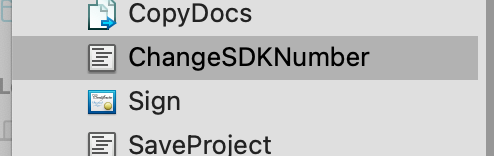
and paste in the following code:
// Calculate the full path of the binary inside the bundle
Dim binarypath As String = CurrentBuildLocationNative
Dim binaryName As String = CurrentBuildAppName.Replace(".app", "")
Dim bundlePath As String = binarypath + "/" + CurrentBuildAppName
Dim fullBinaryFolder As String = bundlePath + "/Contents/MacOS/"
Dim fullBinaryPath As String =  fullBinaryFolder + binaryName

// pull out the minimum version
Dim minVersion As String = getMinOSVersion(bundlePath)

// convert the binary so the sdk version is 26.0
Dim cmd As String = "cd ""%1"" && vtool -set-build-version macos %2 26.0 -output modified ""%3"" && mv -f modified ""%3"""
Dim expandedcmd As String = Param(cmd, fullBinaryFolder, minVersion, binaryName)
Dim result As String = DoShellCommand(expandedcmd)

Function param(template As String, ParamArray values As String) As String
  For i As Integer = ubound(values) DownTo 0
    template = template.ReplaceAll("%" + Str(i+1), values(i))
  Next
  Return template
End Function

Function getMinOSVersion(bundlePath As String) As String
  Dim cmd As String = "/usr/libexec/PlistBuddy -c ""Print LSMinimumSystemVersion"" ""%1/Contents/Info.plist"""
  Dim result As String = DoShellCommand(param(cmd, bundlepath))
  Return Trim(Result)
End Function
Use at your own risk, your mileage may vary…
13 Likes

Thanks for this hint.
How does that affect the app when it runs on mac OS 15 or earlier? (i.e. does it become “dependent” on the SDK?)
Also, when the app runs on mac OS 26, where this SDK is applied, does it change things we wouldn’t expect?
Yes it can produce unexpected problems, thus Greg’s warning:
1 Like
I would say that for now, it’s just a hack so you can start preparing your apps for Tahoe. Xojo traditionally updates the SDK version when Apple says you have to but I suspect they’ll be more keen to do it so we’ll be able to use declares to take advantage of the new features.
I have already had some strange issues and unexplained crashes with this hack so it probably shouldn’t be considered a long term solution.
If you really want to be able to take advantage of this as soon as Tahoe ships, you should file a feature request so they know it’s important to you.
1 Like
I have a problem with Tahoe in that I can no longer move a file or folder to the trash.
file.MoveTo SpecialFolder.Trash
I get a message saying that I don’t have access rights.
We can probably make a declare for you. IIRC There are four different trash destinations on macOS and it’s certainly possible that the Xojo framework doesn’t work any more.
Is your app sandboxed?