So I have a class object (Device) that contains two string arrays. In some cases, both arrays will have numbers in them. In some only one or the other. All of the Device objects are stored in an array called 'Devices". I have a couple popup menus that list devices with entries in one array or in the other. To populate the list I am going through all the devices and checking to see if it belongs on that list, inserting it if so. However, when I test the count of the array to see if it’s empty (which would mean it doesn’t belong on the list), the test is failing and it’s continuing on with the code, populating the popup menu anyway.
More concretely, this is an app to control an audio signal router. The router has inputs (“From”) and outputs (“To”), and the app allows you to specify which ports on the router a given device is connected to. Some devices record, some devices only play, so there is a mix where some have inputs and outputs, some only have inputs, some only outputs.
I’m using the following code to populate a popup menu of devices with “From” ports (Inputs) and a second popup with devices with “To” ports (outputs). With the devices I have set up right now, there are only two, and each should only show up on one of the popups (one is only inputs, one is only outputs).
//Populate the from and to device popups
break
for each entry as Device in DeviceList
  //If there are From entries, then add it to this popup
  if entry.RouterInputs.Count > -1 then
    puRouteFrom.AddRow(entry.DeviceName)
  end if

  //If there are TO entries, then add it to this popup
  if entry.RouterOutputs.Count > -1 then
    puRouteTo.AddRow(entry.DeviceName)
  end if
next
When I reach this code’s break, I can see that this entry has no RouterOutputs (“To”) so this should fail the test. Yet when I step through it, it acts like there is something there, and adds that device to the popup
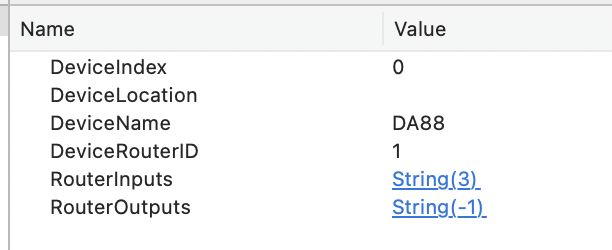
I’ve also tried testing if entry.RouterOutputs.Count <> -1 and it still fails. but clearly it’s “-1” as being reported by the debugger.
So am I doing something wrong or is this a bug? (I’m in 2025r3)