I haven’t myself explored WebCharting, but there is a WebChart.Pressed Event which will pass you the DataSet that was clicked. When you know what DataSet was clicked, you could remove that data from your master DataSet and re-load the chart?
For a pie, the dataset has a series of values (in one dataset)
I looked at that, but couldn’t figure out how to tell which labels for that dataset were pressed.
Maybe I’m using the chart control wrong though. I haven’t spent a lot of time with it.
The problem is that the dataset isn’t difficult to find.
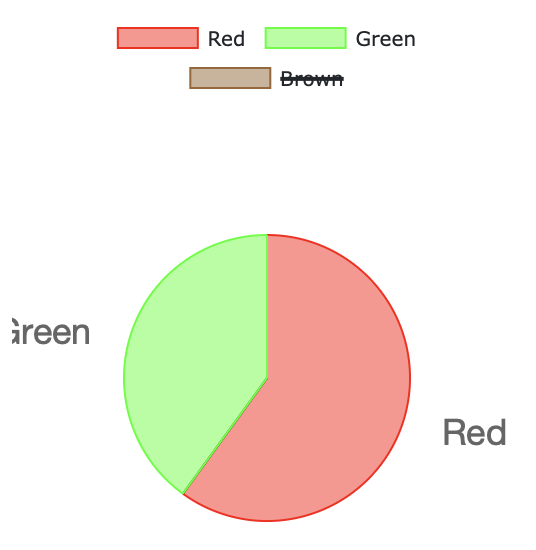
If someone clicks the 4th legend item, it crosses it out and hides that element from the chart.
I can’t find any way to know that this has happened at all programmatically.
If I click on one of the items in the chart I get its index.
If I click on the legend the index is -1. That’s not usable at all.
I’m was hoping I could somehow interrogate the control to find out which legend items are selected or not, but there is no way.
That’s for the entire dataset
The dataset has any number of values which can be shown or hidden
The legend is show or hidden on whole - not just individual nodes
Var dataset As New ChartCircularDataset("color", values, cols)
values is double array and cols is a color array
Here I clicked “brown” and it strikes it out and hides it from the pie.
I get a pressed event with an index of -1.
There is no way to interrogate the chart or dataset to find out which elements are “hidden”
I’m not sure WebChart was designed to be this interactive. Latency and all that. Maybe I’m wrong.
Can you do what you want in Desktop? If so, then we may need to ask to make it work for Web.
I don’t think I can in desktop either.
I don’t think this would add any more latency issue than what’s already going on.
There just needs to be a way to determine which legend items are selected or not - that could be evaluated optionally anytime there is a pressed event.
A user that will click one, then other, then other rapidly will make your webapp respond slower than the clicks.
The graph will update as it should be on the browser but whatever you want to calculate/show to the user may be slower than expected (as other sites may have that in browser and not in server).
What I’m trying to say is that if you add some code to the pressed event and send responses to the browser you may see the delay. It may also change if you use the send in batches or not.
Just a heads up, it may never affect your app.
I understand the Ricardo added the pressed event.
You may want to ping @Ricardo_Cruz about this and create an Issue, to either add what you need/want or for clear documentation/example.