Long-time user, relatively infrequent poster. This question is similar to WebButton pressed state is sticky? which doesn’t seem to have had any resolution.
I have a web app with a single page containing two vanilla WebButtons. When it’s run and I view it on an iPad or an iPhone (iPhone 16 Pro iOS 18.7.1), tapping the button appears to leave it in a semi-pressed state. That is, the fill color differs from other unpressed buttons, and the only way to get it back to its original fill color is to tap somewhere else in the browser window.
I’ve tried setting “Allow Auto Disable” to True, and then putting code into the Pressed event to re-enable the button, but that doesn’t have any effect. I’ve also tried calling SetFocus on another control in the window.
I’ve thought about creating a WebCanvas-based button (which I’ve done many times in desktop apps), but the requisite mousedown/up events aren’t present in WebCanvas.
I have about 40 buttons to lay out over 3 pages, and I’d love to get a suggested workaround to this bug before I start doing that.
Thanks as always to the amazing community that is Xojo!
Xojo 2025r2.1, macOS Sequoia 15.7, MacBook Pro M3 Max.
I suspect the answer is that iOS leaves the button in the “hovered” state because the cursor hasn’t “moved”. Touch devices are different because the pointer doesn’t move unless you touch the screen somewhere else.
Thanks for that answer. That CSS doesn’t seem to have any effect. Button behavior is still the same. I’m shocked, SHOCKED, that ChatGPT provided an incorrect suggestion.
I can upload a screen video if you’d like to see what’s happening. I know it’s possible to have momentary buttons because many iOS apps (e.g., Calculator) do it.
Anyway, I’ll play around with CSS some more to see if I can come up with anything.
Maybe I’m not explaining myself correctly. If I have 5 buttons, I want them to act as momentary pushbuttons. That is, when the button is touched, it should change (color, highlight, whatever). When the touch is removed, the button should revert to its previous non-touched state, without any further touches required.
What’s happening now is that when I touch the button it darkens, and does not return to its previous state until I touch anywhere else in the window. This makes it behave more like a radio button, which latches until a different button is pressed.
I’m sorry Android is behaving different. I may be able to test later with an iPhone.
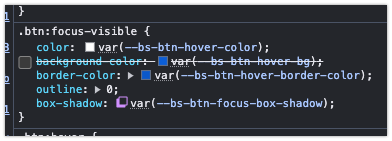
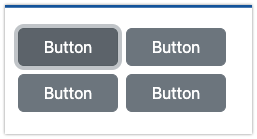
With Android what happens is that the button gets focus and it receives the focus ring and the darker color. This is different than active (when you actually click).
Do you see the focus ring around the button?
Android uses Chrome, are you testing with Safari on your iPhone?
Here’s a movie. Each time I tap a button, the button style is as though I am continually pressing it. The only way to get rid of that “pressed” style is to tao another button, or tap anywhere else on the page.
I just tried Chrome, version 140.0.7339.101 in iOS, and it looks the same as in Safari, except the buttons have a focus ring around them when touched.
The button turns blue, and stays that way until I touch another button.
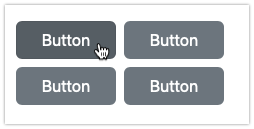
Interestingly, if I view this on a desktop browser, the blue is shown when the mouse hovers over the button, and then the button reverts to its original gray state when the mouse is no longer hovering over it.
So does Xojo think that the button press is actually a permanent “hover” state?