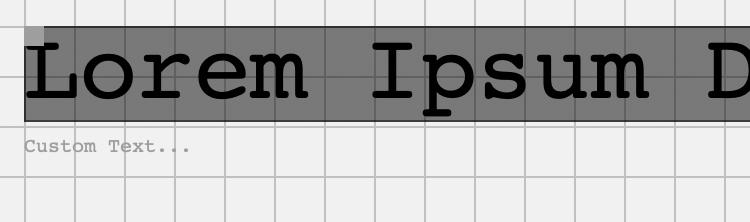
This is a black, transparent rectangle drawn on a canvas in a Desktop app. The contents of the text and the position, size, text color, background color and transparency all live in a class object. There can be multiple objects like this on the canvas.
What I can’t seem to figure out is how to get the bounding box to be exactly at the top and bottom of the text, including descenders - there’s always padding at the top, and the bottom of the rectangle is in line with the text baseline, not the bottom of the lowest descender. What am I doing wrong here?
(mRects is an array of BITCObjects, which contain the text attributes)
//Add the on-screen objects
For Each r As BITCObject In mRects
  //Set the font size in pixels
  g.FontUnit = FontUnits.Pixel
  g.FontName = "Courier"

  //The size of the font is stored in a BITCObject as a percentage of the height
  //of the canvas (r.Scale), not as a point or pixel size
  //Calculate the pixel size from that percentage
  g.FontSize = LayoutCanvas.Height * (r.Scale / 100)

  //change the width and height of the bounding box to match the text
  r.Width = g.TextWidth(r.Text)
  r.Height = g.FontAscent
  //using fontAscent for height because g.fontSize results in a
  //rectangle that's about 2x taller than needed


  //draw outer rectangle
  g.Transparency = 0
  g.PenSize = 1

  if r.isSelected = true then
    g.DrawingColor = Color.Red
    r.isSelected = false
  else
    g.DrawingColor = Color.Gray
  end if


  //Fill the rectangle
  g.DrawingColor = r.bgColor
  g.Transparency = r.bgTransparency
  g.FillRectangle(r.x, r.y, r.Width, r.Height)
  g.DrawRectangle(r.X, r.Y, r.Width,  r.Height )


  //Draw the text to screen
  g.DrawingColor = r.fgColor
  g.Transparency = r.fgTransparency
  g.DrawText(r.Text, r.x, r.y + g.FontAscent)


  //Draw the Text Align Box
  g.DrawingColor = color.Gray
  g.FillRectangle(r.x, r.y, r.DragBoxWidth, r.DragBoxHeight)

  //format the label text (All of this is outside the filled rect, and not really relevant)
  g.FontUnit = FontUnits.Point
  g.FontSize = r.LabelFontHeight
  g.DrawingColor = color.gray
  //Get the plain english name for the field
  var lbl as string = GetKeyFromValue(textTypes,r.Type)
  //Add the text
  if r.y < (LayoutCanvas.Height * 0.1) then
    //too close to the top, move text below box)
    g.DrawText(lbl, r.x, r.y + r.Height + 5 + g.FontSize)
  else
    g.DrawText(lbl, r.x, r.y - 5)
  end if


Next
Any idea why the code above isn’t formatted (color, etc) and is just showing as preformatted text? I selected it and hit the code wraper icon in the toolbar. It works in this comment, but not in the parent post:
That’s just the way fonts work. They typically have padding built-in to make sure the glyphs render correctly - for example, they leave room for  even though you aren’t using that character in your test. That means that a capital A will have some space above it for that diacritical mark. The same is true for descenders.
If you want to work around this, you could try using an Object2D TextShape object, but I don’t know if it will provide any better results.
Would this type of approach help? Send it a TextShape and it returns a Dictionary with the line height, text width, and text height. I’m not sure what kind of precision it has.
Public Function textWH(txshape As TextShape) As Dictionary

  Var p As New Picture(100, 100, 32) ' any size will do

  p.Graphics.FontSize=txshape.FontSize
  p.Graphics.Bold=txshape.Bold
  p.Graphics.FontName=txshape.FontName
  p.Graphics.Italic=txshape.Italic
  p.Graphics.Rotate(txshape.Rotation)
  p.Graphics.Scale(txshape.Scale,txshape.Scale)
  p.Graphics.Underline=txshape.Underline

  Var rdict As Dictionary = New Dictionary
  rdict.Value("lh")=p.Graphics.TextHeight("line",1000)  ' height of one line
  rdict.Value("tw")= p.Graphics.TextWidth(txshape.Text) ' text width
  rdict.Value("th")= p.Graphics.TextHeight(txshape.Text,rdict.Value("tw")) ' text height
  Return rdict

End Function
I have made use of GMImage from the Monkeybread plugins to get the exact bounds based on where the pixels ended up, rather than where the font suggests they will.
I create a picture, draw the text, then get the bounding values
Took the following from my code, see if it helps
dim gm as new GMImageMBS(thepicture)
dim k as string = gm.boundingBox.StringValue  //can be examined in debugger

pseudowidth = gm.boundingBox.width - gm.boundingBox.xOff
pseudoheight = gm.boundingBox.yOff *2 + gm.boundingBox.height