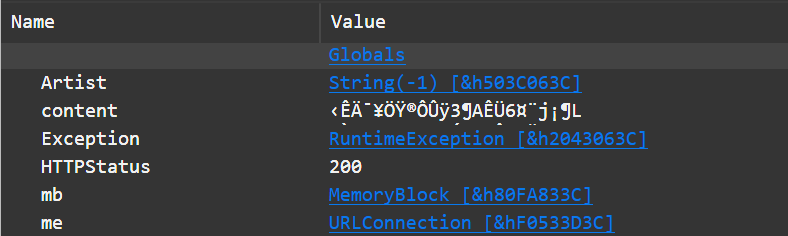
This is required by the API to accept results in gzip as the JSON returned can be quite large. I can omit the header in test mode but not production.
On MacOS it works fine, the server returns the results gzipped and the URLConnection class decompresses it to UTF-8 in the ContentReceived event.
On Windows, though, I get back the binary, compressed data in the ContentReceived event. If I omit the Accept-Encoding header, I get back the expected UTF-8 JSON string (but again, I can only do this while my app is in test mode).
Sub ContentReceived(URL As String, HTTPStatus As Integer, content As String) Handles ContentReceived
  Dim mb As MemoryBlock = content
  content = mb.Decompress()
End Sub
Thank you for this! Will give it a try when I get in front of my Windows box. Is there a way to know if you’ve received compressed or decompressed data?
The server should tell you whether/what compression was used in the Content-Encoding response header. The absence of the header indicates that no compression was used.
Sub HeadersReceived(URL As String, HTTPStatus As Integer)
  Dim compressor As String
  For Each header As Pair In Me.ResponseHeaders
    If header.Left = "Content-Encoding" Then
      compressor = header.Right
      Exit For
    End If
  Next
End Sub
You can also check the downloaded data to see if it has the magic number of one of the requested compression formats (though, I don’t think Xojo can decompress zstd or brotli, and brotli doesn’t have a magic number):
Sub ContentReceived(URL As String, HTTPStatus As Integer, content As String)
  Dim mb As MemoryBlock = content
  Dim compressor As String
  If mb.UInt8Value(0) = &h1F And mb.UInt8Value(1) = &h8B Then
    compressor = "gzip"
  ElseIf mb.UInt8Value(0) = &h78 Then
    compressor = "deflate"
  ElseIf mb.UInt8Value(0) = &h28 And mb.UInt8Value(1) = &hB5 And mb.UInt8Value(2) = &h2F And mb.UInt8Value(3) = &hFD Then
    compressor = "zstd"
  End If
End Sub
You could also ship the brotli DLLs with your app, and call it directly:
Function DecodeBrotli(Buffer As MemoryBlock, Optional DecodedSize As UInt64) As MemoryBlock
  Soft Declare Function BrotliDecoderDecompress Lib "brotlidec.dll" (EncodedSize As UInteger, EncodedBuffer As Ptr, ByRef DecodedSize As UInteger, DecodedBuffer As Ptr) As UInteger
  If DecodedSize = 0 Then DecodedSize = Buffer.Size * 3
  Dim output As New MemoryBlock(DecodedSize)
  Dim outsz As UInteger = output.Size
  Do Until BrotliDecoderDecompress(Buffer.Size, Buffer, outsz, output) = 1
    output.Size = output.Size * 1.5
    outsz = output.Size
  Loop
  output.Size = outsz
  Return output
End Function