I’ve been burned with exceptions triggered in property getters: you examine your object or window in the debugger and it crashes immediately because as the debugger calls all the computed property getter methods, it encounters and error and crashes without opportunity to trace.
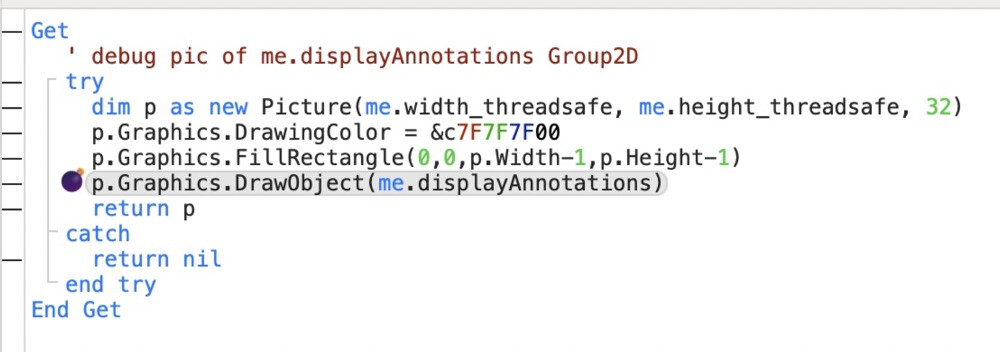
So I’ve learned to wrap all but the simplest getter method code in try-catch blocks, hoping it would keep me safe, but alas no:
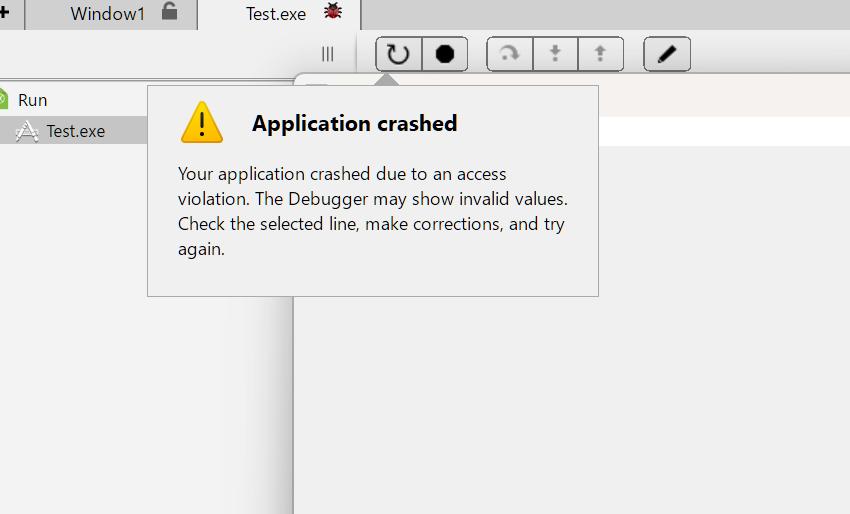
I just spent hours painstakingly tracing through scores of getter methods to see which one causes my app to crash instantly when examining this window’s properties in the debugger. The above shows a crash at the indicated line that should’ve been caught (me.displayAnnotations is nil as the cause of the exception, but that’s not the point).
Why would try-catch fail here, when it caught other nil variables in other getters? This makes tracking down such crashes particularly difficult in getter methods. So now I’m forced to manually check for nil variables etc in these, and cannot rely on try to catch these for me.
i don’t understand: me.displayAnnotations is a regular property containing a group2D. The computed property that crashed is the one shown in the screenshot, see the Get at the top.
@robinlauryssen-mitchell mentions this has nothing to do with computed properties, and is a symptom of calling DrawObject with nil. Likely true, but when inside a computed property makes it very hard to track down because of reasons mentioned.
In this example, the computed property getter has a bug (trying to use a Nil Ptr variable).
This should crash the Debug app (and it does), but it should not also cause the IDE to crash (but it does).
Edit to add: it only crashes the IDE when the Computed Property is Private; with a Public Computed Property, the Debug app crashes, but the IDE does not.
Some folks are having trouble replicating this crash. For me, the IDE crashes 100% of the time when the Debug app crashes, but others are not seeing it. I’m running a M4 Pro.