Come on guys . . . . This can’t be impossible.
I can create a pdf and display it, but I can’t seem to display one that already exists
Come on guys . . . . This can’t be impossible.
I can create a pdf and display it, but I can’t seem to display one that already exists
I have GraffitiPDFViewer as part of GraffitiSuite Web Edition.
I haven’t tested this so I’m only speculating, but can you not open it in a WebHTMLViewer (or target a _blank window), and use HandleURL to send it with mime type “application/pdf”?
You can display an existing PDF file in the HTMLViewer using HTMLViewer.LoadURL.
It works a bit differently depending on where your file lives.
If your PDF lives on a CDN (for those with 1,000s of PDFs), you would simply call (after authenticating for private CDNs).
HTMLViewer1.LoadURL("https://somedomain.somecdn.net/sample.pdf")
If you have a finite number of files you likely use the file system on your deployment platform, be that Xojo Cloud or other web server. The files are stored in SpecialFolders see SpecialFolder — Xojo documentation.
If you have had some issues to date loading existing PDF files, I expect the files are going out of scope before you can load them.
On the web page containing your HTMLViewer, create a Property (to maintain scope):
Name = PDFFile
Type = WebFile
Scope = Private
Say your Debug Build is on Mac:
Var documentsFolder As FolderItem = SpecialFolder.Documents

If documentsFolder = Nil Then
  MessageBox("The Documents folder is unavailable.")
  Return
End If

Var pdf As FolderItem = documentsFolder.Child("sample.pdf")

If Not pdf.Exists Then
  MessageBox("sample.pdf was not found in the Documents folder.")
  Return
End If

Try
  PDFFile = WebFile.Open(pdf)
  PDFFile.MIMEType = "application/pdf"
  PDFFile.FileName = "sample.pdf"
  PDFFile.ForceDownload = False

  HTMLViewer1.LoadURL(PDFFile.URL)

Catch e As IOException
  MessageBox("Unable to open the PDF: " + e.Message)
End Try
I tested CDN, local (debug), and Xojo Cloud implementations.
All that said, we use/recommend GraffitiSuite and generally use GraffitiPDFViewer as it has a nicer PDF implementation (and is more feature rich), than the HTMLViewer in respect of PDF functionality.
However in answer to your original question - there is a way.
I hope that helps.
Kind regards, Andrew
sorry for my post above it is for desktop, and I did not see you asked for web.
but in your other post, I answered with my new web project for using mozilla pdf.js
it works fine with web projects, and can display url, local, pdf.
if you have the MBS Xojo DynaPDF Plugin with a Pro license, you can render the PDF pages as pictures and show them.
This way users can see them, but not get the PDF saved in the browser unless you explicitly code that.
This code matches, but it’s not showing (in debug mode):
var f as folderItem = app.helpFiles.child(“Notes - Login.pdf”)
If f <> nil And f.exists Then
try
var pdfFile as webFile = webfile.open(f)
pdfFile.mimeType = “application/pdf”
pdfFile.fileName = “Notes - Login.pdf”
pdfFile.forceDownload = false
w.d.notes.pdf.loadURL(pdfFile.URL)
w.d.notes.pdf.visible = true
It doesn’t. Your code differs from the working example I provided.
This will go out of scope before it loads.
I recommended you make PDFFile a property of your web page - to maintain scope.
I’d also recommend you use one of the standard SpecialFolder/s, to place a file during debugging.
Simplify everything, even the name of your file, lowercase, no spaces etc, to get your example working.
In fairness - in under a minute, you could have just copied my example code into the opening event of a HTMLViewer, then created a Property (PDFFile) on your web page. Placed any old pdf named sample.pdf into your Documents folder, and pressed Run. Which is about 30 mins quicker than the time it took to help you in the first place, and about 15 mins quicker than replying to your follow-up.
Kind regards, Andrew
The last bit I needed was making pdfFile a property of the page.
thanks,
I’m an amateur. I’m good at but still an amateur, so questions:
what do I download and what do I do with it?
will this work on an iPhone to show the entire pdf? (iPhone only shows one page).
yes the iphone app lets you scroll the pdf. its a simple xojo pdfviewer for ios
just clic on the green"code" button top right, then download zip
unzip it
you have all projects just use the one you want between ios android web console or desktop
dbl clic on the xojo project and run
I’m getting a zlib1.dll missing error. I’ve downloaded it but I’m not sure where to put it.
I’m on windows 11 btw
explainations here
So, where in the folder do I put it?
I got your app to work, pretty cool, but I don’t see anything in it that shows the pdf.
I’ve been using fpdf for years. The issue I’ve got is that in safari and chrome on the iphone is that after the pdf file, HTMLviewer will not load the toolbars or more than one page of the pdf.
Sorry but I have some difficulties to understand what you want…
you made multiple posts on the forum
talking about xojo web apps, then iphone, then windows…
please explain to us what you want to achieve, and what problem you face exactly
on which platform/operating system
and I’m sure we can help you in a better way.
Okay, I have a web app, it’s used to help gymnastics coaches build and maintain their athletes’ routines and print out the documents needed for competition. It has been available on desktop, laptop, and pad for over a decade including being used in the Olympics.
I’ve introduced it on phones (still a web app), but I (and a competitor) have a problem. Unlike on a desktop, we can’t show the entire PDF document. It just shows one page, then you have to email to yourself.
Having the entire PDF show on the phone would be a big competitive advantage, so it’s important.
I’ve been using a version of fpdf for several years, so I don’t need help with producing the PDF, just with having the entire PDF show in the phone web app.
I was hoping this would work, but it didn’t show the entire PDF, nor the toolbar: .loadURL(mywebFile.url + “#toolbar=1”)
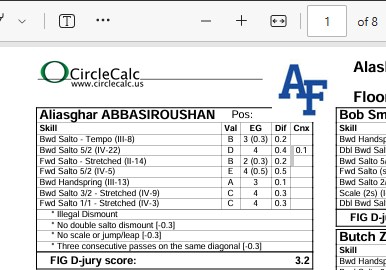
On the desktop:
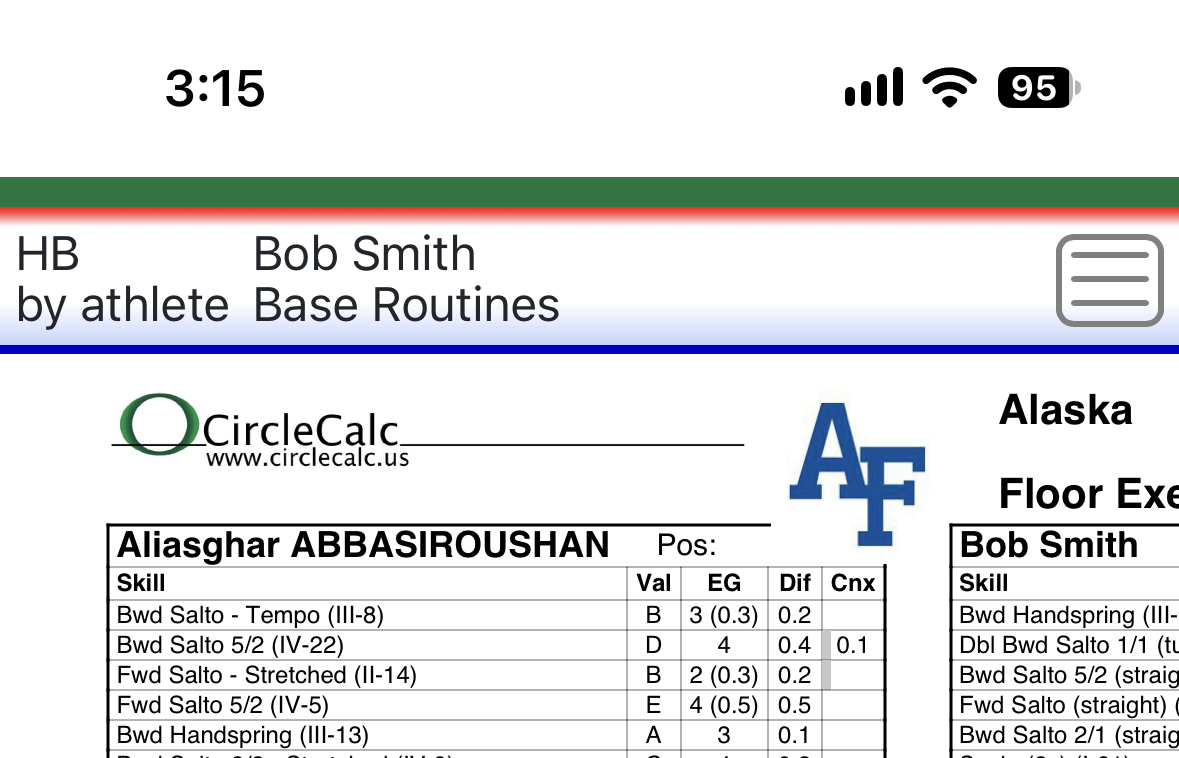
On the phone:
poor amateur with a small customer base. Can’t afford your suite.