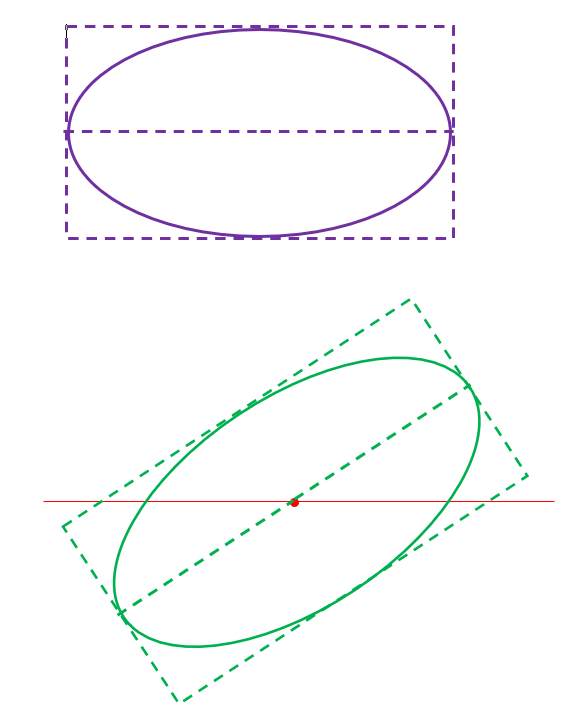
In desktop, I can use an object2d to draw an oval at 45 degrees.
In a PDF, I can mess about with the orientation of the graphics, draw a horizontal oval, and turn the page back around again.
I can find no way to do this in graphics on iOS , as object2D still doesnt exist there (and after all these years, its clear that Xojo will not/cannot bring that functionality over)
Is there a way to fudge the graphics orientation like in a PDF?
Jeremie is correct (as usual!). One can use graphics.rotate(angle) and also graphics.translate(cx, cy) in iOS projects.
Var p as GraphicsPath

g.SaveState
g.Translate(cX, cY)  // do the drawing at 0, 0 so it rotates as expected
g.Rotate(angle)
g.scale(radiusX, radiusY)

p.MoveToPoint(0, 0)
p.AddArc ...

g.RestoreState
Each to his own, of course, but I much prefer using GraphicsPaths to Object2Ds for almost all drawing. Unfortunately, GraphicsPaths do not have an add oval command, but the code above fakes one by drawing a circle with AddArc with a g.scale(radiusX, radiusY) command in effect. Or one could just do g.DrawOval without the scale option.
But… do you have a contains(x, y) method that can accurately tell if the user clicked on the line around the oval, outside or within the oval - not by just using the bounding rectangle ?
It’s this limitation that irked me and drove me to coding all the maths for every shape I use and drawing as bitmaps.
Ya… but the methods available in XOJO cannot determine whether the user has clicked within say 4 pixels of the path of a complex open curve like a spline, or the edge of the tooth of a gear created as a vector object (from CAD) and displayed in XOJO.
To do that either its necessary to have access to the points of the curve as computed, OR resort to the “brute force” method Jeff alluded to - which only works for closed shapes, not open paths, and its useless for selecting an open curve in close proximity to other close curves.
This is really basic 2D stuff - even Powerpoint supported this 30 years ago. This is a basic need for any complex 2D drawing beyond the level of boxes and ovals.
I now do it all computationally and the graphics are all rendered to a canvas as bitmaps, apart from rotated text where I use the Object2D methods.
I’ll admit I’ve never tested the GraphicsPath.contains function for accuracy because I use a PointInPolygon function written long ago in Fortran and rewritten by Rick Araujo for modern Xojo. I don’t keep graphic objects around. All of my basic data are GIS linestrings, multilinestrings, etc with all of the coordinates in longitude and latitude.
Here’s a link to the PtInPoly code in case it’s of use to anyone:
Hello,
Drawing an Oval
I’m not very good at math.
I’ve created a simple calculation using sine and cosine functions,
along with an angle offset.
See the example.