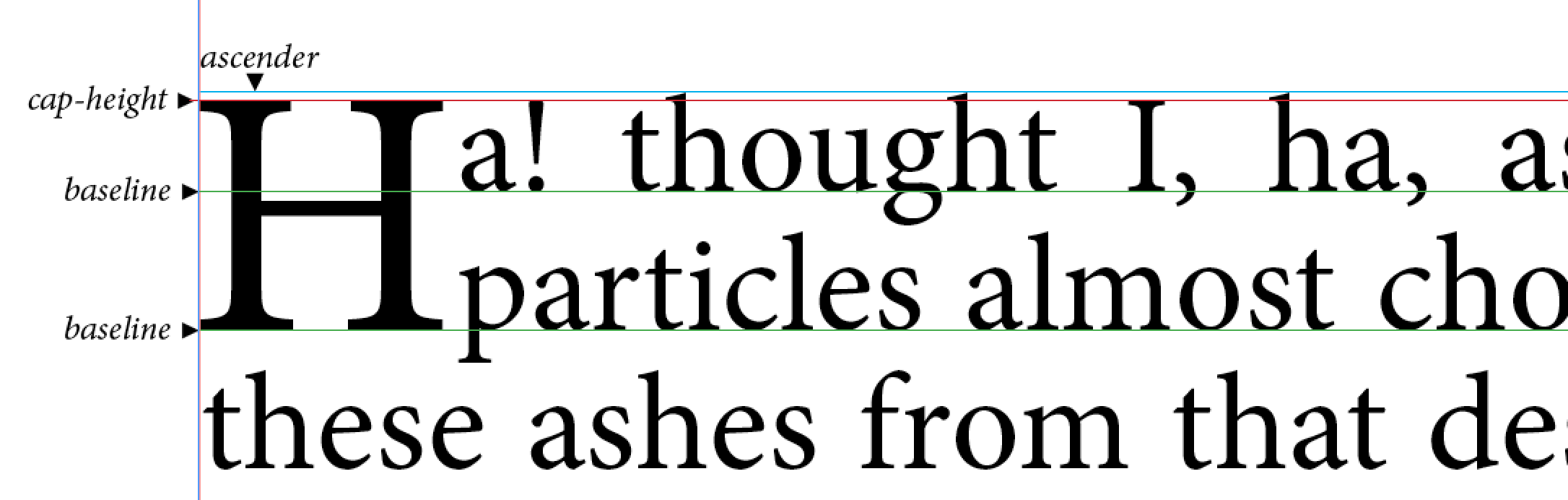
I have a tricky question today - at least it’s for me
Let’s say I know the dimensions of a circumscribing rectangle (REALbasic.Rect).
How can I determine the text size of a Graphics object depending on the size of the circumscribing rectangle?
So let’s just say I have a rectangle with a height of 150 pixels. Now I want to draw a letter before the rectangle using Graphics.DrawString that has the height of the rectangle.
No, if you look at the graphic in my first post, you will see that the size (height) of the first letter (drop cap) is calculated by summing the height of the first and second lines.
hard to answer the question when you change it later
Xojo basically exposes two font attributes (that you care about)… TextHeight and TextAscent
TextHeight is from the top of the font cell (not the top of a character) to the bottom of the text cell, while TextAscender is the distance from the baseline to the bottom of the text cell.
Yes, it will not because font properties are often specified by the font designer rather arbitrarily and pure Xojo does not reveal enough characteristics about fonts for a safe output.
If you look at the properties of NSFont, properties like boundingRectForFont would be those you are looking for.
If you dont want to use declares or plugins, you would possibly be on the safe side by analyzing the font in a graphics object for the relevant details. You would possibly want to cache the results as this operation could be quite time-consuming.
Speaking about speed: How about replacing this loop
 Do Until g.TextAscent >= h * 1.3
    g.TextSize = i
    i = i + 1
  Loop
by taking the TextAscent for a size like 100 and calculating the font size by use of the factor a division with the graphics height delivers?