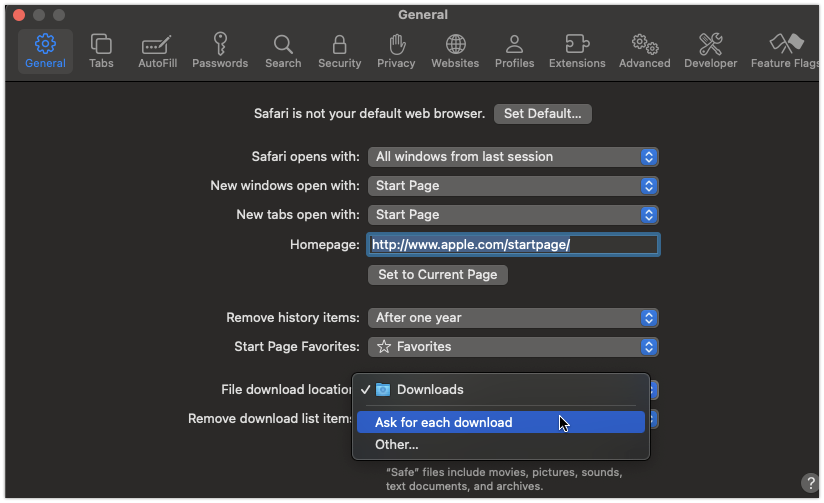
Did something just change or did I forget to do something?
Here is a snippet of my code:
'— THIS CODE WILL INITIATE THE DOWNLOAD
FSM_Webfile = New WebFile
FSM_Webfile = WebFile.Open(dbFSM.DatabaseFile)
FSM_Webfile.ForceDownload = True
FSM_Webfile.Filename = dbFSM.DatabaseFile.Name.Lowercase
Session.GoToURL(FSM_Webfile.URL)
In the past, and I have to admit that I created this web app sometime ago, it would prompt me to select the folder I wanted to download the file to. Now in Safari, it just downloads to the Downloads folder without prompting me for a folder location. I want the prompting back.
I check the settings in Safari and it was already set to “Ask for each download” however, when I click on the dropdown to see what other options were available, it flipped to “Downloads” and would not let me select “Ask for each download”. I was ready to do a “magic” restart of my Mac then thought I’d just do a restart of Safari and that fixed it. Something must have gotten stuck but it’s working now.
Have a great weekend to all that replied. Sanity restored.
You can also right click on the link and Download File As… and you can select the download location even if the setting gets stuck in Downloads folder.
Good point Alberto, but I’m trying to make this as self-prompting as possible. Otherwise, they’d have to navigate to where I’m creating the file, right-click on it, and then save to the correct location.
There’s always the possibility to click on the magnifying glass icon in the downloads list (from the downloads icon), which automatically reveal the downloaded file.