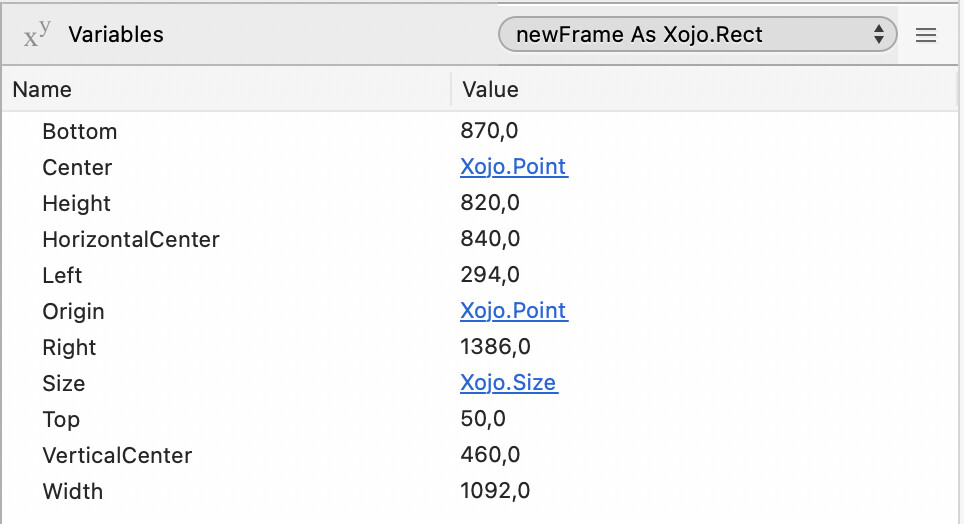
I’m using the following which seems to work fine on my Desktop iMac but not on my MacBook Pro. On the Desktop I get a centred screen for my app but on the MacBook I get a window pushed off to the right. What have I missed?
Thanks for the pickup Christian. Even with that change the when run on the MacBook it still displays off centre and off screen slightly.
I thought if I moved that code to the App open event it might make a difference but it is still the same??
Ok, some more info. The code does behave and centre horizontally if I set the MacBook display to the maximum scaled display size but not on any other setting.
window.top is the top point of the content area (top + window chrome height). window.bounds.top is the top point of the window. window.height is the height of the content area of the window. window.bounds.height is the height of the content area + window chrome height.
The top and height behave as expected (even though I have things a little muddled).
The horizontal adjustment is what is not consistent between iMac and MacBook.
Does the .availablewidth take screen scale into consideration or does it just look at maximum availability?
Well, you’ve got gold here as you have a machine that can reproduce the problem. I would suggest using system.debuglog to make sure that the values are what you think they should be.
Write out the screen dimensions, then the available dimensions, then the window dimensions.