I understand a .rtfd holds the rtf source code file plus the images (in my case).
But what about other object in the same case ?
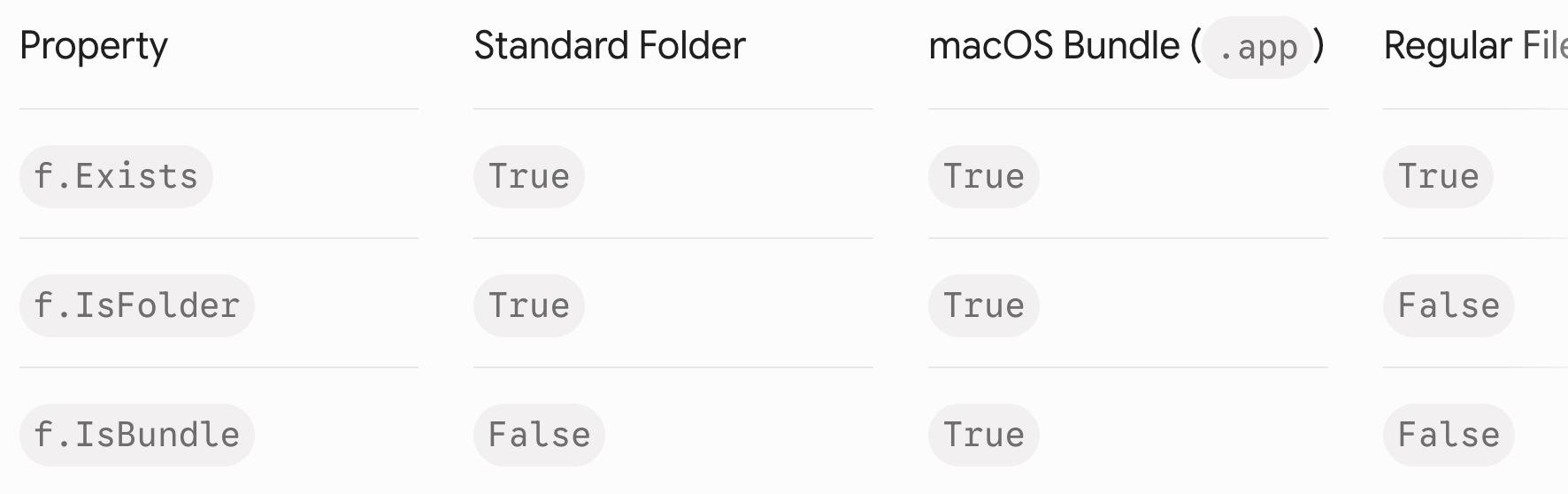
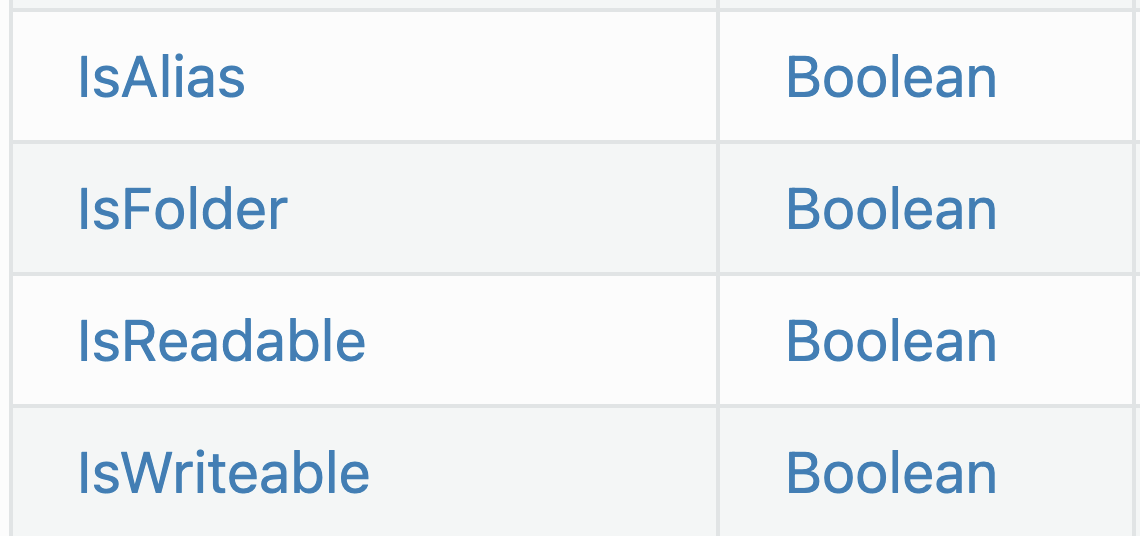
I use .isFolder to exclude objects and keep Folders in project. How can we exclude .rtfd objects (folders that are treated as objects, not folders by the Finder ?
The idea you are looking for is “bundle”. There have been many discussions here on how to detect them - look around for the solution that best fits your needs.
Of course, this is Bundle (and Packages share the same idea/trouble), and there are many discussions here, some even talk about a bundle in the Xojo Store, most of them talk about to Sign an App and the Apple Store, even in conjunction of Data Base and I do not talk about Microsoft Applications default Save created objects (XLS, XLSX and others) nowadays (but it was not like that 40 years ago).
What I was searching was .IsBundle. But there are none in Xojo.
The master folder is on top, inside it there actually are five Childs. Each Child have some to plenty (around 10 to around 500) folders with the data.
The project scan all folders and make an html report file with images: the Master folder will get a Table of Contents, each of its Childs too, then the real Report about the publications (paper magazines are stored in Folders (one per issue, of course) with Content txt and cover image).
Doing a design artwork of where the data are stored allows to code easilly without forgetting something. I do not need to add arrows as this looks like a pyramid:
Create an html ToC file for the Editor (Publisher Company),
Create an html ToC file for the Collection(s),
Create an html ToC file for all Issues (1 to n… issues).
Bundle:
In macOS, iOS, iPadOS, tvOS, watchOS, and visionOS, and in GNUstep, a bundle is a file directory with a defined structure and file extension, allowing related files to be grouped together as a conceptually single item
Package:
The package is a common file system abstraction used by Apple operating systems, such as macOS and iOS. It is a directory that may contain a hierarchy of files or objects that represent a preserved, organized state.
If Not Loc_FI.Child("TXT.rtf").Exists Then
  // Deals with a folder
I can add a test against info.plist (in fact Contents:infoplist), but how many Chimera object must I try to detect ? (.framework - tricky -, PkgInfo, and each an every I do not know about).
There is no reason to find .XLS, .XLSX, .App, and any other Chimera Object in the target (scanned) folder, but the above solution is not the panacea.
Don’t reinvent the wheel. The correct way to do this is by asking the system. MBS has the IsBundle extension method, for example. There are declares for this too, I just don’t know them off the top of my head.
The solution a member of the Xojo’s forum gave me years ago:
Public Function IsPackage_f(Extends CetElt as FolderItem) As Boolean

  Var DrapPackage as Boolean ' Retourne Vrai si  CetElt  est un Package (.app .rtfd . pkg .mpkg etc.) et Faux sinon. Note : J'utilise  Extends  pour pouvoir écrire  MonElt.IsPackage_f

  #If DebugBuild Then ' Si  CetElt  n'existe pas ça plantera, doit être testé avant
    If not CetElt.IsFolder Then MessageBox "Problème Tom, IsPackage_f , tu ne devrais (dois ?) y tester que des dossiers !"
  #EndIf

  #If TargetMacOS Then
    ' #If RBVersion < 2013 Then ' RealStudio donc 10.5 (et +) ' If TargetCarbon Then
    ' Declare Function LSCopyItemInfoForRef lib "ApplicationServices" (ref as Ptr, whichInfo as Integer, info as Ptr) as Integer
    ' Var err as Integer
    ' Var rec as New MemoryBlock(24)
    '
    ' err = LSCopyItemInfoForRef(CetElt.FSRef_f, &h4, rec)
    ' DrapPackage = not(Bitwise.BitAnd(rec.Long(0), 2) = 0)
    '
    ' #Else ' Xojo donc 10.6 et + ' #If TargetCocoa Then
    Declare Function boolValue Lib "Foundation" selector "boolValue" ( obj as ptr ) as Boolean
    Var isPackage as ptr

    If GetFileValue(CetElt, "NSURLIsPackageKey", isPackage) Then
      DrapPackage = boolValue(isPackage)
    Else
      ' At this point, isPackage isa NSError. Do something with it or just assume that it's not a package.
      DrapPackage = False
    End If

    ' #EndIf ' Xojo ou RealStudio

  #Else ' Windows , Linux
    DrapPackage = False

  #EndIf

  ' Méthose Commande Shell
  '#If TargetMacOS Then
  'Var CdeShell as New Shell
  '' NE PAS utiliser  "'" + MonFolderItem.NativePath = MonFolderItem.ShellPath_fAS + "'"
  '' NON : CdeShell.Execute "mdls -name kMDItemContentTypeTree '" + CetElt.ShellPath + "'"
  '' On n'utilise pas le Quotedform avec ' ' car s'il y a un ' dans le nom ça merde
  '' CdeShell.Execute "mdls " + CetElt.ShellPath
  '' MessageBox CdeShell.Result
  '' Avant : CdeShell.Execute "mdls -name kMDItemContentType -raw " + CetElt.ShellPath
  'CdeShell.Execute "mdls -name kMDItemContentTypeTree " + CetElt.ShellPath
  'If CdeShell.ErrorCode = 0 Then
  '' MessageBox CdeShell.Result
  'DrapPackage = not(CdeShell.Result.IndexOf("com.apple.package", ComparisonOptions.CaseInsensitive, AlocaleProg) = -1)
  '' Avant : DrapPackage = not((CdeShell.Result = "public.folder") or (CdeShell.Result = "public.volume"))
  'Else ' Dossier sur lequel on n'a pas les droits ou etc.
  'DrapPackage = False
  '' MessageBox "Error code : " + Str(CdeShell.ErrorCode)
  'End If
  'CdeShell.Close
  '
  '' Avant avec AppleScript mais c'est plus lent :
  '' DrapPackage = (IsPackage_s(CetElt.NativePath = CetElt.ShellPath_fAS) = "True") ' Méthode AppleScript plus lente que méthode avec Carbon
  '
  '#Else
  'DrapPackage = False
  '
  '#EndIf

  Return DrapPackage

End Function
then I always use my function IsFolderButNotApackage below (as you can see, my function’s name is FrenchGlish ) :
Public Function IsDoss_f(Extends CetElt as FolderItem) As Boolean

  Var TampDrap as Boolean ' Retourne Vrai si  CetElt  est un Folder = Directory mais pas un Package

  If CetElt.IsFolder Then
    TampDrap = (not CetElt.IsPackage_f) ' Si pas TargetMacOS ça retourne (not False) donc True
  Else
    TampDrap = False
  End If

  ' Je pourrais faire : TampDrap = CetElt.IsFolder and (not CetElt.IsPackage_f)  car si 1er test à False alors on ne fait pas le 2ième mais je n'aime pas

  Return TampDrap

End Function
You need this function:
Private Function GetFileValue(CetElt as FolderItem, key as String, byref result as ptr) As Boolean

  ' Cette Fonction doit être Privée car appellée uniquement par  IsPackage_f  Method pour savoir si Package avec Xojo Cocoa, donc 10.6 (et +)
  ' Gets an NSURL resource value for the given FolderItem.

  #If TargetMacOS Then
    ' @param f The FolderItem to inspect (non-nil).
    ' @param key The NSURL resource value key. See the documentation for NSURL.
    ' @param result Upon return, the resource value or error.
    ' @result Whether or not the function succeeded.

    Declare Function dlopen Lib "System" (path as CString, mode as Integer) as ptr
    Declare Function dlsym Lib "System" (handle as PTr, name as CString) as ptr
    Const RTLD_LAZY as Integer = 1
    Const RTLD_GLOBAL as Integer = 8

    Var libPtr as ptr = dlopen("/System/Library/Frameworks/Foundation.framework/Foundation", RTLD_LAZY or RTLD_GLOBAL)
    If libPtr = Nil Then Return False

    Var symPtr as ptr = dlsym(libPtr, key)
    If symPtr = Nil Then Return False

    ' Now we can create the URL and get the value
    Declare Function NSClassFromString Lib "Foundation" (name as CFStringRef) as ptr
    Declare Function URLWithString Lib "Foundation" selector "URLWithString:" (obj as ptr, Str as CFStringRef) as ptr
    Declare Function getResourceValue Lib "Foundation" selector "getResourceValue:forKey:error:" (obj as ptr, ByRef Val as ptr, key as ptr, ByRef error as ptr) as Boolean

    Var fileURL as ptr = URLWithString(NSClassFromString( "NSURL" ), CetElt.URLPath)
    Var value, error as ptr
    If getResourceValue(fileURL, value, symPtr.ptr, error) Then
      result = value
      Return True
    Else
      result = error
      Return False
    End If

  #Else ' Autre que MacOS
    Return False ' Mais ne devrait pas être appelée de toute façon

  #EndIf

End Function
Here’s another extension to get you to use aFolderItem.IsBundle without Plugins:
Public Function IsBundle(Extends f As FolderItem) As Boolean
  #If TargetMacOS Then
    If f = Nil Or Not f.IsFolder Then Return False

    Declare Function NSClassFromString Lib "Foundation" (name As CFStringRef) As Ptr
    Declare Function fileURLWithPath Lib "Foundation" Selector "fileURLWithPath:" (cls As Ptr, path As CFStringRef) As Ptr
    Declare Function getResourceValue Lib "Foundation" Selector "getResourceValue:forKey:error:" (obj As Ptr, ByRef value As Ptr, key As CFStringRef, error As Ptr) As Boolean
    Declare Function boolValue Lib "Foundation" Selector "boolValue" (obj As Ptr) As Boolean

    Var nsURLClass As Ptr = NSClassFromString("NSURL")
    Var url As Ptr = fileURLWithPath(nsURLClass, f.NativePath)

    Var value As Ptr
    If getResourceValue(url, value, "NSURLIsPackageKey", Nil) Then
      Return boolValue(value)
    End If
  #EndIf

  Return False
End Function
To me those code snipplets look somehow messy and on a first glance do more than needed. It’s not what I would want anyone else to look at and copy as an example. So that’s why I’ve added a simple and straight-forward one.
You’ve got a solution that works for you, and you’re fine with it.
I usually don’t blindly trust “other people (or AI)'s code” and try to learn and understand what it’s doing, comparing with possible alternatives.
Should I stumble upon code that has dlopen in there and I wouldn’t have a clue what that might do, then I’d probably not use it. Unless I’ve understood why and what for - and came to the conclusion that it’s the right thing to do. Otherwise such “unknown pieces of code” tend to work and be fine until they aren’t - and that’s even more annoying to fix if one doesn’t even understand why or what.
Anyway - your reply contained even more, such as the “is a folder, but not a package” method(s). That’s great to build upon the basic .IsBundle.
Before that, one needs to understand the design and difference(s) of folders, bundles - and know what one’s application needs. It’s then up to the developer to decide how to deal with that in a Xojo built app (since Xojo itself doesn’t provide it all out of the box).
Thank you Jürg, I modify my Method and now use your code. The code was posted by a Xojo member who is known on the forum then I was confident (as with you). The code has to been updated years ago because of Mac OS system change.



 ) :
) :