RS422 on Mac/Raspberry pi with Xojo

I’m building a controller for an audio router that has a serial remote and published protocol.

I have my app basically complete at this point and need to get to the stage where I’m communicating with the router, to send it the configurations my app generates. This unit is about 20 years old, and was originally controlled by a Mac OS 9 app or an external hardware remote. I have one of the hardware remotes. The company that made it is no longer around it seems (web site is still up but hasn’t been updated since 2004, nobody responds to queries though).

So the issue I’m having right now is that I can’t seem to connect to the device (I know the device works, as the hardware remote control I have works with it). Here’s my setup:

Mac Studio M2 Max
USB-C->USB A hub
Dtech KJ5119 FTDI-based USB to Serial adapter connected to that hub

The Mac System Information window, my Xojo app, and an app I downloaded called “SerialTools” all see this adapter with no drivers installed. The printed instructions that came with it only reference Windows installation, and it came with a mini CD containing drivers. I haven’t had a machine with a DVD/CD reader in years so no way to load that. Their web site does have a driver download, but the Mac folder only contains drivers for old Macs, and only for PowerPC or Intel, not Silicon. But the fact that the system sees it suggests it may not need drivers?

In SerialTools’ terminal, I send it the command ‘80h’ which is used to see if the router is alive. It should respond with ‘FFh’ but I get nothing back. When I send the command, the “Tx” light on the adapter flashes. The Rx light does not. The manual says there should be a reply within 1ms from the router to this command.

My questions:

  1. Do I need drivers for this USB adapter, or should I expect that it’ll “just work” on my mac if the OS is recognizing it?
  2. If I can’t get drivers for my mac, can someone recommend a USB to Serial adapter that is known to work for RS422 communication, on a mac, with Xojo? (I may also move this over raspberry Pi once it’s finished, so I can rackmount it with a touch screen so compatibility there would be good as well)

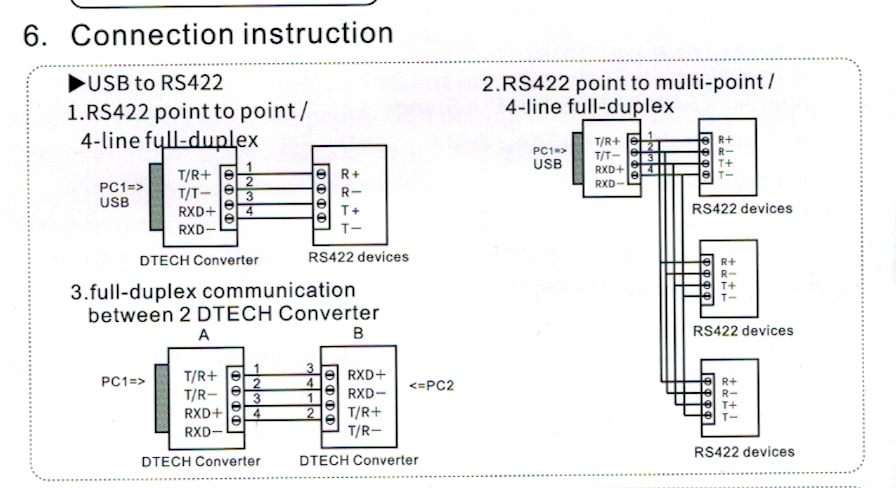
The Pinout on the USB adapter is printed on the back and is different from the pinout outlined in the Router’s manual. I have built a cable that matches the pinouts on both ends

From their serial protocol document:

The only pins used are RXD+, RXD-, TXD+, TXD-, and GND; no ACK signals are used.

It’s only two pages, very straightforward.

At this stage, I need to eliminate some variables from this equation and start with an adapter that is known to work properly, because right now I can’t seem to connect to the device even via a simple terminal. Any suggestions?
you may try the drivers corresponding to your ftdi chip model from their web downloads

Thanks. nothing on the box or in the docs specifies the exact chipset though, just “FTDI Chipset”.

That said, digging around it seems that Apple has built in FTDI drivers, available since Mavericks. It seems (at least from what I can see) that the adapter is working, at least for transmitting. I can also get the Tx light to show when I send a 40h or 80h command to the router, when using the terminal ‘screen’ command.

using a tool like usb prober you can check the vendor/product id of the chip
to detect which chip it is about.
then with recent security enforcements on macos, I would still install a driver for that
as it seems you have a rs422 chip, it is not the simple rs232 to usb standard chip you may be using.

Hmm. I think it’s possible I miswired this. Looking at the instructions, it has the adapter’s transmit pin going to the Receive pins on the other end. I wired transmit to transmit and receive to receive. So that may be my issue.

Sony’s RS422, which I work with a lot for tape deck control (at least in terms of making cables) is straight pass-through from one end to the other, which is why we’re able to make cables using basic DB-9 to RJ45 adapters, and ethernet cabling.

I’ll rewire this and report back.

I wired it according to the diagram in the manual, using example 1 (Full Duplex RS422):

I also installed the VCP drivers from FTDI’s site, even though they only list Mac OS 12 as the latest one they support, and as a beta only, and I’m on 14 (Sonoma). The drivers installed, and I now see the adapter under a different addressusbserial-2, where before it had the S/N of the unit in the name). I can connect to that, but I’m getting the same result: Tx light indicates it’s sending the signal, Rx light never lights.

I’m sending the following series of commands:

A5h  //About to send commands
00h  //I want to address Router #1 (The only one connected at the moment)
40h  //Asking if it's alive
(no response)
5Ah  //Done sending commands

I’ve done this with both Screen and SerialTools, but I get no response

At this point I’m hoping there might be a known good adapter that I can trust will work. I can putter around with this a bit more, but I feel like I’ve covered all the obvious things at this point.

I had once a problem figuring the communication protocol with a bl0942 power meter chip.
the solution was to hook up an oscilloscope (with uart decoding capabilities) on the wires
once you see what’s going in the wires it’s always easier.

I don’t have a scope with those capabilities (At least I don’t think mine does), nor would I really know what to look for if I did.

ChatGPT (I know, I know) after quite a bit of back and forth troubleshooting, seems thoroughly convinced the adapters I have aren’t really RS422 compliant. It suggests I try a “FTDI-based USB-RS422-WE-1800-BT” adapter (looks like a USB cable with bare wires at one end and the chip integrated into the USB plug, or an older Keyspan RS422 adapter. I will look to see if I have any of the latter but I don’t think I do.

In the mean time I’ll probably order one of the USB-RS422-WE-1800-BT models on amazon for Monday delivery just in case.

Current macOS version usually come with some support for FTDI adapters, but you can always install the latest VCP driver from this website: VCP Drivers - FTDI

An easy way to test the adapter and driver is to wire up a loop back on the serial port end.

  • For RS232, connect RX and TX together.
  • For RS232, connect RX+ to TX+, and RX- to TX-

This way, everything that is sent is immediately received.

1 Like

Yeah except I’m using RS422, not 232.

The driver built into the mac, and the VCP driver from FTDI ended up with the same result - nothing received.

Make sure the following:

  • baud rade is correct
  • Bits
  • Parity
  • Stop bits

CTS and/or DTR may need to be set.

wiring:

TX to RX

RX to TX

GND must be common to both ends.

The second row seems to be for RS422. I guess @Roger_Meier copied/pasted, which can be a dangerous sport :wink:

All of the wiring is correct for RS422. All of the comms settings are correct as well (9600/8-n-1). The issue seems to be the usb adapter which is probably the case. In the post production world RS422 was used for decades to control tape decks from edit systems and many USB adapters that will work fine for other purposes will not work for RS422. Even though they say they do.

I bought both the bare wire adapter and a known to work (for video) RS422 Keyspan adapter. I should have the bare wire one on Tuesday. The Keyspan was eBay so who knows when it’ll show up.

I actually screwed this up the old fashioned way by turning my brain off while typing. None of that newfangled “copy-paste” stuff the kids are using these days :slightly_smiling_face:

This is what I meant to type:

  • For RS232, connect RX and TX together.
  • For RS422, connect RX+ to TX+, and RX- to TX-
1 Like

All indications are that the issue I’m having is electrical - something is up with the adapter. I’m waiting for the Keyspan USA-19HS USB to RS422 adapter I bought to arrive (remains to be seen if I can get it working on a newer mac though), as well as another option I can try). It was widely used in broadcast for deck control, which is always RS422 so I’m hoping that does the trick.

As it stands right now, everything is wired correctly from the adapter to the device, so the problem seems to be the USB adapter(s) I purchased aren’t really RS422 compliant.

If it comes down to it, I have an ancient windows laptop with a 9-pin COM port on it, and may just have to try that, at least to establish initial communication with the machine.

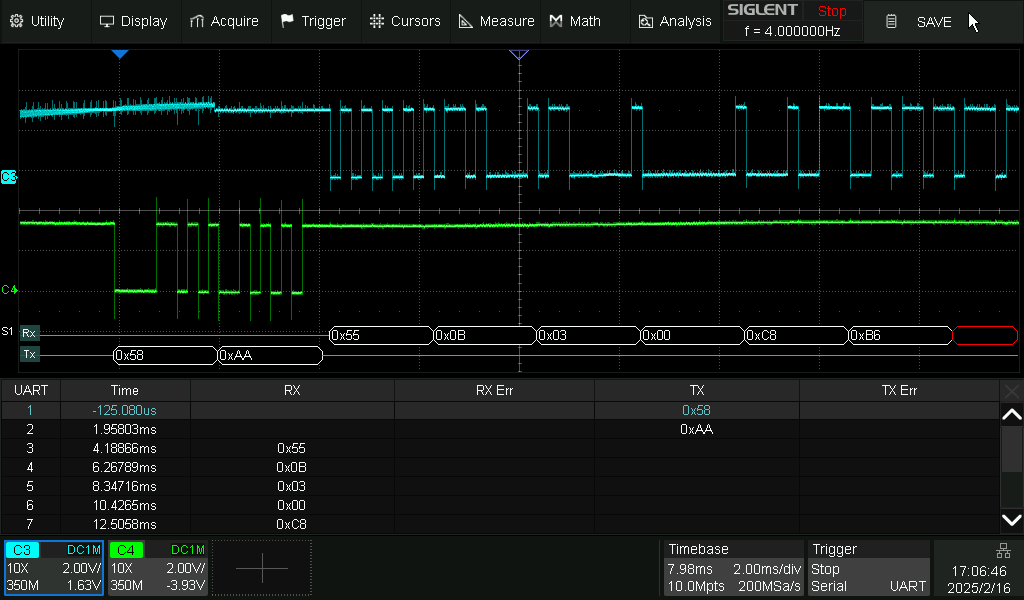
Ok, fresh cup of coffee and I sat down with the DTech adapter I currently have, since the USPS seems to have lost the Keyspan in the mail. The Dtech came with a little breakout board with screw terminals, so instead of the wire I built I snipped the end of an old serial cable from a tape deck, and wired it up to this breakout board. Lo and behold, I’m getting a signal from the machine in SerialTool:

This is the “Are you alive” command, and it responds with “FF” indicating yes. Confusingly, it turns out that these routers, which came in different configurations, have completely different command sets for the different versions. So I guess I need to build a lookup table of commands to keep them straight. For example, On the 16x16 and 32x32 units, the command indicating that you’re about to start sending a string of commands is “A5” but on the 64x64 unit it’s “ff”

In any case, now that I have this at least physically connected I can start working on the code.

I have my app making a connection to the device now, and I am sending the same command as above. I should get a response of “FF” from the device. In the DataReceived event for my serial connection I’m doing this, which should put it into a text area:

Var receivedData As String = Me.ReadAll
taSerialDataReceived.Text = taSerialDataReceived.Text + receivedData

However, I’m just getting this:

That looks like a text encoding issues so I thought maybe I need to set the text encoding in ReadAll and set it to Encodings.ascii - but that results in:

ÿ

How do I need to handle the received data (in hex form) so I can work with it?

ÿ translates to FF, so you are received the correct binary data. You can use the EncodeHex function to convert your received data into a string of hex values:

var hexData as string = EncodeHex(receivedData)

and if you pass an additional boolean argument set to true, the resulting hex string has spaces inserted between each byte:

var hexData as string = EncodeHex(receivedData, True)

perfect - thanks! That works.

1 Like

Ok so now I have another problem:

There are 64 channels. Every output channel has to have some input channel assigned to it, it can’t be empty. So when I set up a loop to get the value of each channel, I should get 64 results but I’m only ever getting 50 numbers back. Always 50 every time.

I tested by setting up a simple loop that builds and sends this command, once for each channel:

Var hexString As String = "ff0040"+ i.ToHex + i.ToHex +"ee"

So this will tell the router it’s sending a command (ff), which router it’s sending it to (00), then sends a command that should result in channel 1 Input being routed to channel 1 output (40 00 00), then it’s ending the command (ee). This runs in a for loop where i iterates on each pass, and i is also the channel number.

When I poll all the channels in a for loop, I get 50 results, not 64 and they are in this order. For some reason there are always two oddballs at the beginning, then it starts at channel 16 (10h).

12
2E
10
11 12 13
14 15 16
17 18 19
1A 1B 1C
1D 1E 1F
20 21 22
23 24 25
26 27 28
29 2A 2B
2C 2D 2E 2F
30 31 32
33 34 35
36 37 38
39 3A 3B
3C 3D 3E
3F

If I manually check channel 15 (ff00800Fee) the result I get is “13” – so that 12 2E that comes before the sequence begins at 16 (10h) is not channels 14 and 15.

If I manually poll, say, channel 4 like this: ff008004ee the result I get back is “04” - which is correct. The mapping is there, but something is getting lost when I try to collect all the mappings on all the channels in a loop. Is there a better way to do this?