Good Evening,
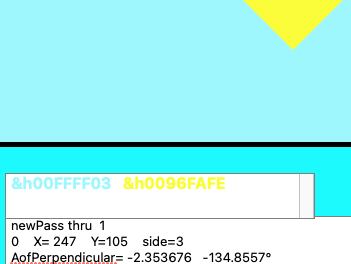
I am using the value of color to flag an action in a program that simulates light passing through an optic. At one time this was easy to do. Now I am not getting correlation between the assigned RGB number and the color that is being displayed. I have tested for this correlation by having the RGB value printed in the color of the assigned value in a textBox. The color is correct, the value is very wrong. I am at a loss here and thought you may be of help.
On a side note, I got some very good help on instantiating an array. I tried to thank the responders, but the message could not be replied. So thank you, and I will thank you now for your assistance for this issue.
Please see attached:
yellow and light blue are correct, RGB assignments are not. The yellow is an edge of a prism.
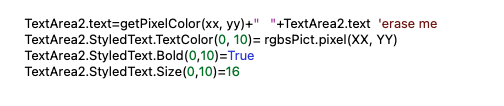
I’m not quite clear on what the issue is, especially since we can’t see the code for getPixelColor. But…
I believe in Xojo it’s &hRRGGBBAA.
The hex displayed for these should be &hFFFF0300 and &h96FAFE00 so you need to move the first two bits to the end.
I think you also flipped the display of the colors in your text box; #FFFF03 is the yellow color and #96FAFE is the cyan.
One common misconception is that using a particular RGB color to draw will result in those exact values being displayed (and read back out via screen color sampling software). This is almost never the case due to the built-in color correction mechanisms in most operating systems. You will usually find the RGB values slightly off, and this is in fact normal.
Also, it tooks me minutes to see you have cyan and yellow text and a magnifying glass (plus my standard glasses) to be able to read these texts.
This hapens to people from 40~45 y/o and later.
But I see far worse on TV, advertising pages, etc.
At last, I add recently a TextArea and place reports there:
Pure Black (work fine): text explain where the code is (important lines)
Pure Red (Errors): A FolderItem is Nil, does not exists, Else executed code (wrong), etc.
00FFFF is cyan. @Christian_Wheel is right, you’ve mixed up your values in getPixelColor.
Much easier to spot if you use RGB ( redvalue, greenvalue, bluevalue), albeit probably a tiny bit slower
Thanks for the help. The issue is color correction, which I did not know happens. Have a great summer.
Carl