Let me first apologize for causing us to go off script a bit from my original request.
Let me provide a bit of historical context here:
In the industry within-which I’ve been writing software (oil & gas) for the past 34 years, it has only been within the past 4 or 5 years that I’ve had to write anything for macOS. I have written software for iOS, however the dev tools of choice were either C# or SWIFT. As such, my experience with the nuances of Apple Intelligence (specifically the Writing Tools) is quite limited.
The two primary operating systems that I’ve had to deal with are Windows and Linux as most of my clients are in the Petroleum Engineering space and those are the two main operating systems that they use, however macOS has become a bit more prevalent as well in recent years.
Why I chose Xojo?
Please keep in mind that I’ve only been using Xojo for a year now! Prior to Xojo, my computer programming background has been in C++, C#, PL/SQL, VB.NET, and PowerBuilder.
There are (RAD and Cross-Platform support) primary reasons why I decided to begin using Xojo and becoming a Pro Plus subscriber:
-
RAD (Rapid Application Development
-
- Over the decades, the .NET Framework (while extensive in capabilities and cross-platform support) has become far too bloated and no longer a RAD solution.
-
Cross-Platform (iOS, macOS, Windows, Android, and Linux
-
- I really like this about Xojo (coupled with RAD) (.i.e. One code base)
User Feedback:
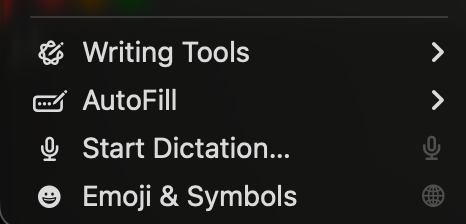
Having said that, for the past couple of weeks I’ve been receiving feedback from my customers (two different corporations) as it relates to these additional menu items.
Truth be told, I never really noticed those menu items on the Mac during my testing because neither Windows, nor Linux adds anything to the Edit menu of my applications. Not even Copilot which is pretty much forced into nearly every aspect of Windows 11 does this. Several of my users brought it to my attention.
To give you a better idea of how my application is used. In oil & gas, users have to enter in (as an example) something called Well Test data. There are certain abbreviations and company-centric codes that are entered into the TextArea control of my application. Because of this, Apple’s AI tries to “assist” by adding capitalization and auto-correcting and underlining codes that it simply thinks are misspellings (or whatever it thinks it is). In short, while AI is acceptable in other 3rd party applications they use, it is unacceptable in this particular use case.
Yes! You can right click in the TextArea and selectively disable/enable the AI spelling and grammar options, however I have yet to find a way using Xojo to persist those selections once my application is closed.
The TextArea control has a property (TextArea1.AllowSpellChecking). I have a menu item called: “Spell Checking”. When the user enables/disables it, I store that value to an appsettings file so that when the application reopens the application, it retains that enabled/disabled state that the user last made to it (this is a customer requirement). Setting that property to False (no surprises here) does not disable the Apple AI spelling and grammar (thus the confusion).
I’ve been receiving support incidents about this because they thought it was something “I” explicitly added to the application.
Unfortunately, based on what I’ve seen thus far, the Xojo framework doesn’t provide a mechanism for capturing any of these Apple AI settings so that I can persist them to storage as well (or just disable them outright). The Engineers find it frustrating to have to go in and right-click to disable features they don’t want each time they use my application. They showed me another application (written by another company) used for a different use case on macOS that has spelling and grammar, Substitutions, Layout Orientation, and AutoFill all removed from the menu.
Summary:
I do agree with Ian Kennedy, however that the dictation feature is something good to retain (and none of the Engineers have a problem with that either).
Even Apple’s own Developer Documentation talks about times when you may want to disable Writing Tools and this is a direct quote from their documentation:
“The UITextView and UITextField classes have built-in support for Writing Tools, but you can customize how the feature works for your interface. You might choose to change how someone experiences Writing Tools in your app, or disable the feature for specific types of content. For example, you might disable Writing Tools in a view that you use to display code listings. You can also customize the type of content Writing Tools generates for your text view.”
I’m assuming that the Xojo TextArea is neither a UITextView or UITextField because of the need for cross-platform support.
Decisions-Decisions:
One of my desires for using Xojo is that I only have to maintain/support ONE code base for all 3 operating systems and seeing as how (coming from Geoff Perlman) the genesis of Xojo was macOS, I was hoping to find a solution using Xojo for this.
However, because this issue may quickly become a showstopper (and I highly suspect it will based on feedback I received from both companies yesterday in separate meetings), I am going to have to (unless any of you can suggest another way using Xojo) write the Mac version in SWIFT where I can disable the writing tools feature(s). The Windows and Linux versions can remain in Xojo.
Perhaps I could write an API using SWIFT that would tackle this and then use a Declare Function statement in Xojo to handle it that way. I dunno (i’m kinda thinking aloud right now).
I need to think it through pretty quickly so that I can wrap this project up and get paid.
So this isn’t “ME” just wanting to disable it to make it consistent across operating systems (Windows and Linux simply don’t currently do this). This is based on recent user feedback and my livelihood, gentlemen.
Again! I DO apologize for not being a bit more clear with my initial request, but I’m under-the-gun to get this application completed and sadly, if I need to have two code bases, then so be it.
My original lack of clarity lead to a discussion on the merits of keeping these menu items vs not keeping them.
I hope that this update helps provide that clarity.
 It’s weird, but it works.