I will try to explain this as clearly as possible. I am creating my own simple chart ( I don’t have $300.00 for the plugin for personal use ) for an application I have written for my own use. The premise is simple, I have a canvas set up to display rectangles sized and placed based on input values. ( see screen shot for idea of what I am doing ).
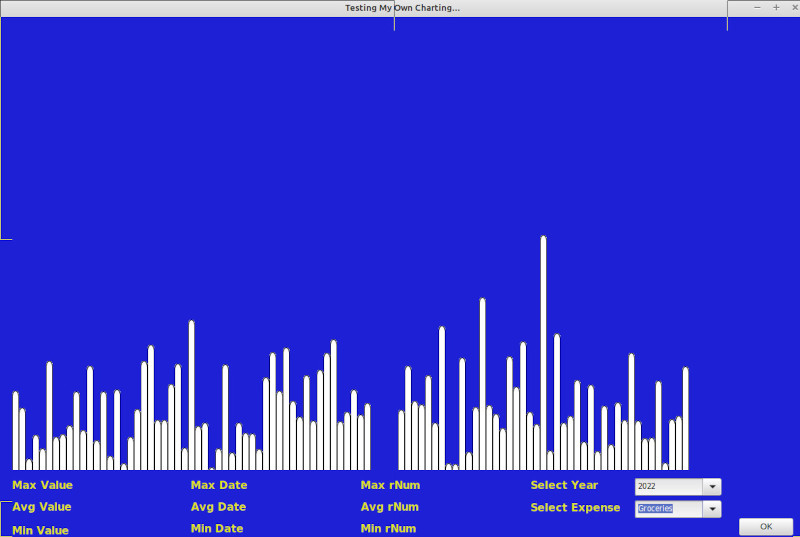
The Window is set up so I can select a year I want to look at and a topic ( topic in this case would be a bill ). It works great for the first go, but when I change the topic the first result remains. So how do I remove the rectangles I have created in the first go so the second set will build without displaying the first set too? I have been digging around for a while now and can’t seem to find an answer that works.
Below is the code I have in the Canvas.Paint area. This is called by the ComboBox.Expenses ( aka Topic )
// ----------- Variable Declaration Center ---------------
// A = Left
// B = Top
// C = Width
// D = Height
Var i, A, B, C, D As Integer = 0
Var strArryExpense( ) As String // Used to set the rectangle height...
Var dblArryExp( ) As Double // Stores the actual dollar value of the item...
Var strArryDate( ) As String // Stores the date of the values...
Var strArryRnum( ) As String // Store the rNum of the values...
Var rsData As RowSet = modSelect.mthSel_Expenses( "Sorted", "" )
Var strPaid, strDate As String
// ---------- Where the magic happens! ------------------
A = 20 ' Starting point...
B = 666 ' Bottom of the canvas...
C = 10 ' Width of the item...
D = 100 ' Height of the item...

g.ClearRect(0, 0, g.Width, g.Height)

Try
  If( rsData <> Nil ) Then // So long as there is a record return it then close the rowset...
    // Build array with bill names...
    strDate = rsData.Column( "transDate" ).StringValue
    strDate = strDate.Left( 4 )
    For Each row As DatabaseRow In rsData
      If( strDate = cboYear.Text ) Then
        If( rsData.Column( "billPmntSrc" ).StringValue = cboExpense.Text ) Then
          strPaid = modSystem.mthCash_UNFormat( rsData.Column( "withdraw" ).StringValue )

          B = B + strPaid.ToInteger ' Subtract the value from the base top to get the actual height...
          strArryExpense.Add B.ToString
          B = 666

          If( strPaid.Left( 1 ) = "-" ) Then
            Var iLen As Integer = strPaid.Length - 1
            strPaid = strPaid.Right( iLen )
            dblArryExp.Add strPaid.ToDouble
          Else
            dblArryExp.Add strPaid.ToDouble
          End If

          strArryRnum.Add rsData.Column( "rNum" ).StringValue
          strArryDate.Add rsData.Column( "transDate" ).StringValue

          i = i + 1
        End If
      End If
      'strCompare = rsExpenses.Column( "billPmntSrc" ).StringValue
      strDate = rsData.Column( "transDate" ).StringValue
      strDate = strDate.Left( 4 )
    Next
  End If

  Var iHigh, iLow, iAvg, iTest, iAdd As Double
  Var strHighRnum, strAvgRnum, strLowRnum, strHighDate, strAvgDate, strLowDate As String
  iLow = 1000

  For X As Integer = strArryExpense.FirstIndex To strArryExpense.LastIndex
    'Var nTxtFld1 As DesktopTextField = New txtSpent
    'Var nTxtFld2 As DesktopTextField = New txtPercentage
    'Var nLabel As DesktopLabel = New lblAcctName
    Var nRect As DesktopRectangle = New rctOne
    'Var curTotExp As Currency
    iTest = dblArryExp( X )

    ' Get the max value...
    If( iTest > iHigh ) Then
      iHigh = iTest
      strHighDate = strArryDate( X )
      strHighRnum = strArryRnum( X )
    End If

    ' Get the low value
    If( iTest < iLow ) Then
      iLow = iTest
      strLowDate = strArryDate( X )
      strLowRnum = strArryRnum( X )
    End If

    ' Average them all...
    iAdd = iAdd + iTest
    iAvg = iAdd / i
    nRect.Visible = True
    D = strArryExpense( X ).ToInteger
    nRect.Top = D
    nRect.Left = A
    nRect.Width = C
    nRect.Height = 666
    A = A + 10
  Next

  txtMax.Text = modSystem.mthCash_Format( iHigh.ToString )
  txtAvg.Text = modSystem.mthCash_Format( iAvg.ToString )
  txtMin.Text = modSystem.mthCash_Format( iLow.ToString )
  txtMaxDate.Text = strHighDate.ToText
  txtMinDate.Text = strLowDate.ToText
  txtMaxRnum.Text = strHighRnum.ToText
  txtMinRnum.Text = strLowRnum.ToText

  'MessageBox( "There were " + i.ToString + " grocery records processed for 2022" )
  'MessageBox( "The high value was $" + iHigh.ToString + ". The low value was $" + iLow.ToString + ". And the average was $" + iAvg.ToString + "." )

Catch error As DatabaseException
  MessageBox( "Error: " + error.Message )
End Try