In the recent blog post about optimizing code, it should have been highlighted how dangerous it is to use app.doevents in a desktop app. I can’t believe it’s not mentioned!
For all you newbies, DoEvents is there because a Console app needs a way to create a run loop if it’s more than just a one-shot program. Otherwise, just doing a tight loop hangs the app.
In Desktop apps, it makes debugging your app damn near impossible and opens you to ThreadAccessingUI exceptions.
The only moment I need a DoEvents() for a Desktop app, is during tests where I finish with
DoEvents()
Quit
Because (Xojo bug? Or “As Designed”) seems to create a System.DebugLog() print queue that is not flushed at quit time and the contents are destroyed never being printed in the debug console window without the DoEvents() acting like a FlushPendingDebugLogs()
Without DoEvents() to enable a “FlushPendingDebugLogs()” the tests fail to show the expected and real values. It truncates the prints.
No, it isn’t. The only reason it hasn’t been removed is because the IDE used (or uses) it for the splash screen. This too is a bad design. It’s always a bad design, especially with regards to threading and even more so with preemptive threading.
If you want to produce some bizarre stack traces, DoEvents will get you there.
Any time you think you need it, you’re wrong. It may be annoying or downright hard to do it right, but DoEvents is simply not a substitute for proper concurrency.
This is a silly thing to say. There’s plenty we can be certain about. If you throw a ball, you can be certain it’ll hit something. A wall, the ground, a person, whatever. It’s going to impact something. You know this because your experiences on this planet tells you as much. No sane person would argue otherwise.
Likewise, what I’m saying about DoEvents comes from decades of experience with Xojo. I’ve seen the pitfalls first hand. I’ve made the mistakes. I’ve seen the stack traces of a timer action event that appears to run inside a database query.
I don’t say this because I like to or I want to make your life more difficult. I say this because I have the experience to share. I want to help you be a better developer.
You can lead a horse to water, but you can’t make it drink.
To wrap this up, my intention was to point out that anything that Xojo publishes, whether it’s by one of the employees or by a guest contributor becomes part of the canon of best practices for Xojo. The problem here is that the use of DoEvents is definitely not a best practice and one could argue that it’s a worst practice for all intents and purposes.
Since the AIs of the world are being trained on all things on the internet, this is going to be assimilated because it’s on an official Xojo site and users will unwittingly be getting code with it for years to come.
Thom and I both have the experience of having worked at Xojo on the IDE and seeing all the bad that DoEvents can cause. Please, PLEASE don’t use it unless it’s an absolute last resort.
I use it in some apps and it would be extremely difficult (if almost impossible) to do without unless I put that code in threads which is, in my case, almost not doable due to cheer size of the project. I also never had any issues with it.
It would be great if you provided us a project that show cases it can crash, do odd things, behave oddly, … in a use case scenario. That would be great. This has been asked several times in the past but no-one has ever provided such examples.
In the “Only Nearly Foolproof?” section near the end there are two examples that will be a problem. Neither use DoEvents directly, but cause the exact same problem. The first is one that any experienced dev should catch on to being problematic. But the second is really sneaky.
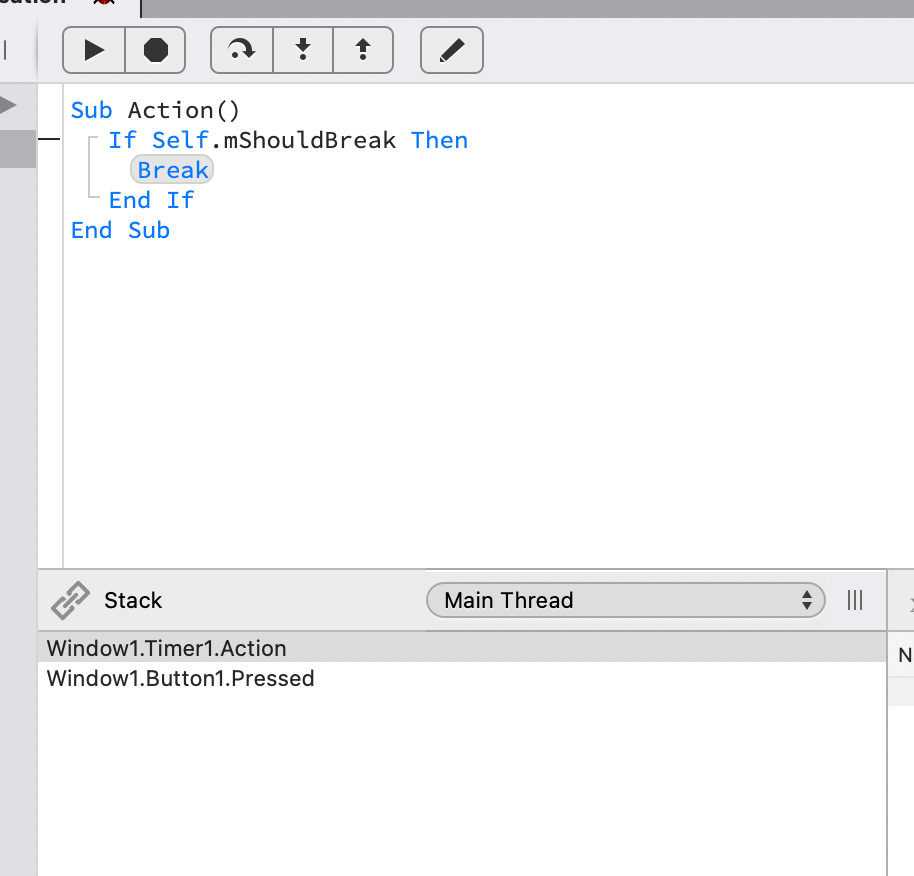
Timers and sockets are the best ways to get into trouble with DoEvents. You can do something simple like setup a timer, then a button with a loop that runs DoEvents, and the timer’s action even will fire inside the button’s pressed handler.
Whether or not this is a problem really depends on what the code is doing, but it leads to really hard to find issues. I suspect since you’re not threading, you probably haven’t noticed anything wrong, but that doesn’t mean it’s safe. You just haven’t been burned by it.
But I’m also concerned that you think threading is impossible in your app. That’s a bigger warning sign that the code is not healthy.
I agree. I wanted to comment on it moments after it was published, but Xojo doesn’t allow comments on their blog posts. I almost texted Geoff, but decided it wasn’t my problem.
OK, I have tried this but that is not the case here and I cannot get to trigger the Timers action event in the button Pressed event. I ended up adding more Timers and buttons with doevents() loops. Still, it just works fine.
Anyhow, I am aware what doevents() exactly does and I understand it very well too. And it may go wrong in some use cases. 99 out 100 it is ok and will do no harm. As said, it has some use cases and should not be removed.
It does not have any legit use cases in a desktop app. You’re right, and Greg said it too: it works ok until it doesn’t.
Here’s what I mean about the timer firing inside the pressed event. Look at the stack. That’s not normal. But as I said, whether or not it actually causes a problem depends entirely on what else the code is doing. Regardless, using DoEvents has messed up the natural order of event flow. Button1.Pressed starts, Timer1.Action starts, Timer1.Action ends, and Button1.Pressed ends. That kind of nonsense should never happen.
 But I get it.