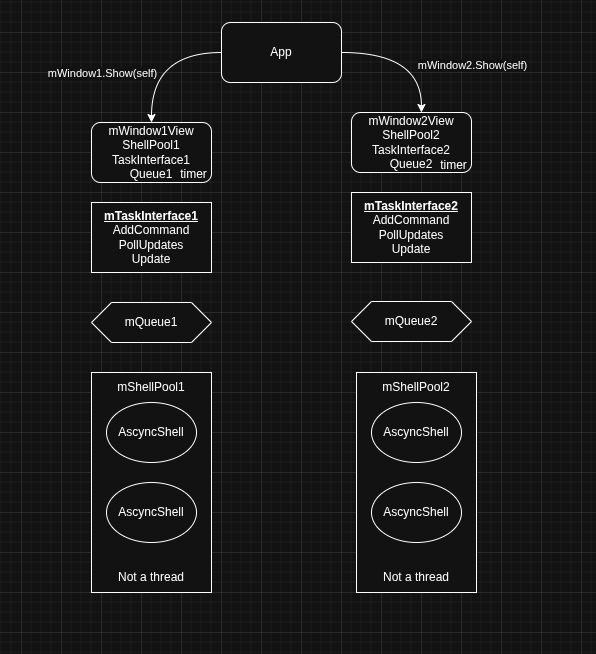
I have an application that has two servers it servers.
At the bottom of all work there is a shell to an external shell command.
This command runs asynchronously, prints text to stdout, stderr but has no stdin.
Several commands can be running at the same time by the shell pool and they are all writing output, until they end. That output gets put into the appropriate queue for the window to poll and process. (Not exactly pub/sub, yet)
At some point in my implementation I started noticing that while one pool was working the others got blocked and that is when I decided to come here to look for some guidance…
So because the shells are async, i didn’t use any thread classes. UI updates are all handled by the window timer event by polling the interface for updates that were queued.
The UI is NOT blocked by ‘en-queuing’ a command because all it does is stuff a queue and return.
I don’t actually see one task talking to the other, really they talk to their parent only.
This is probably where the issue lies. Because you aren’t using threads, when one window works on data, nothing else happens in the app – the other window never gets any CPU cycles to do anything. If your process is short, this won’t be noticeable, but if the process takes more than a second or two you will notice that the UI stops responding.
Can you tell us more about what happens during the processing of the data?
The command that the shell executes would be the equivalent of the Run method of a shell.
It’s the one doing doing work that can take minutes. It the long running loop. but its an asynch shell for this version.
My CPU has 4 cores (my lil pi 5) so i try not to have more than two shells running.. Not sure if i had 4 cores and tried to start 5 shells what happens.
Honestly - unless you can provide a lot more detail, we’re not going to be able to help. Maybe it would be best to upload a sample project that we can look at.
No.. I borked that up the first time.. Calling ShowModal vs Show(self)
What I am ‘struggling’ with at the moment is, the App opens the default window for you.
I was thinking that App might have ‘hooks’ to handle opening an array of windows of the class.
It appears i may have to do that in the default window’s opening event.
it looks identical, why do you need many windows?
basically you have a configuration,
you execute a tasks,
it have a feedback (ui update see AddHandler/RemoveHandler)
and at some point it ends.
its not ideal to use a own class with super to Thread?