I have a Window that presents the user with many options. There are a lot of buttons on the Window. There is also a TextField. When the Window opens, I do not want the TextField to get focus. I only want it to get the focus in the user actually clicks in the TextField.
The only way a textfield can actively prevent focus is to set its Enabled or Visible property to False.
You could set Enabled to false by default, but then enable it in the MouseDown event, and set it to False again in the FocusLost event.
The other way would be to .SetFocus on another UI element in the TextField’s FocusReceived event, unless the mouse happens to be over the textfield (you can keep track of this by setting window-level boolean properties in the MouseEnter, MouseExit events). This has more moving parts though.
The other thing is that you shouldn’t forget about users who are using keyboard shortcuts to navigate your UI, like tabbing between controls. Not sure if you want to support that or not, but neither of the above approaches are compatible with that without modifications.
I would concur with Christian’s caution regarding accessibility.
But with that said, under Xojo focus is handled at the window level so you can simply clear focus whenever you like:
Self.Focus = Nil
Lots of ways of doing this through FocusReceived, maybe Activated on the window, etc. but all will likely require a flag so that this only happens once at launch. Here’s an example project:
When the window opens, you can decide to not put the focus in the TextField, using either AnotherTextField.SetFocus or self.SetFocus (to set the focus to the window).
I read your question as concerning only when the window opens, is that correct?
If you put that in the FocusReceived event of the TextField then it will not show get the focus. But you still want to get the focus if the user clicks on the TextField, you have to figure out how to only use Self.Focus = Nil when the window is coming to life and subsequently not do that. Patrick solved this by creating a property in the Window that detects the initial TextField.FocusReceived event and then have the Self.Focus = Nil only initially.
A slight complication is that there are actually two TextField.FocusReceived events that occur when the window is opened for the first time. One after the window is Opening and another after the window is Activated.
WindowOpening
TextField.FocusReceived
WindowActivated
TextField.FocusReceived
You can deal with this one way or another - perhaps Self.Focus = Nil in the WindowActivated event and then set a Boolean property that allows the first subsequent TextField.FocusReceived event to be short-circuited, but subsequent ones to be allowed.
I could get this to work, but ultimately preferred to use Richard Duke’s suggestion to have a dummy Control in the window that gets the focus when the window is opened. I just used a tiny Canvas that has no other purpose than to get the focus. It just seemed simpler and did not require a property to be created.
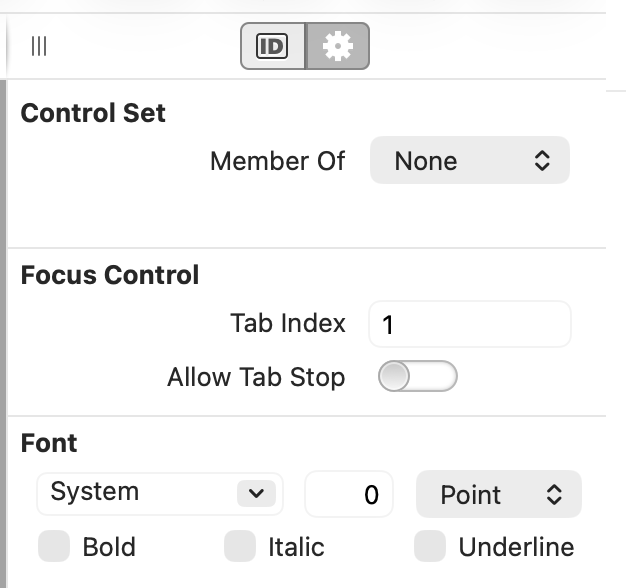
On my Mac, disabling Allow Tab Stop prevents the field from receiving the focus when the window opens, even if it’s the only control in the window. Maybe this is affected by a System Setting? The field can still receive the focus if the user clicks in it.