but can you just try?
Same problem on Intel, no problem on M CPU.
dim f as FolderItem
if PictureFolder <> nil then
f = PictureFolder.Child(ArtikelID + “.png”)if MyPic <> nil And f <> Nil then
var NewPic As New Picture(MyPic.Width, MyPic.Height, 32)
NewPic.Graphics.DrawPicture(NewPic, 0, 0)
NewPic.Save(f, Picture.Formats.PNG)
end ifelse
MsgBox “PictureFolder not defined”
end if

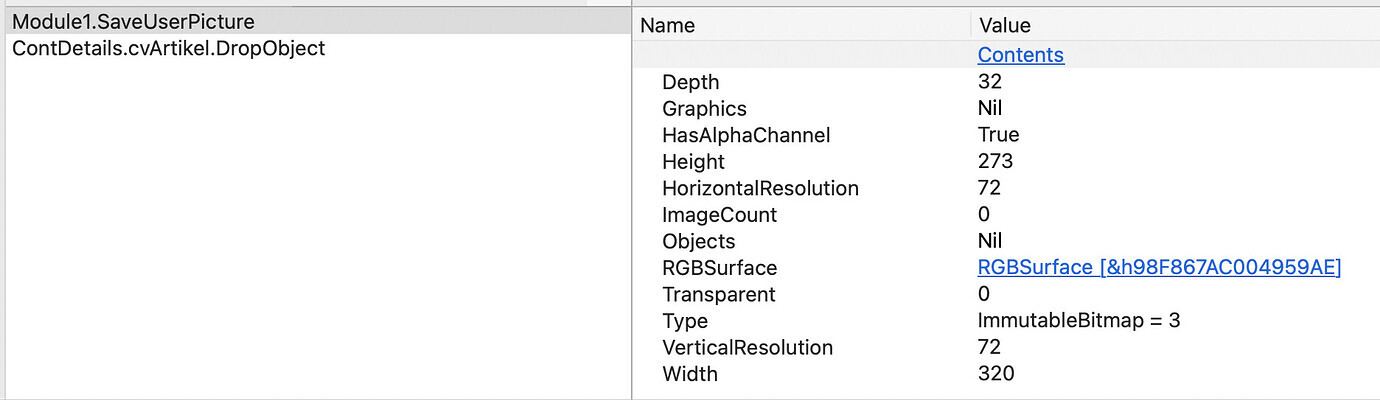
NewPic values:

Ok. This rules out any inherent problem with ‘mypic’ as a source for the save.
I don’t see that you’ve attached the problematic image anywhere here. Or is it all images? Some source formats may be supported for input, but not conversion/output by the framework depending upon architecture or OS version, possibly. I think (correct me if I’m wrong), PDF is this way.
I could not be a problem with the image. Any picture or screenshot is working on Apple M CPU and not on Intel. Also I have run the application as an Intel binary, but I got the same problem.
Good info to have. Thanks. Looks like your best bet is to open a case with Xojo, point them to this thread, attach the non-MBS example project and a sample image (because they’ll ask), and wait to see if they can reproduce.
Now a test with Einhugur Plugin:
dim f as FolderItem
if PictureFolder <> nil then
f = PictureFolder.Child(ArtikelID + “.png”)if MyPic <> nil And f <> Nil then
// var NewPic As New Picture(MyPic.Width, MyPic.Height, 32)
// NewPic.Graphics.DrawPicture(NewPic, 0, 0)
// NewPic.Save(f, Picture.Formats.PNG)
// MyPic.Save(f, Picture.Formats.TIFF)
// Picture.SaveAsPNG)var PNGex as new RawPngExporter // pngex.CompressionLevel PNGex.SaveToFile(RawBitmapConverter.FromPicture(MyPic),f) if PNGex.LastError <> 0 then MessageBox PNGex.ErrorMessage return end ifend if
else
MsgBox “PictureFolder not defined”
end if
No problem on Intel CPU.
Can you confirm that your client has problems with Intel and Mx computers but you only with Intel?
1 Like
Yes. Problem exists only on Intel. But I think the problem must be a Modul or a Plugin that I use on this application.
If I create a new project, add a Canvas, add the same code, this application is running on Intel CPU without any problem.
Now I remove any plugin and module from the project to find out what the problem is. I will write the solution her, after I found the problem.
Thank you to all for your help.
2 Likes
In the image properties, Graphics is Nil:
This is your image (Copy / Paste from/to the Forum software): see far above…
The problem was a not existing folder. Normally it was created at the first start. I don’t know why it was created on M CPU and not on Intel.
Now I have added a new method that does a double check. If the folder is not exiting, it would be created, if the user drag a picture into the application.
Then the message is clearly wrong: “This format is not supported” when the folder doesn’t exist. Still worth a fix from Xojo, IMO.
2 Likes