I have a big desktop app still maintained with Xojo2023r2 and I wanted to port it to Xojo2025r3.1.
The app is using a MySQL DB running on macOS. I’m using Xojo MySQLCommunityServer.
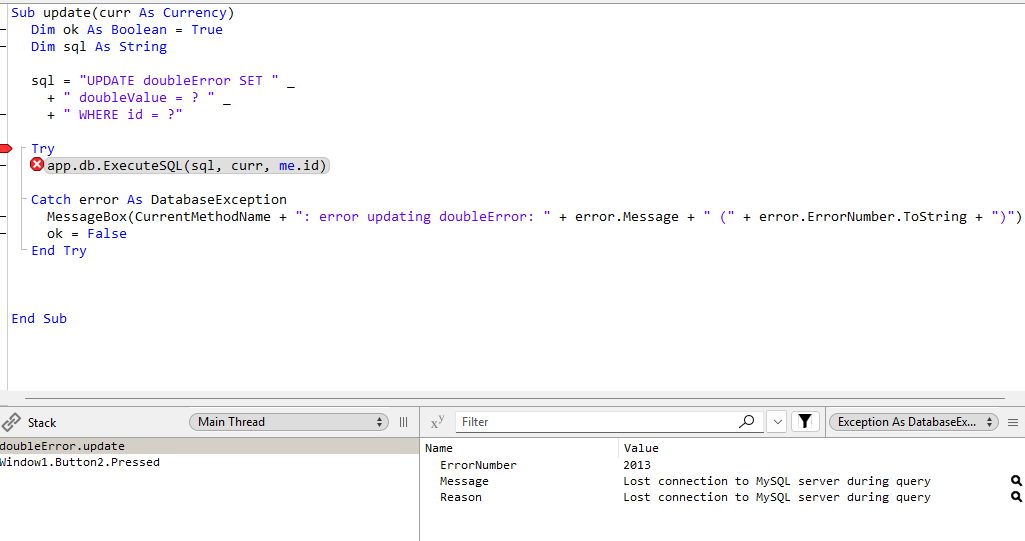
The app compiles fine with 2025r3.1 but when running I have a DB error ‘1265 data truncated for column’ for every UPDATE on tables with DOUBLE columns, updating them with Currency values.
The currency values are quite small, sometimes even 0.
I developed a small app to demonstrate the issue (attached).
There’s a series of design doubts I don’t want to question, but what’s your locale? Does it use comma or period as decimal?
Because your system breaks as it is designed if using commas, because parsing things as “123.45” will become “12345” using ToDouble() under such locales
The test project is not adapted to handle different locale, especially using a TextField.
My (real) app always uses double or currency variables and pass all values using prepared statements.
If you want to try you can just ignore the textfield and pass a constant or currency value to the update method.
The app is running for about 10 years without any issues, now using Xojo2023r2. The DB contains something like 100 tables, most of them with multiple double columns.
I never encountered any problem before.
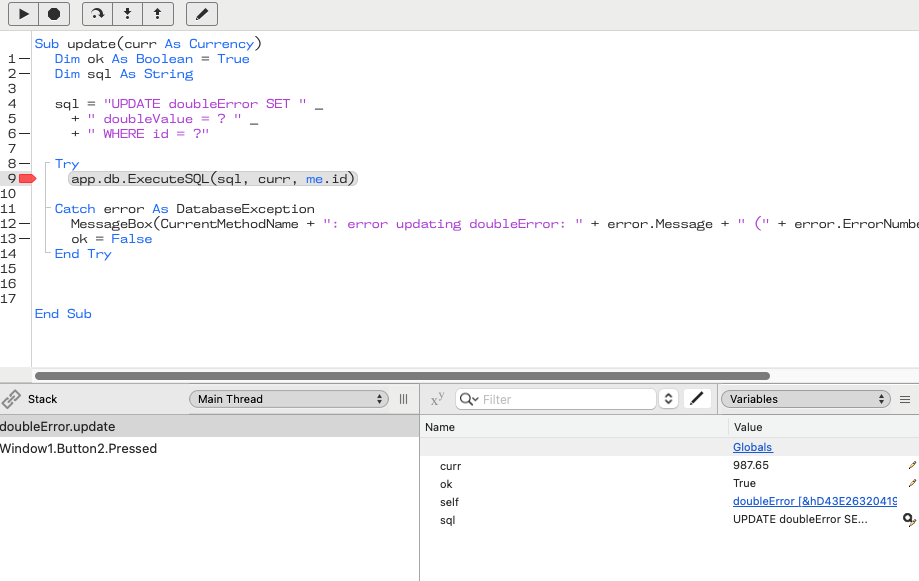
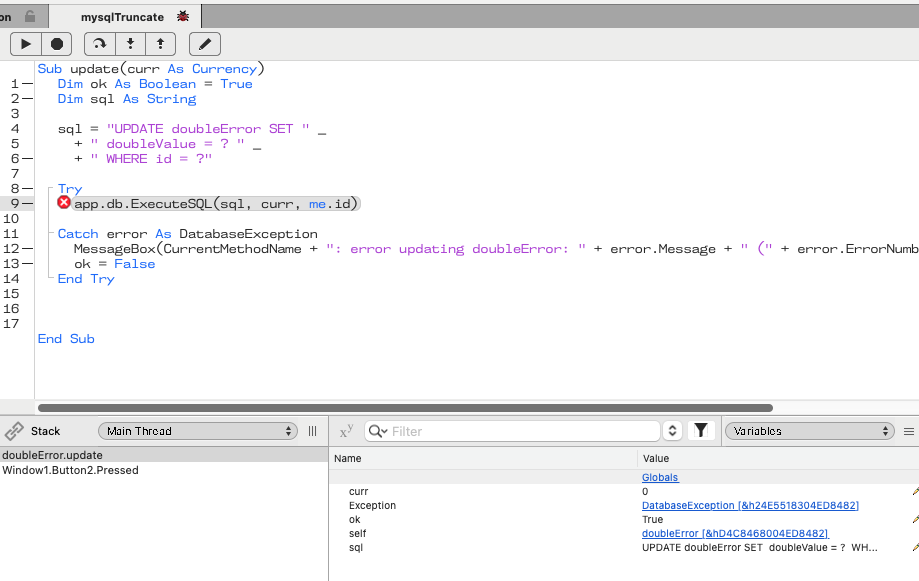
What’s working with 2023r2 is not working anymore with 2025r3.1. Same computer, same app, same DB, diff. Xojo version. See below. The currency value is 987.65 (period as decimal).
After changing .ToDouble() to .Val() and letting it run without debugging steps, seems working satisfactorily as designed without a DatabaseException in the update(currency)
During the UPDATE operation, you pass a currency value to a double column, which could cause the truncation. (*Because the Xojo currency type has a fixed range: -922337203685477.5808 - +922337203685477.5807 with 4 decimal places.)
Try to replace all currency values with double values and use the currenty type only for monetary calculations.
Currency can contain values from -922337203685477.5808 to 922337203685477.5807. It uses 8 bytes.
Currency is a 64-bit fixed-point decimal. This means that Currency does not have some of the rounding issues that are inherent in floating-point numbers stored in Double.
Use Currency instead of Double when storing monetary values. Since Double is a standard double-precision floating-point number, it is unable to store some specific decimal values. The Currency type avoids these issues, which can be particularly important with rounding and when dealing with money.
Perhaps it’s worth a try? It could be that the issue isn’t a bug in the current Xojo version, but rather a bug that was fixed in the current version. In other words, it might have only worked before because there was a bug in Xojo.
I’m using MySQL v8.0.32 on an Intel Mac running Sequoia 15.7.2
That’s weird, as Xojo states
For any user-visible numbers, you should use ToDouble instead.
and
For localized number formatting, use the ToDouble function instead. Generally, you will use Val for converting internal data and use ToDouble for converting data for input and output of user data.
It is important to note that Val does not take separator characters into consideration. For example:
During my time at a bank, we processed values before and after the decimal separator independently in our software. This allowed us to avoid rounding and conversion errors.
Anyway, I’m out of ideas here, and I hope for your sake that it’s a bug in Xojo that can be fixed in a future release.
It’s not a bug in ToDouble(), your text contains numbers with periods, and I’m using a computer with a locale where “1,23”.ToDouble() is ok, but “1.23” is not.
ToDouble() works as expected, it is your processing logic that is not internationalized, just it. I just changed the code to run it ok here for tests.
Sadly I can’t extend the tests for your precise use case, MacOS Intel (bad deprecation feelings here) + MySQL 8.x
That advice is certainly correct as one usually wants to use a function taking different locales into account. But then you said that you don’t so Val might actually be the function of choice here.
Thanks to all of you, but I want to clarify something as many are questioning the .ToDouble in the sample app. This app was made only to demonstrate the issue on the MySQL update.
Please ignore the ToDouble and focus on the update with a currency value.
If you change the doubleError.update method, ignoring the parameter and just do the following:
Dim currValue As currency = 123.45

sql = "UPDATE doubleError SET " _
+ " doubleValue = ? " _
+ " WHERE id = ?"

app.db.ExecuteSQL(sql, currValue, me.id) ‘ this is CRASHING in 2025r3.1 not in 2023r2
It’s crashing (in 2025r3.1) even if you set currValue to 0.
If you use a double value, like this, it’s fine.
Dim dblValue As Double = 123.45

sql = "UPDATE doubleError SET " _
+ " doubleValue = ? " _
+ " WHERE id = ?"

app.db.ExecuteSQL(sql, dblValue, me.id) ‘ this is NOT crashing
I’m well aware of the localisation issues when dealing with numbers and monetary values. The problem is not there.
The problem is that when using a Currency variable in the prepared statement to update a column of Double data type it’s crashing.
This behaviour has changed somewhere between 2023r2 and 2025r3.1