Bought a 2025 M4 MBAir as the M5 isnt going to make a diff for me.
Tried using Migration Assistant , which ran for 8 hours then gave up, having changed the Macos version on the target to 15.7.5, and the source as 15.7.4, after which it announced that the version were too different and it wasnt going to play.
Used a Time machine backup instead.
After which My Xojo installs all report ‘Xojo is damaged.. send to bin’
My project files now have a last modified date of 1970 and cannot be sorted by date in Finder
My Xojo 2023r2 file, released august 9 2023, won’t accept my 2023 licence any more, demanding a 2025 one.
This all looks very weird to me, and obviously I cannot shift to the new machine until it is all resolved.
Anyone had similar issues? Did I do something wrong?
I’d do a format and reinstall on the new machine, eliminate every trace of your botched migration. Get both machines on the same version of the OS before even starting Migration Assistant. Use Thunderbolt Target Disk Mode if your machines support it, it will go much much faster than any other method.
And then pray to whatever gods you believe in. Migration Assistant used to be a crown jewel of macOS; my recent experience with it has been less than stellar.
Yes, and no. Welcome to the club of macOS users who know how bad Migration Assistant is. It will screw up permissions and fail to transfer things correctly. Unfortunately most people don’t find out until after that they should not use it.
Because Apple Computers (Macintosh) were always tied to the macOS version they were released with as the minimum.
In the past, some people provided patch to allow running some older macOS version, but that was in the past;
There is even a keyboard shortcut who allows the user to download the macOS version that computer was shipped with AUTOMATICALLY.
Unfortunately, so today called journalists / ar not like were the one 40 years ago. They give the minimum information and go to the next one. As an example, in Tahoe, the number of selected items | items in that folder and size of the folder is now at the window bottom (it was just below the title bar.
Worst, but different subject:sometimes prices are not disclosed, but you can watch a fantastic product presentation.
To know the prices, you have to click in the buy button. I asked Gemini minutes ago about the current price of the MacBook Pro 14" M5 (standard)… and discover differences in the entry level since [ANN] from last Wednesday (base SSD is now 1TB instead of 512GB)…
NB: I understand you, but… what about installing back the current Tahoe and a Virtual machive with the macOS version you want ?
Emile with a MBPro 13" M1 / 8GB / 512GB (5 years old).
Did you scroll further down ? You will see other options for an upgrade, older versions that the current one. I discovered by chance, I scrolled down by error !
I’ve always had the recommendation to make sure the time, date and region is the same on both machines. Ideally the same OS version if possible.
Wait for Migration Assistant to count up the sizes on every category before choosing what to migrate. Even though you can click on before that.
Obviously, use the fastest connection method available on both machines. FireWire used to be king, obviously these days thunderbolt with high speed cables is the winner.
As others have said, boot into Target disk mode on the source and mount it on the target before starting MA.
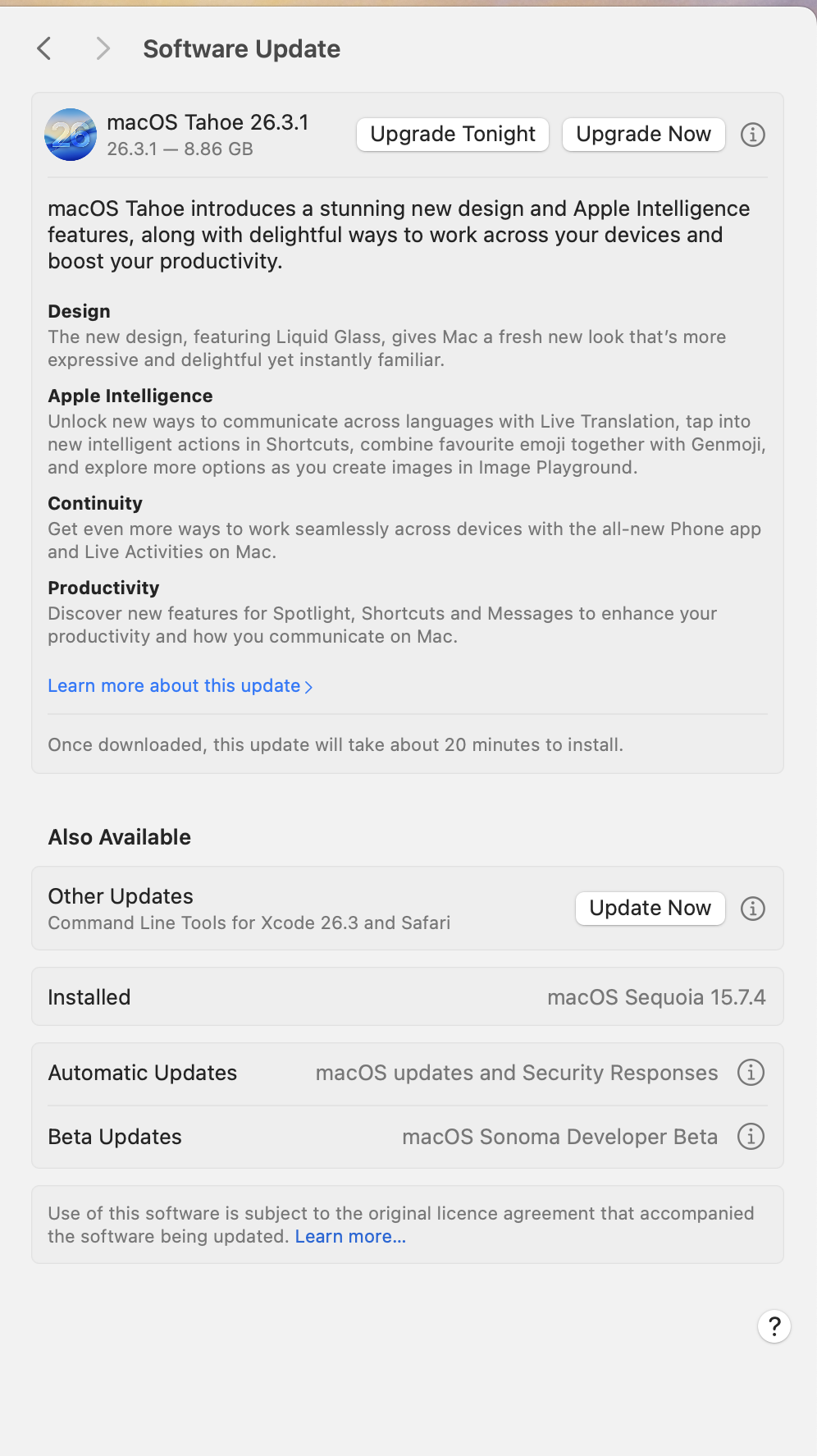
Be sure to click the circled (i) button below on the “Also available: Other updates” to check the 15.7x version, and uncheck the 26.x version, which is selected by default even in the “Other updates” section.
For me, the crazy thing is that target machine refused to migrate until I allowed it to update the OS to match the source machine, which was 15.7.4 Obviously both machines are in the same region - my living room.
It installed the wrong version and died.
FWIW, my dates have returned (Finder issue?)
Xcode has updated, and I can build for iOS. Pretty much everything is running bar Xojo 2023, which I’ll tackle tomorrow.
I should have used Carbon Copy Cloner, which I now recall I bought for exactly this purpose a while back. Hey ho.
my mac Mini M4 Pro was updated this way to 15.7.4, and thought I documented that with a screen capture, I could not find it. My memory recalls that, unfortunately I don’t a memory capture software .
The same was true with my iPhone and iPad. When iOS and iPadOS wre released, I decidec to wait till .2 ans was able to upgrade when I wanted to. Back in those day can easily wait to upgrade and insead apply a patch to the current OS.
But lately things avec changed. On my iPhone, the version is 26.3, if I go to Software update I see that 26.3.1 is available and there aer two buttons:
Update, means update right away
Update tonight
If I just go out, the iPhone will be updated anyway, even if Automatic updates and Automatic download are off. Its is the same with macOS : my MacBook Pro OS is currently 26.2, 26.3.1 is available with same choices. I turned of Automatc updates an Downlad, locked the screen and closed the lid. I am almost sure that sometimes between now and tomorrow morning it will be updated. The macMini is alsways on, being a server, and never sleep, andt it will be updated between now and tomorrow morning.
Looks like Aple changed the way updates/upgrades are applied : they do this silently, there is no more an visual buble - I don’t know the name - besides the icone that let you know an OS update is avaliable. And the update is installed.
I would love to know why it now done this way, does Apple fear an attack on their OSes ?
 .
.