// Variables defined here...
Var rsData As RowSet = dbJobLogSp.SelectSQL( "SELECT * FROM tblTankLocations WHERE address=? ORDER BY status ASC, manufacture ASC", "18535 5th Ave" )
Var sStatus As String = rsData.Column( "status" ).StringValue

// Where the magic happens... or breaks...
lstBxTanks.RemoveAllRows
Try
  If( rsData <> Nil ) Then // So long as there is a record return it then close the rowset...
    For Each row As DatabaseRow In rsData
      If( sStatus = "Decommisioned" )Then
        // Do not a thing...
      Else
        lstBxTanks.AddRow( rsData.Column( "rNum" ).StringValue )
        lstBxTanks.CellTextAt( lstBxTanks.LastAddedRowIndex, 1 ) = rsData.Column( "serNum" ).StringValue
        lstBxTanks.CellTextAt( lstBxTanks.LastAddedRowIndex, 2 ) = rsData.Column( "manufacture" ).StringValue
        lstBxTanks.CellTextAt( lstBxTanks.LastAddedRowIndex, 3 ) = rsData.Column( "size" ).StringValue
        lstBxTanks.CellTextAt( lstBxTanks.LastAddedRowIndex, 4 ) = rsData.Column( "tankDate" ).StringValue
        lstBxTanks.CellTextAt( lstBxTanks.LastAddedRowIndex, 5 ) = rsData.Column( "status" ).StringValue
      End If
      sStatus = rsData.Column( "status" ).StringValue
    Next
  Else
    MessageBox( "What no records?!" )
  End If
  rsData.Close
Catch error As DatabaseException
  MessageBox( "Error: " + error.Message )
End Try
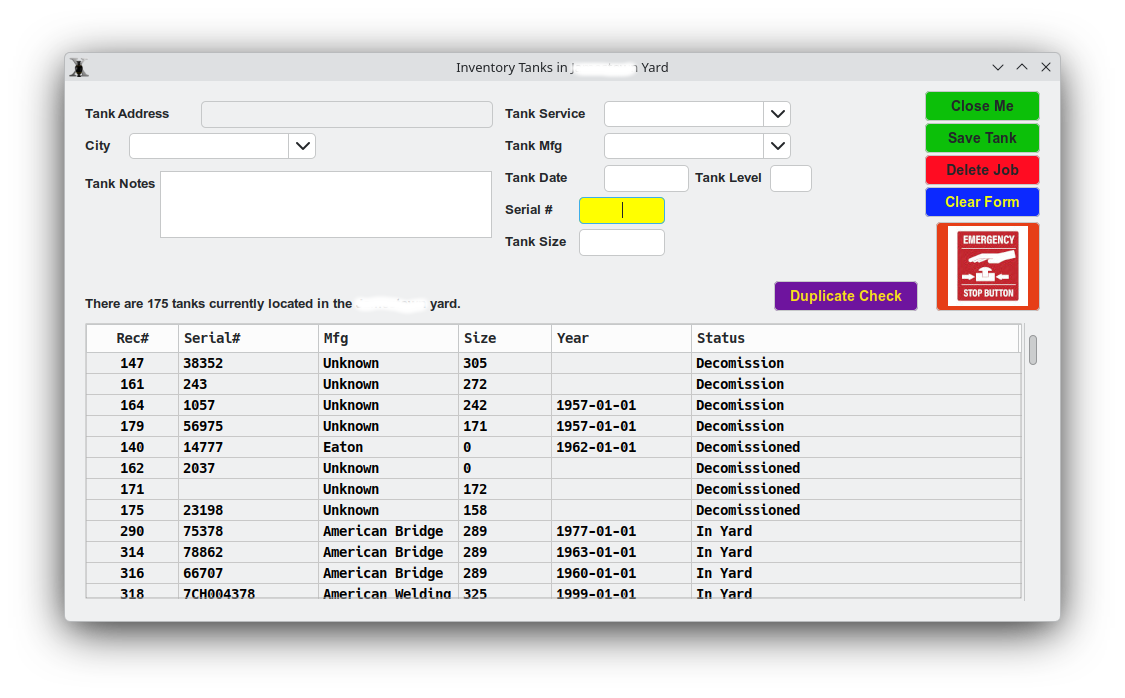
I don’t know why the record still loads when I explicitly tell it not to. This is driving me bonkers trying to sort this out! Linux Kubuntu 26.04 LTS using Sqlite as the DB.
You’re setting sStatus before the loop, and then again at the end of the loop. So you might be testing the previous record instead of the current one. Best practice is to set sStatus at the top of the for loop (especially since “for each” does not guarantee order).
Also “Decommissioned” may be spelled wrong in your code (it usually has two s’s). Depends how it’s entered in your database, obviously.
Oh, I will look into that in a bit. Right now I am attempting to create a formatted document for reporting purposes… this is a new pain I am now inflicting upon myself.
// Variables defined here...
Var rsData As RowSet = dbJobLogSp.SelectSQL( "SELECT * FROM tblTankLocations WHERE address=? ORDER BY status ASC, manufacture ASC", "18535 5th Ave" )
// Where the magic happens... or breaks...
lstBxTanks.RemoveAllRows
Try
If( rsData <> Nil ) Then // So long as there is a record return it then close the rowset...
For Each row As DatabaseRow In rsData
If( rsData.Column( "status" ).StringValue <> "Decommisioned" )Then
        lstBxTanks.AddRow( rsData.Column( "rNum" ).StringValue )
        lstBxTanks.CellTextAt( lstBxTanks.LastAddedRowIndex, 1 ) = rsData.Column( "serNum" ).StringValue
lstBxTanks.CellTextAt( lstBxTanks.LastAddedRowIndex, 2 ) = rsData.Column( "manufacture" ).StringValue
lstBxTanks.CellTextAt( lstBxTanks.LastAddedRowIndex, 3 ) = rsData.Column( "size" ).StringValue
lstBxTanks.CellTextAt( lstBxTanks.LastAddedRowIndex, 4 ) = rsData.Column( "tankDate" ).StringValue
lstBxTanks.CellTextAt( lstBxTanks.LastAddedRowIndex, 5 ) = rsData.Column( "status" ).StringValue
Else
// Skip it..
End If
Next
Else
MessageBox( "What? No records?!" )
End If
rsData.Close
Catch error As DatabaseException
MessageBox( "Error: " + error.Message )
End Try
Okay so I changed how I look for the condition and I still get unwanted records in the listbox…
SQL is your friend here… lose the unwanted records before you even do the loop.
Try something like
Var rsData As RowSet = dbJobLogSp.SelectSQL( "SELECT * FROM tblTankLocations WHERE address=? and status NOT LIKE ‘Decom%‘ ORDER BY status ASC, manufacture ASC", "18535 5th Ave" )