If you’ve ever used a diff tool to review Xojo code before checking it into your preferred version control system, you probably understand the frustration of working with a tool that does not recognize Xojo’s syntax.
That changes with Kaleidoscope 7.
Xojo code is now properly syntax highlighted, making diffs easier to read and changes easier to review.
This work has been underway for quite some time and would not have been possible without help from several people along the way. Many thanks to @GarryPettet for creating the original Highlight.js Xojo language parser, and kudos to the Leitmotif team for being so willing to bring Xojo support into Kaleidoscope.
Florian from the Leitmotif team here. Thanks @Patrick_Salo for the shout-out!
For those interested in Kaleidoscope, we are participating in the Indie App Summer Sale this week, where you can get all of our apps at a great discount, including our issue tracker Taska and our backup tool Parachute Backup. For Kaleidoscope, we are offering 40% off for two consecutive years, the best deal we’ve ever offered. Search for Leitmotif at https://indieappsales.com
Some of you might have noticed that if your Xojo project is fairly large or if you have a fairly complex window or container, that Kaleidoscope wouldn’t colorize the file when doing a diff. You could manually colorize it though via the Syntax Coloring button in the bottom toolbar (first icon on the left).
Most files received the Xojo syntax coloring just fine though. In talking to Florian, Kaleidoscope had a file size threshold where anything above a certain size wouldn’t be automatically colorized. I asked him to give us Xojo folks a way to ensure automatic colorizing could take place in spite of maybe some additional time to load the file.
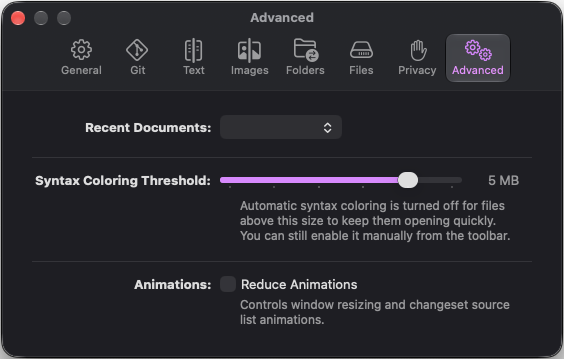
He took this under consideration and this feature is now available with the recently released Kaleidoscope 7.0.2:
New Syntax Coloring Threshold setting. Automatic syntax coloring is turned off for large files so they keep opening quickly — you can now pick that limit yourself, from 250 KB up to 5 MB, or None to never turn it off. The setting lives in the Advanced pane, which appears when you hold ⌥ while opening Settings.
Many thanks to @Florian_Albrecht and the rest of the Kaleidoscope team in making this happen.