I’m using CURLSMBS to get data back from a REST API.
Var j As New JSONItem(curl.OutputData.DefineEncoding(encodings.UTF8))
That line is hitting a JSONException: “lexical error: invalid bytes in UTF8 string.”
The Content-Type that the server is reporting is “text/html; charset=UTF-8” so it should be safe to assume that the JSON I’m getting back is in UTF-8, right?
Here is the JSON being sent from the API:
{"success":true,"message":"OK","found":[{"track_id":"5IVuqXILoxVWvWEPm82Jxr","Title":"Crazy In Love","Artists":["[\"Beyonc�\", \"JAY-Z\"]"]}],"not_found":[]}
Clearly it’s tripping up over the accented “e” in Beyoncé and I’m not sure what to do to check for, or prevent it. I’m not even sure what character encoding that is, because I’ve put it into some online tools and I can’t get it back to the accented e to look like Beyoncé.
Without defining the encoding I get the same issue.
I used CURLSMBS because other endpoints involve file uploads and it was just easier to implement consistently using the same file transfer class across all endpoints. Unfortunately it’s a private API and I’ve got my own keys. I have verified the same output in curl from the command line, though.
It sounds like you are attempting to define a string as UTF-8 that isn’t really UTF-8. This is like trying to change some file into a PDF just by changing or adding the “.pdf” extension. DefineEncoding is meant to tell the system what the bytes represent, it doesn’t actually convert anything, so if the underlying bytes don’t actually represent what you say, you will see errors like that.
I’m guessing the original string has a nil encoding, so you have to figure out what it really is, define it as that, then ConvertEncoding to UTF-8.
For more information, this is my Xojo conference presentation on the subject in 2019. I’m not saying it’s the best such presentation ever, but I’m not not saying that either.
I don’t necessarily need the string to display correctly, I just need it to not break the JSON parser and prevent the string from being ingested as a JSONItem.
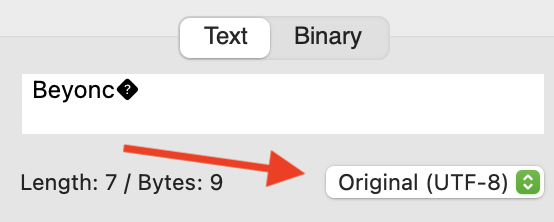
“é” in UTF-8 is always more than one byte. If you are only seeing a single byte at the end of the string, then the original data was not properly encoded as UTF-8.
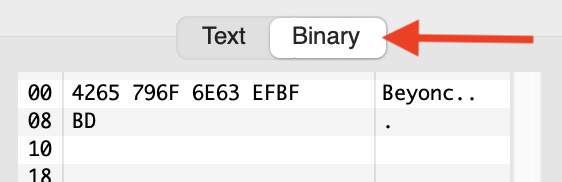
EFBFBD is the unicode replacement character indicating an unrepresentable character - at this point it’s already been substituted for whatever was originally there, so too late to figure out the encoding.
Good point! But unless the OP tells us what they see in debug mode, it’s not clear where the EFBFBD is coming from (it could be something different on their computer but gets converted when they paste into the forum software, for example).
Thanks for the replies. The maintainer of the API corrected it - it was not sending UTF-8 despite claiming it was in the header. The header was also saying it was text/html when it was actually application/json.
I suspected it could be a character encoding issue from their database queries and they confirmed that.
I still don’t like that the xojo JSON parser can’t handle it without an exception though. It’s one thing if it’s a malformed structure due to bad JSON control characters but there’s gotta be a better way to handle it than throwing an exception due to an unknown character inside a string within a valid JSON block. I guess technically extended characters are supposed to be escaped, but they often are not.
In any case, the issue is resolved. Appreciate everyone’s input and it’s a good reminder to sanitize strings that you don’t control.
First of all, the JSON spec clearly states that the encoding has to be UTF8, coming in or going out.
Secondly, this is exactly what an exception is for. It’s for handling “exceptional” circumstances that the library said it couldn’t handle. Otherwise you could send it anything and the JSON library does what? Just converts? If you want that, I suggest subclassing JSONItem for yourself and overriding the constructor to do that for you.