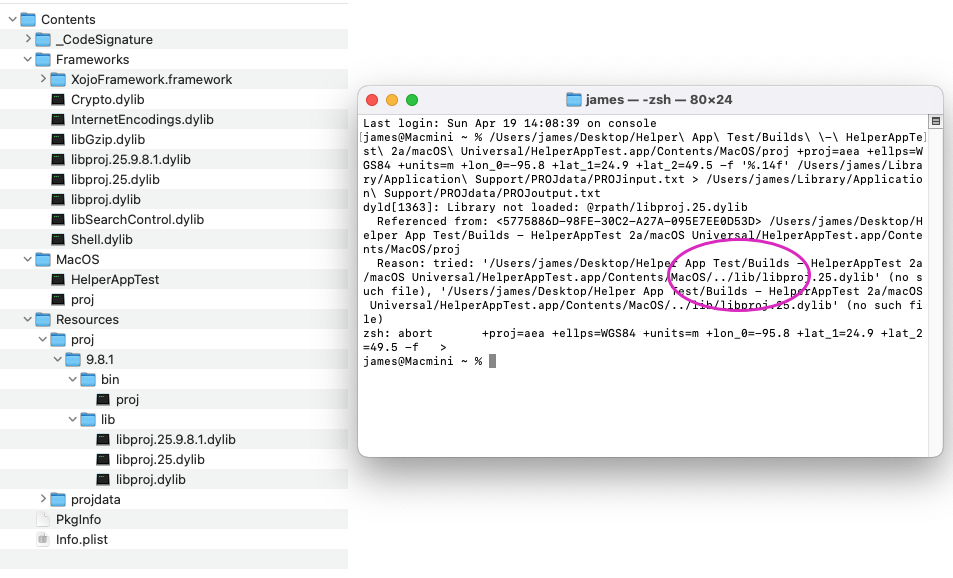
I am hoping that there is a well-established way to incorporate a C++ executable into a Xojo desktop app that signs for the App Store. It seems like it boils down to the executable expecting its dylibs in a folder called ‘lib’ where the compiled OS X app puts them in ’Frameworks.’ If so, does a simple edit to the C source and a recompile solve the problem? (I am not unix/C literate so I will have to find someone to advise. Right now I just want to know what I am up against. The program I need is current, well-maintained and has a cmake file at proj.org.)
How have folks handled this situation in the past?
Thank you Greg for the suggestion of install_name_tool. It seems like the right tool for the job. Now I need to find a unix guru to help me with the syntax.
Thank you again. I am stumbling all the way back at the newbie level. the entire path that fails is, for me:
/Users/james/Desktop/Helper App Test/Builds - HelperAppTest 2a/macOS Universal/HelperAppTest.app/Contents/MacOS/../lib/libproj.25.dylib’ (no such file)
I assume that, for , I need to give otool just the tail end of this, maybe “MacOS/../lib/libproj.25.dylib” or “Contents/MacOS/../lib/libproj.25.dylib” perhaps with a tilde? …and the same for , with “Frameworks” in for “lib”.
I gave up programming back in the 60s before c and unix became a thing, then when “RealBasic” came along in the 90s, decided to get back into it. regular contributors to the Xojo forum are almost all bilingual in C and XOJO. But not me.
You should put the binary into the helpers folder inside the bundle and the new rpath needs to be the relative path to the Frameworks folder from your binary.