How can I retrieve the data highlighted in red when I select a row in the table?
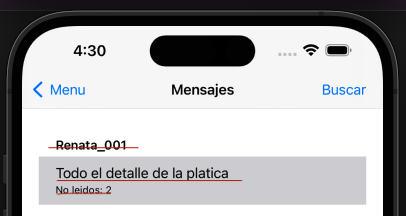
you fill the table, so on selection you know the section and row the user has selected and can get the real value (think a table not as repository of information, but only as viewer)
1 Like
Are you telling me there’s no way to recover those values I entered into the table?
Absolutely no. You can get the value, but you have to get it as you enter it and the best way to do so is using a delegate function that you assign to the cell (with the right signature you need and corresponding cell property) when you create/update (ie: in your rowData method)
Remember that cells are reused so your rowData method is called whenever iOS need to do so.
iosTable is not like a listbox (1000 rows → 1000 cells) but is intrinsically more efficient (1000 rows → 20* cells) where 20* cells is something the iOS elaborated on its own needs.
As I said before Tables are viewers, but since you interact and create their cells you have enough info to create ephemeral connections (IE: delegate not static connections)
1 Like
You definitely can! Use RowCellData and pass in the row number you want to access.
For example:
System.DebugLog(Table1.RowCellData(0).Text)
or
System.DebugLog(Table1.RowCellData(0).DetailText)
On the Table, you can create a SelectionChanged event, which gives you the selected section and row. Inside that event, you can then do:
System.DebugLog(Table1.RowCellData(section, row).Text)
1 Like
Antonio and Gavin.
Thank you so much for your replies.
Indeed, the method RowCellData(section As Integer, row As Integer) As MobileTableCellData was in the user manual. But no matter how many times I read it, I didn’t understand it.
Thanks again. Have a good weekend.