I have three Unix apps ( ffmpeg , povray, proj ) that I need to call from within my compiled app. If I use a build step to get them into Contents, then (if I do no signing) I can go into the compiled app and drag the executables into MaCOS and that works.
Most of the forum discussion of this problem is old so I do not know if any of it still applies. Is it possible to have a Notarized app that includes helper apps? If so, is it a build script I need?
I have a current copy of App Wrapper 4 if it is applicable.
Of course, you can use helper apps. But these go into Library/Helpers or Library/Loginitems and not the Contents folder. Yes, you can use a build script and AppWrapper will notarize just fine.
thank you Beatrix for the quick response. earlier there seemed a disagreement between /library/helpers, which has to be created, and MacOS which is already there. if I can figure out how to write the needed build script, I will try them and see how far I get. James
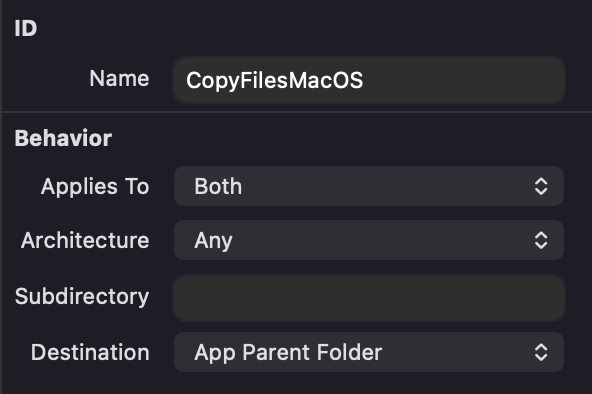
You can definitely bundle helper apps into your app with a CopyFiles build step. App Parent Folder is the destination that you would use to get them into the MacOS folder.
Thank you Jared. This gets the helpers nicely into MacOS. It works cleanly without sandboxing but now I have to deal with the fact that the sandbox is apparently not allowing a helper to access its dylib that I have put in Frameworks.
I think you’ll either need to compile the helper apps with a custom configuration in order to point to a different relative path for the frameworks or just keep them in their original structure instead of moving the frameworks to the Xojo frameworks folder.
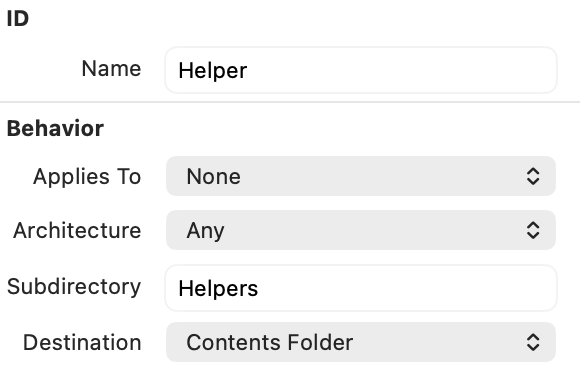
Then your files go into the Helpers folder, which is the correct folder for helper apps. That said, I’m not sure ffmpeg is considered as a helper in that context; is that not rather a shell application?
You may first try as a helper and see whether signing is accepted.
This is all a bit over my pay grade. I originally used a “Otool” unix command to adjust the native dylib call within the “proj” Unix executable. That allowed me to put the dylib in Frameworks. It works in the IDE and works compiled without sandboxing. Once sandboxed, PROJ gives the error “Reason: tried: ‘/opt/homebrew/opt/libtiff/lib/libtiff.6.dylib’ (file system sandbox blocked open())”.
I will query apple on this one. It should work the same way in a sand box as it does without.
I am also unaware of the “Helper” folder option. If I put the executable in “Helper”, do I still put the dylib in “Frameworks?
The problem is that your ffmpeg is a dynamic build and depends on things you compiled with homebrew (*)
That would also mean your app will not work on other systems if they lack those homebrew libs. So basically it will only work on your system.
The only solution is to compile a decent ffmpeg static (which is not easy to do on macOS when you do not have the expirience).
(*) FFmpeg Homebrew or Macports are to be avoided. As said, they are dynamically build (cannot be shared) and mostly not optimised (read: slow). I compile static FFmpeg builds myself for many years and with each iteration (like the latest 9.0) you always needs to make adjustments in the compile scripts and make sure you update cmake etc… it is real PITA
wow. it sounds like ffmpeg is out of reach, so I will take that functionality out of my app. povray probably goes, too, since it has needed ffmpeg to stitch the frames together.
I do, however, need to get PROJ (a gis app) running solidly. it is a single unix executable with a single dylib. it is the one I used otool on. the dylib is right there in frameworks.
I will look at my options for recompiling PROJ. Fortunately, it is a well-maintained open source app. thank you for the insights.
Send me a PB and I gladly compile a custom static FFmpeg for you.
FWW With AVFoundationMBS you can also merge/concat images/movies using the default macOS APIs. If you use AVFoundation, it is also license free (which is not the case with FFmpeg for many codecs).