I have a web application, supported by a PostgreSQL database (master data, transactional data, etc.) and a local SQLite database (customizable parameters). It is developed on a Windows workstation, but the productive app is on a Debian Linux server. Works great.
Now, I have a need to import data from Excel spreadsheets from time to time. The spreadsheets are generated by another application (I don’t manage that second application, nor is there an APÎ that I could use to connect to it. Having an administrator export Excel spreadsheets from the second application is the only “interface” that I can use). Each spreadsheet will be named differently, but the format will not vary.
I thought that I could use the ODBC plugin to handle the import task, treating the Excel file as a database. This is the first time I try to use the ODBC plugin. I expected an approach similar to connecting to an SQLite database, but it seems that I need to create a DSN, and then connect to that DSN. And the documentation is a bit vague with regards to using the ODBC plugin and such, on Linux. Considering that every file will be different, which I suppose means a new DSN each time, I wonder whether there is a more convenient method that I could use.
As I said, my plan is to upload the excel files to a dedicated folder on the Linux server (that part already works fine), and then somehow open the uploaded file. Worth noting, I would prefer to treat the imported sheet as a database table. I need to count and/or group multiple records (lines) into various aggregates. SQL is ideal for this sort of task. If a better approach can be used, I am open to it. If a third party plugin must be considered for the task, I am also open to it provided that it gives me a convenient way for handling my little task.I want to be able to give that to users, not keep doing the imports myself. I have considered converting the Excel file to CSV and then converting the CSV to SQLite (or importing it to PostgreSQL), but that task sounds a bit technical for my users.
I would welcome any suggestion on how to best handle the Excel import step.
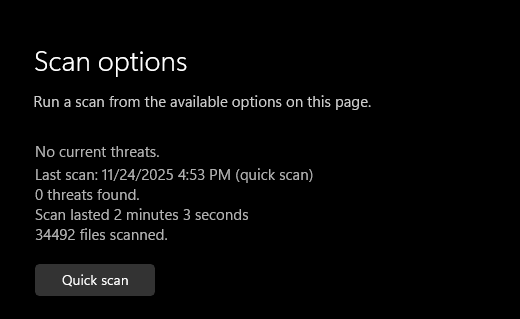
hum… the Excel reader plugin requires typelib and e-crypt plugins as well. Microsoft Defender reports finding a virus in the e-crypt plugin. That will make the evaluation and testing a bit more complicated.
I am quite certain that this is a false positive, but Win 11 25H2 does not like this package. Maybe it is time that I complete my Linux migration and dump the Windows workstation for a Linux workstation once and for all.
Interesting. I never realised that. Indeed, the “sheets” folder has all the data neatly described in a relatively simple XML format for each of the sheets (I only need the first sheet, but still this is nice). Certainly easier than the Google Directions response that I handled elsewhere. This is another excellent suggestion. Thank you!
Nah 140 is not security hole yet. And defender would not report linkage to old libraries. Its I guess just hash that matches something they have.
I never understood why the virus tool makers dont have like 100 hashes, it would not even slow it since you dont need to check next one until you have a match anyhow.
I would say download plugin again…….and from my page and not from somewhere else.
I scanned with defender both plugin as is and plugin blown up into DLL’s. And defender finds nothing at all. So unless you have some other virus protection pluged into your defender to take it over then………
I manually requested an update of Microsoft Defender Antivirus definitions through Windows Update. It appears to have solved the issue. I was able to download the (demo) plugin and Defender did not complain this time. The last update prior to that was yesterday afternoon. There was possibly something wrong with it.
// sarcasm warning // What? Microsoft borking an update? Nah! // end sarcasm warning //
The solution using the Einhughur plugins is easy and works very well.
I also tried the no-plugin approach suggested by @Jean-Yves_Pochez . It is a bit more work, but it works fine for my needs. Both prototypes allow me to import the data from the test file. While the no-plugin solution is more work (more code to extract the data, and some housekeeping code to manage and clean-up the unzipped folders and files), I decided to go with this solution. Should issues be discovered some time in the future with this solution, the Einhughur plugins solution is right there with my working prototype as a backup solution.
I extend a warm thank you to everyone who helped me get through this learning process.
As a side note, this was the tipping point. I will be migrating my email database and my data drive to a Linux workstation. The Windows workstation will remain just a test bench and an alternate solution. 25H2 has proved quite unstable compared to 24H2, not mentioning other smaller issues such as the false positive on the Einhughur plugin for a day or so. I also dislike the direction that MS is taking, with the “agentic OS”. More half baked features, more privacy intrusions. I started with Microsoft OSes with DOS 3.1 on a NEC V20 processor running at the astounding speed of 8 MHz. Not exactly yesterday. It took some time, but MS managed to chase this long time customer away. At some point, my VM’s were on Windows Hyper-V Server (MS killed that version of Windows Server). They have been running on Proxmox VE for a couple of years already. Desktop computing is going Linux now also. I do have a few special cases that will remain on Windows for the foreseeable future, running as VM’s on Proxmox VE, but for the most part, Windows will now be in the past.
as a side note, creating excel xlsx files is more tricky ! you need to zip them in a special way (I did this long ago and don’t remember all the details but it was not a simple zip of the folder)
Thankfully, I only need to read them. But this is good to know. Perhaps the ExcelWriter solution from Einhughur will be more attractive if I ever need to create Excel files.