Why can’t I intercept keys like “Command” or “Control” in a textarea using the KeyDown or KeyUp events? Other keys, such as a–z, work fine.
This code doesn’t work:
Function KeyDown(key As String) As Boolean Handles KeyDown #If TargetMacOS Then // Prüfen, ob Cmd + V gedrückt wurde If Keyboard.CommandKey And (key = “v” Or key = “V”) Then // Deine eigene Logik hier einfügen… Return True // True verhindert das Standard-Einfügen durch das System End If #Else // Prüfen, ob Strg + V gedrückt wurde If Keyboard.ControlKey And (key = “v” Or key = “V”) Then // Deine eigene Logik hier einfügen… Return True // True verhindert das Standard-Einfügen durch das System End If #EndIf // Standardverhalten für alle anderen Tasten beibehalten Return False End Function
The framework doesn’t report modifier keys as keypresses the same way.
You need to poll periodically using a timer, check for Keyboard.AsyncCommandKey or Keyboard.AsyncControlKey to be true.
If you’re trying to add keyboard shortcuts to your textarea (for example Cmd+B to change to bold text), you can use the KeyDown or KeyUp events to check for the “B” key, then also test Keyboard.AsyncCommandKey and if it’s true, you’ve got a Cmd+B that was pressed.
Function KeyDown(key As String) As Boolean Handles KeyDown
#If TargetMacOS Then
// Prüfen, ob Cmd + V gedrückt wurde
If Keyboard.CommandKey And (key = "v" Or key = "V") Then
// Deine eigene Logik hier einfügen…
Return True
// True verhindert das Standard-Einfügen durch das System
End If
#Else
// Prüfen, ob Strg + V gedrückt wurde
If Keyboard.ControlKey And (key = "v" Or key = “V”) Then
// Deine eigene Logik hier einfügen…
Return True
// True verhindert das Standard-Einfügen durch das System
End If
#EndIf
// Standardverhalten für alle anderen Tasten beibehalten
Return False
End FunctionaPreformatted text
This is better for reading.
Now the question:
How do you know this code works or not ? 
The command was intercepted by the OS.
And you can see that by yourself if you place text in the Clipboard.
AI suggestion #1 does not works too, but this line is… nice:
If Keyboard.AsyncCommandKey And key.Lowercase = "v" Then
Only one test for both V and v
“These said”, what do you want to do with Cmd-v ?
WHY DON’T YOU ADD A NEW MENUHANDLER with Cmd-Shift-V or | and Alt-Shift-V ?
And that’s exactly what isn’t working—is this a Xojo bug?
One reason it might not be working is that Command V is the menu shortcut for Paste and the menu is handling the keystroke before the text area sees it.
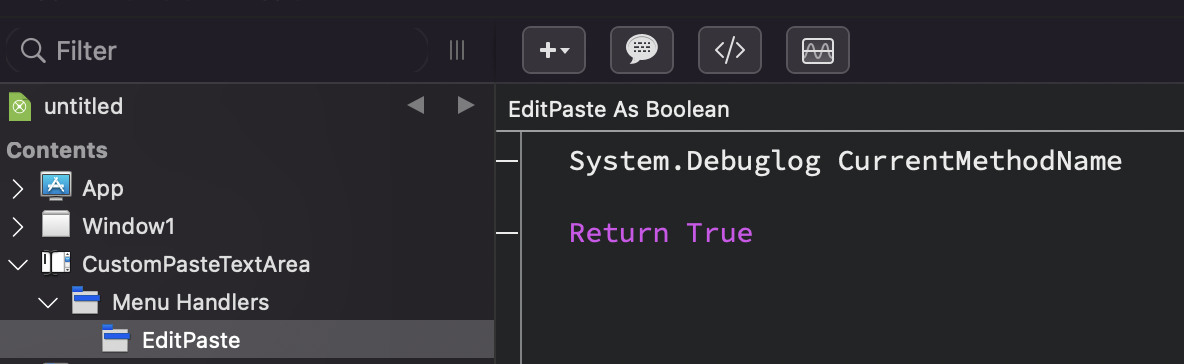
If you just want to intercept the default paste functionality, you can subclass the TextArea and then add a menu handler for EditPaste.
From there, you can do whatever you want and then return True to stop the default paste functionality from happening or return False to allow the paste.