Trying out libraries, I noticed that when I build the library the compiled item in the Finder build folder has the wrong icon (seems to have picked up a Nisus Writer icon). The library works OK in a test application, but I’m curious as to why the icon is incorrect.
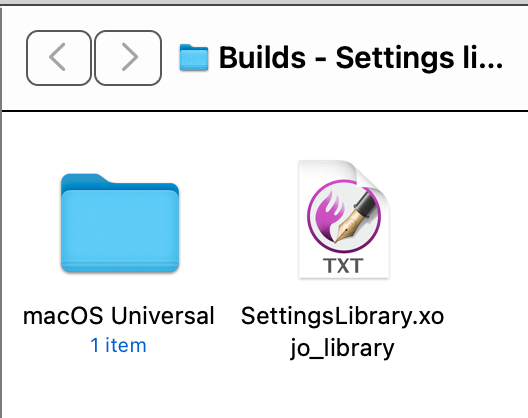
Rebuild your Desktop Database? 
If you get a sec, open Terminal type mdls , drag the library onto the terminal window and then press return. I’d be curious to see the output.
Hi Greg,
This is the response I get.
_kMDItemDisplayNameWithExtensions  = "SettingsLibrary.xojo_library"

kMDItemContentCreationDate         = 2025-12-16 13:33:59 +0000

kMDItemContentCreationDate_Ranking = 2025-12-16 00:00:00 +0000

kMDItemContentModificationDate     = 2025-12-16 13:33:59 +0000

kMDItemContentType                 = "com.xojo.library"

kMDItemContentTypeTree             = (

    "com.xojo.library",

    "public.content",

    "public.data",

    "public.item"

)

kMDItemDateAdded                   = 2025-12-16 13:33:59 +0000

kMDItemDisplayName                 = "SettingsLibrary.xojo_library"

kMDItemDocumentIdentifier          = 0

kMDItemFSContentChangeDate         = 2025-12-16 13:33:59 +0000

kMDItemFSCreationDate              = 2025-12-16 13:33:59 +0000

kMDItemFSCreatorCode               = ""

kMDItemFSFinderFlags               = 0

kMDItemFSHasCustomIcon             = (null)

kMDItemFSInvisible                 = 0

kMDItemFSIsExtensionHidden         = 0

kMDItemFSIsStationery              = (null)

kMDItemFSLabel                     = 0

kMDItemFSName                      = "SettingsLibrary.xojo_library"

kMDItemFSNodeCount                 = (null)

kMDItemFSOwnerGroupID              = 20

kMDItemFSOwnerUserID               = 501

kMDItemFSSize                      = 6850

kMDItemFSTypeCode                  = ""

kMDItemInterestingDate_Ranking     = 2025-12-16 00:00:00 +0000

kMDItemKind                        = "Xojo library"

kMDItemLogicalSize                 = 6850

kMDItemPhysicalSize                = 8192
Thanks Sascha. The problem is not changing the icon, it is understanding why the Xojo build operation produced the wrong icon.
Ian.
–
Your file isn’t faulty. It’s Nisus Writer which may have registered for public.data Files.
You could “force” Finder to use the correct association by selecting the File, pressing CMD+I and then choose the “Open with…” option. Then select Xojo and then activate “Change all…” or so (i use a german macOS…).
Or you move the Xojo App for 2-3 minutes ot of the Applications Folder (f.e. onto the Desktop) and then back into the Applications folder. This would force macOS to update the info.plist file.
Or you do a
/System/Library/Frameworks/CoreServices.framework/Versions/A/Frameworks/LaunchServices.framework/Versions/A/Support/lsregister -kill -r -domain local -domain system -domain user
followed by a
killall Finder
in the Terminal, to rebuild the Launch Services Database.