Best example I have is GitHub’s window that allows you to click a button and it opens the folder where the GitHub project exists.
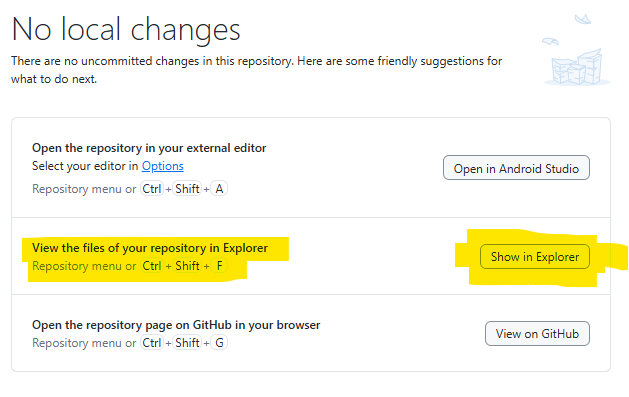
… not sure how to do this in Xojo desktop apps.
Var f as FolderItem = SpecialFolder.Desktop
f.Open(true)
Only if you want to open the file. For showing the file in Finder use:
NSWorkspaceMBS.selectFile(theFolderitem)
I’m sure that there are declares which can be used instead.
This is the method I’ve used for some years now.
It opens the folder containing the file and highlights it.
Public Sub showfile(extends f as folderitem)
#if TargetWindows
Var param as String= “/select, “”” + f.nativepath + “”“”
Declare Sub ShellExecuteA Lib “Shell32” ( hwnd as Integer, op as CString, file as CString, params as CString, directory as Integer, cmd as Integer )
Const SW_SHOW = 5
If System.IsFunctionAvailable( “ShellExecuteW”, “Shell32” ) Then
ShellExecuteW( 0, “open”, “explorer”, param, 0, SW_SHOW )
else
ShellExecuteA( 0, “open”, “explorer”, param, 0, SW_SHOW )
end if

#elseif TargetMacOS
Var ae as AppleEvent
Var obj as AppleEventObjectSpecifier

// activateFinder
ae = NewAppleEvent( "misc" , "actv" , "MACS" )
if not ae.send then
  beep
end if

// show file
ae = NewAppleEvent( "misc" , "mvis" , "MACS" )
obj = GetNamedObjectDescriptor( "cobj" , Nil, f.nativepath )
ae.ObjectSpecifierParam( "----" ) = obj
if not ae.send then
  beep
end if

#endif
End Sub
Or an alternative Method that includes Linux:
Protected Sub doRevealFolderItem(f As FolderItem)
  'www.xojoitaliablog.com/evidenziare-un-file-sul-desktop
  If f = Nil Or Not f.Exists Then Return
  #If TargetDesktop Then
    If f.IsFolder Then
      If f.isBundleMBS Then f = f.Parent
      f.Open(True)
      Return

    Else
      #If TargetMacOS Then
        Call NSWorkSpaceMBS.selectFile(f)
        Return

      #ElseIf TargetWindows Then
        'www.monkeybreadsoftware.net/global-winopenfolderandselectitemsmbs.shtml
        Var Result As Integer = WinOpenFolderAndSelectItemsMBS(f.Parent, Array (f)) 'does this work?
        If Result > 0 Then '0 = success, so try Shell if the above fails
          Var tempShell As New Shell
          Var tempString As String
          tempString = "explorer.exe /root,/separate,/select,""" + f.NativePath + """" 'run on separate new process
          tempShell.Execute(tempString)
          If tempShell.ExitCode > 1 Then 'Error 1 seems to be success, so don't open the window twice!
            f.Parent.Open(True)
          End If
          tempShell.Close
        End If

        Return

      #ElseIf TargetLinux Then
        Var tempShell As New Shell
        Var tempString As String

        tempString = "xdg-open """ + f.Parent.NativePath + """"
        tempShell.Execute(tempString)
        If tempShell.ExitCode <> 0 Then
          f.parent.Open
        End If
        Return

      #Else
        f = f.Parent
        f.Open
      #EndIf
    End If

  #ElseIf TargetWeb Then
    'download?

  #ElseIf TargetiOS Then
    'copy to Files?

  #Else
    Break
  #EndIf
End Sub
While your method works, it can be weak. If the Finder isn’t running or the user uses an alternate file browser, your code will fail. On the other hand, the way using the NSWorkspaceMBS class (or equivalent declares) will always locate the right browser, launch it if necessary, and then select the items.
Here’s one I’ve used with declares for macOS:
Var f As FolderItem = SpecialFolder.Desktop.child("Sub View Example").child("100 Bullets Minis")

//this is a folder inside a folder on my desktop
//it opens a "Sub View Example" folder in a finder window, with "100 Bullets Minis" folder selected

If f <> Nil And f.Exists Then

  Declare Function objc_getClass Lib "Cocoa" ( name As CString ) As Ptr
  Declare Function sharedWorkspace Lib "AppKit" Selector "sharedWorkspace" ( obj As Ptr ) As Ptr
  Declare Function selectFile Lib "AppKit" Selector "selectFile:inFileViewerRootedAtPath:" ( obj As Ptr, fPath As CFStringRef, rootFullPath As CFStringRef ) As Boolean
  Dim workspace As Ptr = sharedWorkspace( objc_getClass( "NSWorkspace" ) )

  Call selectFile( workspace, f.Nativepath, "")


Else
  MessageBox("Folder does not exist.")

End If
If what you’re trying to do is now show or open a file, the solution depends entirely on the target app.
Basically, the app to be controlled has to want to be controlled. Short of that, you’d need to control the user’s input, which would be just awful for both you and the user.
Public Sub ShowFile(Extends file As FolderItem)
  #if TargetWindows Then
    call WinOpenFolderAndSelectItemsMBS File.Parent,Array(file)
  #Else
    call NSWorkspaceMBS.selectFile(file)
  #EndIf
End Sub
It looks like I may need to do a feature request, then, because I am working on an organizer feature for my app which is expected to show files or folder contents.
I was hoping to do this without any plugins needed.
The declares are simple just ask an AI to find them for you, they’re here somewhere.
(not at my desk, sorry)
LOL and down the rabbit-hole I shall go. Maybe I do need to do a feature request on this particular point (show enclosing folder for targeted item).