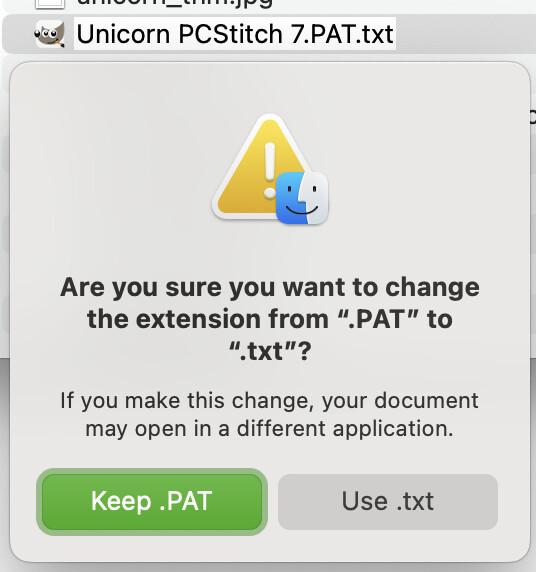
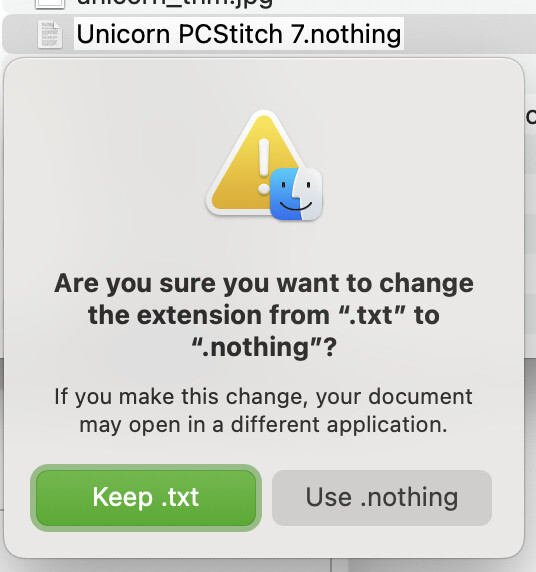
I assign a real existing filename to a FolderItem by ChildAt(Index). Then I want to get its extension by property .Extension: f.e. file “hello.txt“ returns “txt” (which is fine).
If there is a filename called “hello.world.txt” I still get “txt” returned for .Extension property which is also correct.
But when there is a file with dots in its filename but the file has NO extension OS-wise then the .Extension property thinks the part after the last dot must be the extension. F.e.: “hello.world” returns “world” in property .Extension but OS wise this file has no extension. I then would expect no or empty extension being returned by .Extension property as there is no extension OS-wise.
Is this a bug or did I miss(understood) something specific?
Note that for security reasons, all applications must have a file extension. Viruses can hide behind fake extensions.
All operating systems maintain a list of file extensions according to their specific abbreviations. Some use the hexadecimal signature within the file to identify it.
Now let’s get to the important part.
The fact that FolderItem recognizes the extension is good, even if it doesn’t actually exist.
In your case, you need to develop an algorithm to determine if the extension is real or fake. If it’s fake, assign an empty property.
Then, let your program continue running with an empty extension, if that’s the case.
You want to fight against a malformed file name OS wise as Jose says above.
From where this file comes ? This is the real question. If it is an old macOS file dating from the time macOS fdo not use Extension, it is another question: check the date and the first bytes of the file for a tag identification (a different strategy) or lack of tag identification (txt files do not had one).
PK, RAR, JFIF, PNG, HIEC, etc are tag identifications.
Yes. Your misconception is that an extension has to be three characters – there is no such definition, at least on the Mac. For example, an Xojo project saved in binary format has the extension “.xojo_binary_project”. So there’s no way for the operating system to distinguish “.xojo_binary_project” from “.world”.
An extension such as “.world” has no meaning, so the file doesn’t have an extension in such cases.
Ridiculous.
Just because you don’t know what a .world file is for, doesn’t mean it isn’t an extension.
The extension is ‘whatever comes after the last dot in the file name’
What happens when you double click it , is governed by whatever settings the OS has for file association. On old Macs, a file with no extension could still be associated with some app that could ope, read, amend it.
Latterly, MacOs started doing it like Windows - looking at the extension. But to make things feel familiar, Finder would hide the extension by default for known file types.
Check tha by yourself: .png.txt is a "valis extention an allows you to see (with quicklood) the file “as text”;
WHEN YOU CLICK IN THE FILE NAME TO EDIT, THE HIGHLIGHTED PART OF THE FILE NAME IS evrything before the first dot.
So, to know the file extension, get the last “.” occurence of the file name.
Check by yourself, and come back if you still have troubles…
I think the salient point to make is that OP seems to be confusing a file’s extension, its contents (or type), and file associations. The extension and contents do not have to match in any way, shape, or form. I can have a text file with a mov extension and there’s no issue at the OS level with this. A program loading that file should check its contents to see if it is a format that the application supports regardless of its extension – though some applications do require the extension match the contents.
As others have pointed out, this may be further complicated in your understanding by the addition of file associations. This is where applications tell the OS which extensions they can read and are “associated” with (this is typically done on Windows by adding a registry key, and within the application bundle on macOS). That doesn’t mean they can successfully read any file with that extension, or that files lacking that extension cannot be read, just that this is the extension they expect files to have which the application can consume.
In your example, a “file with no extension” would be a file name that’s something like myfile rather than myfile.txt. Note this is different than a file with no association, such as creating a file with the txt extension will likely have an association to a text editor while a file with the extension mov will be linked to a media player application and an extension of iasj98ru2389u2809 likely wouldn’t have any associated applications. Again, just because they have those extensions doesn’t mean an associated application can or cannot consume the data contained within the file.
To determine the actual “type” of the file contents, you would read the contents and determine if it’s valid for your operation.
To get the extension that we expect it should have..?
This is probably what lies behind a frustrating ‘feature’ whereby a text file I create with a custom file extension (lets say .wibble), which happens to contain XML data to my own design, it opened as XML data by mail and browsers.
If I wanted that to happen, I would have used .XML
Leave it alone, OS! I have to get people to zip the files. Crazy
I think the real question underlying the extension discussion is the type of data in the file – which may not be related to the filename extension. Code should generally avoid making too many assumptions about filenames, as users can and will gleefully rename them to their hearts’ delight with no consideration for the extension. Instead, we should be using better tools to understand what is inside a file.
The UNIX ‘file’ command does something much more useful than returning a filename’s extension: it has the magical ability to tell you what kind of data is in the file. It returns a MIME type (‘application/text’, for example) representing its best guess.
Alternatively, on the Mac, you can use Declares to get a Universal Type Identifier (UTI) from the operating system that serves the same purpose as the MIME type returned by the ‘file’ command. It doesn’t appear to try and analyze a file’s data, but it uses metadata provided by the creator of the file, in addition to a filename extension when one is available, to report what the file contains.
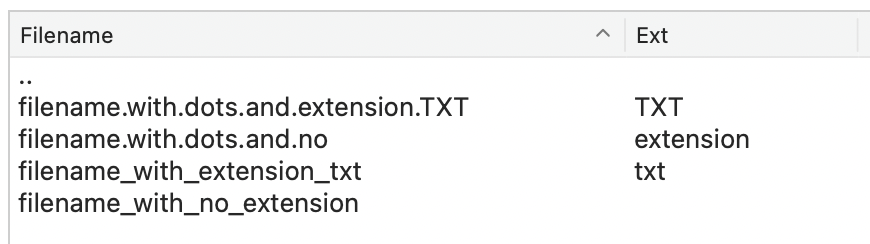
I have created a file manager like file manager and I need to differ between filename and its extension. There are 4 possible file types I have to handle for display:
A filename with dot(s) in it and a valid extension → ok
A filename with dot(s) in it and no extension → problem
A filename with an extension (most common case) → ok
A filename with no extension → ok
Here is how it gets presented in my file manager on splitting file(name) and extension by using the .Extension property:
Based on the documentation the property .Extension should return the valid extension based on Mime type (if there is one). Returning the string after the last dot doesn’t ensure it’s the valid file extension (as it’s shown/displayed on OS side)
FolderItem offers a wide range of methods and properties but is unable to simply return the valid extension by property .Extension? This is totally misleading by the documentation: “Allows you to get and set the FolderItem’s extension.“
It can’t be that I have to evaluate each file extension by opening and parsing every single file (in my file manager) to get the proper (Mime based) extension.
Thank you, will keep that in mind. No, it’s for Win, Mac and Linux but I assume there will be such a shell command for each OS. No clue how much the performance suffers on processing each file of a directory that way.
If what you want is this: “performance suffers when processing each file in a directory,”
Xojo isn’t ideal for this type of task. If you have no other option, build your system with Xojo. But if the goal is automation, other tools can do it almost effortlessly.
I offer automation services to my clients. That’s why I always separate the system from the automation.
There are painful processes when you don’t use the right tool. One of them is processing hundreds or thousands of files as part of a system.
Extensions guarantee nothing about the contents of a file.
So here is your decision tree:
If you are trying to determine the actual contents of files: use operating system-provided accessors or other tools to get the MIME type of the data. And yes, you do this for each file individually. That’s how file managers work.
If you are complying with or creating a policy that dictates all files must have extensions to describe their contents: re-read the bolded words above and reexamine this policy. I can rename a file from “virus.exe” to “grandma’s recipe for blueberry muffins.txt” and if your system is letting “.txt” files sail through, I’ve just gotten a big foothold into your system.
Just to be sure: if I name a file "This is the name of the file. And I’m happy with it”, the extension would be “ And I’m happy with it”, and if I name it “This is the name of the file. And I’m happy with it.” (note the additional period), the extension would be “”. Is this the expected rule? (who has defined that, by the way?)