In one of my apps (iClip) I draw file and folder icons in the app’s window. I like to also apply the “alias” badge to the icon, just like the Finder does for Finder Alias files. Like this:
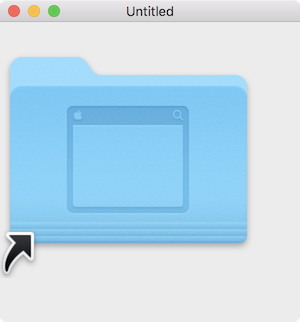
The code I’ve been using for this for over 15 years suddenly doesn’t work right in macOS Tahoe any more. There, the badge grows to the full size of the icon, which isn’t what I want:

Does someone know about this effect and is there a solution?
Currently, I’m applying the badge using the very old IconServices functions, provided thru MBS. Basically, I’m doing this:
dim picWithBadge as Picture = ... ' this fetches the icon as a picture
dim pc as CGBitmapContextMBS = CGBitmapContextMBS.CreateWithPicture (picWithBadge)

dim badgeIcon as new IconMBS("abdg", "macs") ' this is the Alias badge
badgeIcon.DrawIconCGContext (pc.Handle, 0, 0, picWithBadge.Width, picWithBadge.Height, 0, 0, 0, &c000000)

pc.Flush
Download Xojo project here.
Note: I realize that if I change the width & height values in `DrawIconCGContext` then the badge will be drawn smaller, but that would then break the behavior for older macOS versions, too. Which would mean I’d have to use different values for pre- and post-Tahoe. Even though I can do that, it doesn’t answer why it has changed at all (i.e. whether I used it wrong all this time or if this is a macOS bug), and if there’s a “proper” way to do this so that it works right on all macOS versions.