The documentation states the behaviour I’m seeing: a new picture is created by default using a vertical and horizontal resolution of 72 pixels.
I have pictures with 144 pixels of resolution coming from the clipboard. In some places, I need to create a copy of said pictures, so I’m using “New picture(OriginalWidth,OriginalHeight)” and “SecondPicture.Graphics.DrawPicture Original,0,0”. At this point, I avoid using plugins methods like CloneMBS, to try to understand in plain Xojo code.
If I keep the original resolution of the second picture, I now have the original one with a resolution of 144 pixels and the copy with a resolution of 72 pixels, so they are different. But if I set the vertical and horizontal resolutions of the copy like it is on the original (SecondPicture.VerticalResolution=OriginalPicture.VerticalResolution, same for horizontal), then draw the picture, the resulting picture draws at half the width and half the height of the original.
While I agree it’s an area where I tend to be confused, I’m feeling the solution would be to set the resolution of the second picture like the one of the original picture right when it’s created (to not change it afterward, making the “distortion”). However, the constructor of a picture doesn’t support defining a default resolution.
Create the Picture as Pict,
Set the Pict.VerticalResolution and Pict.HorizontalResolution to 144 (dpi),
THEN, load the image from disk Pict = Picture.Open(f) // Something like that
I wrote the above in the web, not the IDE.
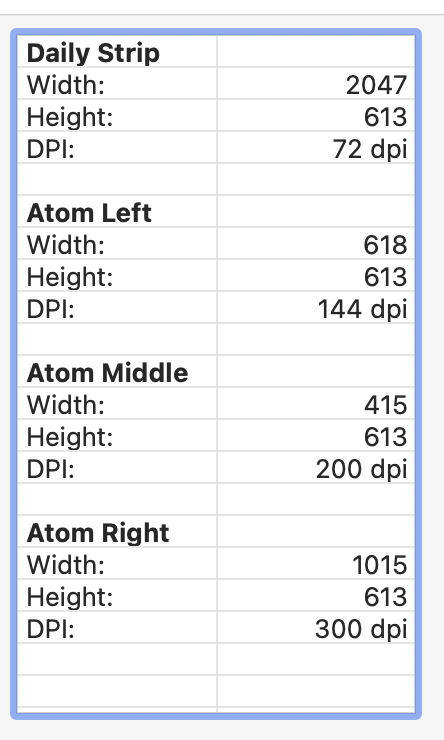
But, no later than yesterday, I wrote in a project a report about 4 images I dropped into a Window:
The Properties are real from the Picture loaded from disk (Pict = Picture.Open(f)).
The DPI are what I set for these 4 pictures: The Bold entries represent an image.
DailyStrip is the image that comes from Internet,
Atom(s) Left, Middle, Right represent a part of the original image above. I specifically change the dpi for testings.
For some reason (“you do not show all pixels”) this is correct (I saw that in the Finder when I choose a non 72 dpi image for a Finder folder window (Show Preview Option, I suppose, last item of the 5th menu; the one after File and Edit to set the image as a Folder window background).
Sorry, I do not have a better explanation. Just that is normal behavior.
Thanks for your answer, Emile, but I’m not loading any picture from disk.
Also, when accessing a picture from the clipboard, the old picture pointed by “pict” is forgotten in your example (since you’re reusing the same variable). Are you implying that somehow the Xojo framework retains the resolution of the previous object (first “pict”) to the second “pict” after you load the file from disk? That certainly would be a bug, not a reliable feature.
Function MakeNewPicture(width as integer, height as integer, scale as double) as picture
  Dim p as new picture ( width * scale, height * scale)
  P.horizontalresolution = 72 * scale
  P.verticalResoluion = 72 * scale

  Dim g as graphics = p.graphics
  g.scalex = scale
  g.scaley = scale
  Return p
End Function
For clarity, you’re confusing dimensions with resolution.
Dimensions are the physical width and height of the image and have nothing to do with the pixel density of the image. Except that the first must be a multiple of the second. They are the physical number of individual pixels horizontally or vertically in the image and to get the size that the image will draw, you divide the size by the resolution (which is called scale in Graphics).
Resolution is the number of physical pixels in each virtual pixel of the drawing surface. For a 1x surface, there are 72 pixels per inch (ppi). For a 2x surface, there are 144ppi (72 x 2.0).
Now, here’s how this all fits together:
Let’s say you have a 640x480 screen. On a 1x screen, the virtual pixels match the physical ones so there are 640x480 pixels to draw on. On a 2x screen, there are twice as many in both directions, so 1280x960, but still displayed in the same physical 640x480 space.
Pictures use resolution to determine how pixels are crammed into physical dimensions. 100x100 at 72ppi will draw as 100x100. If you increase the ppi to 144, those 100x100 physical pixels are crammed 2x2 into each virtual pixel on the display surface, and so 100x100 is displayed as 50x50.
I know you are 100% correct (and I deal with that), but I never understand the why of the things for unknow reason(s). This does not disallow me to do the job / take care of the dpi.
Maybe it is because Graphics Software have a command: "Show all Pixels” that … show all pixels (so the image looks larger and taller [100 x 100] vs normal view [50 x 50]).
In those programs when you do “Show All Pixels” what the program does is make the physical pixels as big as the virtual ones. With a 1x screen, that’s one picture pixel to one display pixel. For a 2x screen, that’s one picture pixel for every two display pixels. All of this has to do with the perception of the human eye. On a 1x 72ppi screen, our eyes can see the individual pixels at an arm’s length. At 2x, they blend together and look seamless. iOS actually has 3x screens because we tend to hold those devices even closer to our faces and need even more resolution to fool our eyes.
I finished a preliminary testing Paste from the Clipboard feature.
I copied from Preview a 300dpi image and paste it in a Canvas.
I reported the Clipboard width, height and dpi.
I get the correct width and height, but the dpi was 72 (but I have the 300 version as GIMP confirm it to me).
NB: with Preview, Pasting the 300 dpi image from the Clipboard results are the same (72 dpi). (I checked, but I already knew that)
But if I duplicate in Preview my 300 dpi image, I get another 300 dpi image… (I checked too, and I already knew that too)
.
So, I do not know what to say / do.
If I was a guy responding with certainty, I’d have said that way too
Thanks for your explanation.
Definitively a post to keep in my bookmarks, as I can’t for the life of me keep this representation in my mind (I’ve already seen similar explanations (though yours is more to the fact than most I’ve seen) and tend to become confused again and again over time, until I re-read the explanation; needless to say, I don’t have a good visual memory).
This just means that Preview doesn’t include the resolution of the copied image data; or, perhaps Xojo doesn’t know how to read it from the clipboard. Either could easily be correct.
Var c As New Clipboard
If c.PictureAvailable Then
  Var Copy As New Picture(c.Picture.Width, c.Picture.Height)
  Copy.HorizontalResolution = c.Picture.HorizontalResolution
  Copy.VerticalResolution   = c.Picture.VerticalResolution
  Copy.Graphics.ScaleX      = c.Picture.HorizontalResolution / 72.0
  Copy.Graphics.ScaleY      = c.Picture.VerticalResolution   / 72.0
  Copy.Graphics.DrawPicture(c.Picture, 0.0, 0.0)
  c.Close()
End If