Hi everyone,
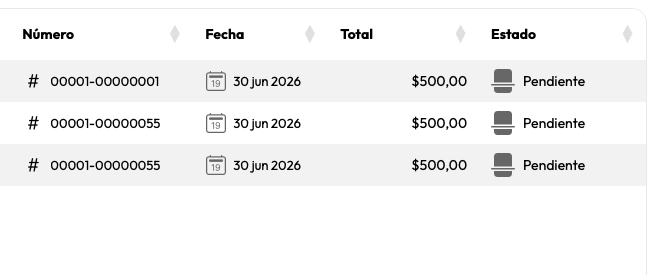
I’m trying to change the default behavior of the WebListBox component in Xojo Web 2.0. By default, it always renders with an alternating “table-striped” look, where the odd rows have a subtle background tint generated by a box-shadow property.
I want my WebListBoxes to have a completely flat, solid white background for all rows (no alternating stripes/shadows).
I am currently using a custom bootstrap.min.css theme in my project. I’ve tried editing all the table colors, row styles, and background values within that file, but I cannot seem to override or get rid of that persistent box-shadow on the odd rows. It keeps showing up on every WebListBox across the app.
Could someone point me in the right direction?
-
Is there a specific CSS class name or selector I should target in my custom CSS or
App.HTMLHeaderto force the box-shadow tonone? -
Or is there a native Xojo way to disable the striped/shadowed style entirely for the control?
Any code snippets or advice on how to force a clean, plain white look would be greatly appreciated!
Thanks in advance.
i.e.: