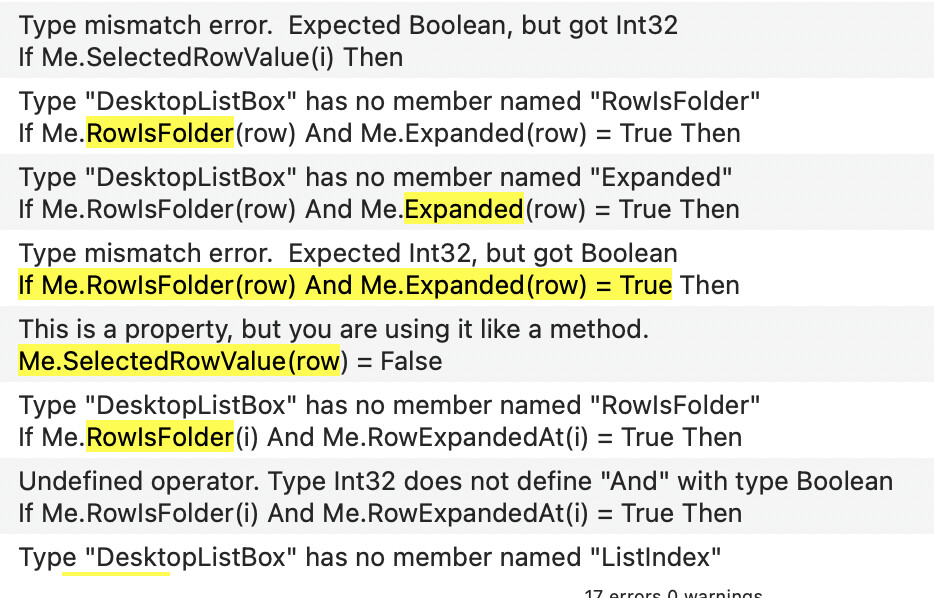
How can I expand a Row with the keyboard ?
I tried right arrow, cmd-right arrow, control right arrow… and every of these together 
How can I expand a Row with the keyboard ?
I tried right arrow, cmd-right arrow, control right arrow… and every of these together
You need to write code in the KeyDown event to expand the selected rows when the right arrow is pressed.
Here’s some drop in code that functions similar to Finder’s list mode:
select case Asc(Key)
case 28 // Left

  dim selected() as integer

  for i as integer = 0 to me.ListCount-1
    if me.Selected(i) then
      selected.Append i
    end
  next

  select case selected.Ubound + 1
  case 0
    return false
  case 1

    dim row as integer = selected(0)

    if me.RowIsFolder(row) and me.Expanded(row) = true then
      me.Expanded(row) = false
    else
      for i As Integer = row-1 downto 0
        if me.RowIsFolder(i) and me.Expanded(i) = true then
          me.ListIndex = i
          exit
        end if
      next
    end If

  case is > 1

    for i as integer = selected.Ubound downto 0
      if me.RowIsFolder(selected(i)) then
        me.Expanded(selected(i)) = false
      end
    next

  end

  return true

case 29 // Right

  dim selected() as integer

  for i as integer = 0 to me.ListCount-1
    if me.Selected(i) then
      selected.Append i
    end
  next

  select case selected.Ubound + 1
  case 0
    return false
  case is > 0

    for i as integer = selected.Ubound downto 0
      if me.RowIsFolder(selected(i)) then
        me.Expanded(selected(i)) = true
      end if
    next

  end

  return true

else

  return false

end
Hi Jared,
Thank you for the shared code.
Me.LastRowIndex
time to leave 'til tomorrow (I’m too tired to continue).
BTW: my project have been created as API2 and the autocomplete does not help for the current word to use (otherwise, it shows the old API in red and the one to use)..
For API 2
RowIsFolder = RowExpandableAt
Expanded = RowExpandedAt
ListIndex = SelectedRowIndex
ListCount = RowCount
Selected = RowSelectedAt
This part isn’t in my code
Me.SelectedRowValue(row) = False
For this part, with your change, just be sure that you remove the “- 1” from the line or you’ll miss the last row.
- Me.ListCount-1: does not exists
I replaced it withMe.LastRowIndex
Thanks.
Will makes the changes later today when back home.
I have this lind of bug in another project (The ListBox “loose” the last Row number) and I must takes some times to locate that -1 to be removed…
Writing things is not easy (withe only the right hand) where I actually am 
I was curious enought to get the solution right now.
Thank you again.
PS: I will comeback once this will be resolved (later this afternoon).
Hi Jared,
I took back your original code, made the given changes, and…
…your code works fine, I only have to polish my data and make a series of checks to be 100% sure.
Thanks for sharing that. I too was wondering how to do that.
For the record, here’s the complete KeyDown Event with the code shared above, for current Xojo:
Function KeyDown(key As String) Handles KeyDown as Boolean
  // Code shared by Jared Feder
  // here: https://forum.xojo.com/t/hierarchical-listbox-expand-a-row-with-the-keyboard/87942/6
  //
  // Works fine with Xojo 2025r3.1 / mac Tahoe 26.4
  // 2026-03-27
  //
  Select Case Asc(Key)
  Case 28 // Left

    Dim selected() As Integer

    For i As Integer = 0 To Me.RowCount
      If Me.RowSelectedAt(i) Then
        selected.Append i
      End
    Next

    Select Case selected.Ubound + 1
    Case 0
      Return False
    Case 1

      Dim row As Integer = selected(0)

      If Me.RowExpandableAt(row) And Me.RowExpandedAt(row) = True Then
        Me.RowExpandedAt(row) = False
      Else
        For i As Integer = row-1 DownTo 0
          If Me.RowExpandableAt(i) And Me.RowExpandedAt(i) = True Then
            Me.SelectedRowIndex = i
            Exit
          End If
        Next
      End If

    Case Is > 1

      For i As Integer = selected.Ubound DownTo 0
        If Me.RowExpandableAt(selected(i)) Then
          Me.RowExpandedAt(selected(i)) = False
        End
      Next

    End

    Return True

  Case 29 // Right

    Dim selected() As Integer

    For i As Integer = 0 To Me.RowCount
      If Me.RowSelectedAt(i) Then
        selected.Append i
      End
    Next

    Select Case selected.Ubound + 1
    Case 0
      Return False
    Case Is > 0

      For i As Integer = selected.Ubound DownTo 0
        If Me.RowExpandableAt(selected(i)) Then
          Me.RowExpandedAt(selected(i)) = True
        End If
      Next

    End

    Return True

  Else

    Return False

  End
End Function
Copy the code, Select the target ListBox entry in the Navigator and Paste.
Works fine.
I think that you might have to replace Me.RowCount with Me.LastRowIndex to avoid an OutOfBounds exception.
Doh ! I let that slip thu my hands
NB: I do not have errors while using the project with that error. (YET).
Here’s the corrected code:
Function KeyDown(key As String) Handles KeyDown as Boolean
  // Code shared by Jared Feder
  // here: https://forum.xojo.com/t/hierarchical-listbox-expand-a-row-with-the-keyboard/87942/6
  //
  // Works fine with Xojo 2025r3.1 / mac Tahoe 26.4
  // 2026-03-27 (29)
  //
  Select Case Asc(Key)
  Case 28 // Left

    Dim selected() As Integer

    For i As Integer = 0 To Me.LastRowIndex
      If Me.RowSelectedAt(i) Then
        selected.Append i
      End
    Next

    Select Case selected.Ubound + 1
    Case 0
      Return False
    Case 1

      Dim row As Integer = selected(0)

      If Me.RowExpandableAt(row) And Me.RowExpandedAt(row) = True Then
        Me.RowExpandedAt(row) = False
      Else
        For i As Integer = row-1 DownTo 0
          If Me.RowExpandableAt(i) And Me.RowExpandedAt(i) = True Then
            Me.SelectedRowIndex = i
            Exit
          End If
        Next
      End If

    Case Is > 1

      For i As Integer = selected.Ubound DownTo 0
        If Me.RowExpandableAt(selected(i)) Then
          Me.RowExpandedAt(selected(i)) = False
        End
      Next

    End

    Return True

  Case 29 // Right

    Dim selected() As Integer

    For i As Integer = 0 To Me.LastRowIndex
      If Me.RowSelectedAt(i) Then
        selected.Append i
      End
    Next

    Select Case selected.Ubound + 1
    Case 0
      Return False
    Case Is > 0

      For i As Integer = selected.Ubound DownTo 0
        If Me.RowExpandableAt(selected(i)) Then
          Me.RowExpandedAt(selected(i)) = True
        End If
      Next

    End

    Return True

  Else

    Return False

  End
End Function