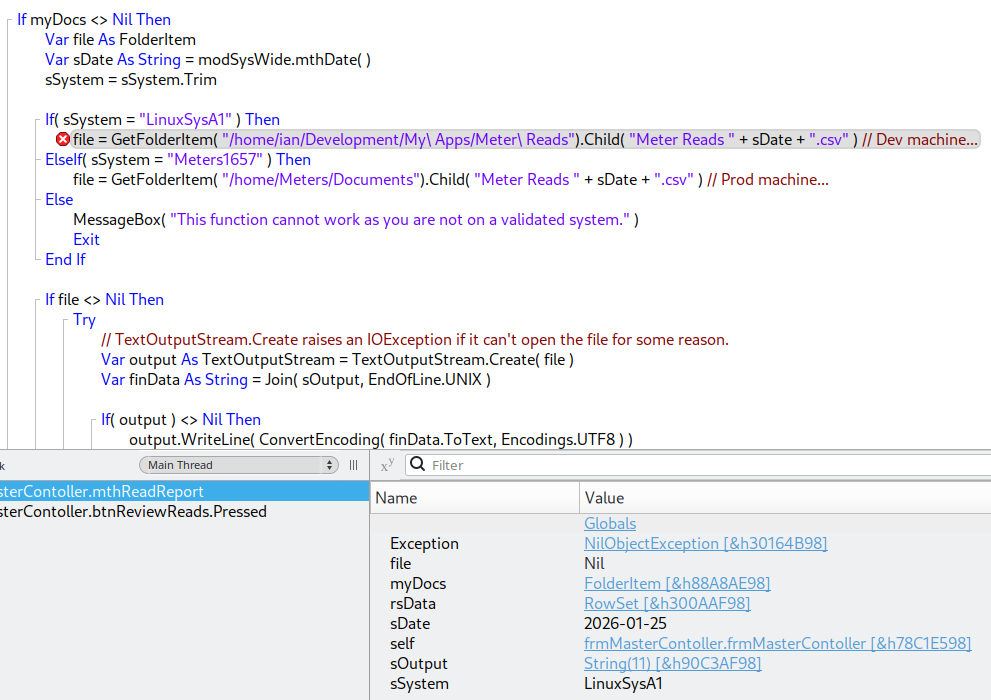
The grandparent directory (/home/ian/Development/My\ Apps/) doesn’t exist. This will cause GetFolderItem to return a Nil folderitem. Calling .Child on the nil folderitem will raise a NilObjectException.
I think the problem is that you’re using backslashes to escape spaces in the path. This isn’t required or supported by GetFolderItem, and so the backslashes are being interpreted as part of the directory name. Try /home/ian/Development/My Apps/Meter Reads.
Huh, ok, I guess I am used to using the back slash in bash scripting I just assumed I would have to do it here too. And… hey! That was it! Thank you!!!
Keep in mind that on macOS you can’t rely on GetFolderItem because of permissions. I seriously wish people would forget the function exists.
You also can’t expect to get to SpecialFolder.Documents without permission either.
(also, notably, the right way to do this for Windows)
In both instances the resulting FolderItem ends up nil with no error information.
As a rule, whenever one calls a method that can return nil rather than an object one should test the result for not being nil before passing it to another method that requires a non nil argument.
To do that the right way, use .Child (as already said above). This will allow you to know exactly “where the error occured” (Nil) in your code.
Yes, it wil took a minute or two and some more lines of code vs writing a question here and wait answers.
NO PUN INTENDED AT ALL.