GetFolderItem API1 to API 2 conversion Syntax Error

Hello,

I wanted to start the conversion to the new format

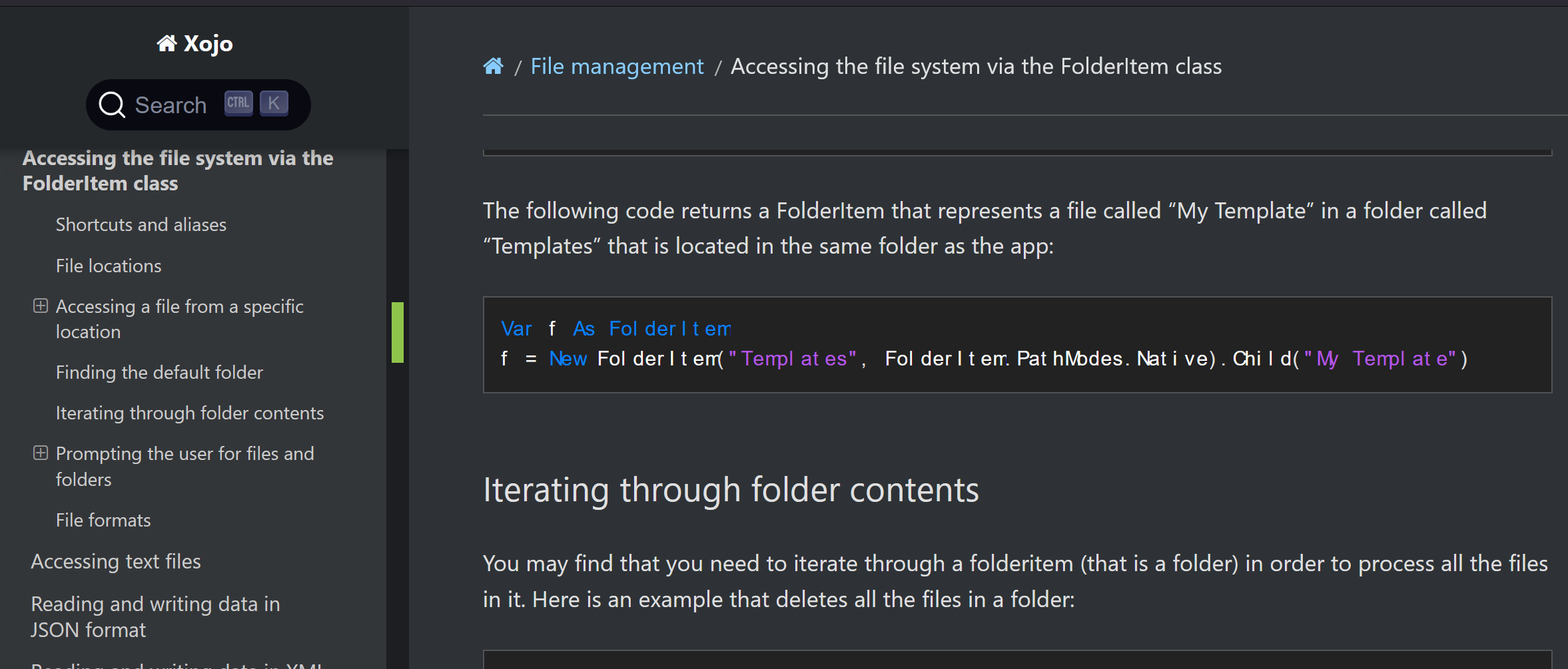
My old line is : f=GetFolderItem(“Templates”).Child(“My Template”)

So I found in Documentation this new format but I always get syntax error. What’s wrong with it?

f = New FolderItem("Templates", FolderItem.PathModes.Native).Child("My Template")

Sometimes I got “New” as Deprecated. Thank you alot

My guess is that you will to do this:

f = New FolderItem("Templates", FolderItem.PathModes.Native)
f = f.Child("My Template")

thank you. but i took the example exactly from the documentation. It should work also on a single line. I have a 500to1000 of this only in 1 application, transforming this on more than a line is a lot of work and less readable.

However I can’t find out to let it work like the examples in the documentation

and even with your example I get “New” as Deprecated warning message

I had a quick look at the documentation and I could not see any examples similar to what you are trying to do.

As far as I am aware you can’t chain function calls when creating a new class instance but someone else might be able to comment on that.

You could put the code that creates a new FolderItem into a function as you would then be able to chain the Child call like you do with GetFolderItem.

Not sure why you are getting a deprecated warning for New as I have not seen that.

Are you sure? The syntax given for New doesn’t include calls like in your example. First you create the new object, then you call one of its methods – it’s always two steps.

Chaining FolderItem calls is an issue anyway. If it is a bad path or the FolderItem fails for some reason then you will trigger a NilObjectException.

Thank you for the suggestions , I know when and how to handle errors and sincerely also in other languages it’s very usual to write it on one single row. Split this single row in more than one is very unprofessional in a very big project

I still believe there must be a solution or something wrong in the code.

Documentation is here: https://documentation.xojo.com/topics/file_management/accessing_the_file_system_via_the_folderitem_class.html

The documentation appears to be in error here. New cannot be used like that and the compiler will complain about a syntax error if you try. You can’t very well argue with the compiler.

Hi Michael, I’m on your side.

But if you don’t use “New” compiler sends back error: “This method requires fewer parameters than were passed.”

Of course, as you need to create a new FolderItem, and without New no constructor gets called and you cannot pass any parameters. It’s just that New cannot be used in the way that this example in the documentation suggests. The syntax of New (New — Xojo documentation) doesn’t support method calls, except implicitly by calling a constructor.

Just write the code in two lines and be done with it.

I think the documentation is wrong here. I don’t use API2, but to me it seems that there are brackets missing.

(If templates is missing, then you will get an error at run time, no matter what- you can’t get a child of a nil)

Does this work?

f = (New FolderItem("Templates", FolderItem.PathModes.Native)).Child("My Template")

This line:

(New FolderItem("Templates", FolderItem.PathModes.Native))

creates the folderitem parent, and you can have a child of that.

I have a 500to1000 of this only in 1 application

Yikes.

Would it not make more sense to have a global variable Folder_Templates initialised at startup?

Then all these calls would simply become

f = Folder_Templates.Child("My Template")

If Folder_templates had been validated already, this line should never error.

Thank you Jeff.

I already tried, but tried again just to be sure :slight_smile: but…

f = (New FolderItem(“Templates”, FolderItem.PathModes.Native)).Child(“My Template”)

is not working. it was the first thing I tried thinking behaviour would be like in other languages prioritizing () but not :frowning:

Probably I’ve to stick with your proposal or leave behind some API2 calls maybe Geoff is reading ?

The API 1 code using GetFolderItem works. Why not leave it as-is?

Hello Julia, I found out that deprecated methods API1 are not treated in the same way as API2. They don’t share always the same code and behavior could be little different. I think they left the code unchanged for compatibility issues and API2 gets internal improvements.

I’d second Jeff’s proposal to initialise a Folder_templates property at startup. In fact that’s exactly what I have done in one app where the same folder gets accessed at multiple points in my code.

I would just create a helper function:

Function CreateFolderItem(Path) As FolderItem
  Return New FolderItem(Path, FolderItem.PathTypes.Native)
End Function

Use that in place of GetFolderItem and call it a day. Yes, there are better ways to handle this, but for the level of usage here, it’s at least a decent middle ground.

Thank you Thom,I just corrected some syntax. For sure the fastest way to replace GetFolderItem. Following is the corrected code:

Function CreateFolderItem(Path as String) As FolderItem
Return New FolderItem(Path, FolderItem.PathModes.Native)
End Function

Hello
missing
f.CreateFolder ??

my test example
test-output-Input-Text2.xojo_binary_project.zip (9.9 KB)

Hallo Rudolf,

just checked your example. Your way you always create a folder even if not requested and so you don’t have any control of it. Final solution is exactly is best solution to fix the Xojo-bug you can’t concatenate .Child(..)

PS: Du Alter, hab schon lange nicht mehr REM gesehen :slight_smile: das erinnert mich an alte Zeiten :slight_smile: Gruss