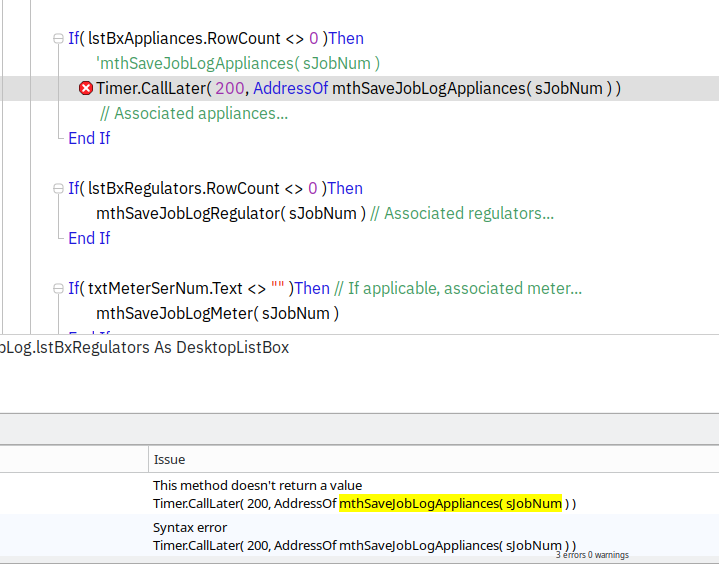
mthSaveJobLogAppliances( sJobNum ) ← This works by itself
But when I put it in this timeSet.CallLater( 200, AddressOf mthSaveJobLogAppliances( sJobNum ) )
I get the error.
I tried using this format for the code timeSet.CallLater( 200, AddressOf mthSaveJobLogAppliances, sJobNum )
And I get a new error
frmJobLog.btnSaveJob.Pressed, line 26
There is more than one method with this name but this does not match any of the available signatures.
timeSet.CallLater( 200, AddressOf mthSaveJobLogAppliances, sJobNum )
Also this is how I set the timeSet: Var timeSet As Timer
Get rid of TimeSet. Just use Timer.CallLater as I said. It’s a shared method and as such is accessed via the class name, rather than an instance (copy of) the class.
If you are going to use the var statement you need a new before the Timer. That actually creates the instance, otherwise it will be nil. But don’t do that. Use Timer instead.
Var TimeSet as Timer // creates a variable that can hold a Timer instance, but without an instance
Var TimeSet as New Timer // creates the variable and an instance you can work with.
Timer.… // allows use of shared properties and methods, without need for an instance.
Look at your code, it is different from ours. You have brackets around the parameter. We have a comma between the name and the parameter.
The call later takes three parameters, the time, the function and the parameter to pass. You can’t call AddressOf with a method and its parameters. Just the name of the method.
There is a version for Methods without a parameter. But you want the one with described above.
So I changed the sJobNum from String to Variant and that seems to work. I need to test a bit to make sure it didn’t break anything. I’ll have to read up on variant as I have never used it before… for that matter didn’t know it was an option.
Thanks, if I have any other issues with this I’ll be back…