FolderItem/Picture.Save vicious bug

There is a viciuos bug in the code below:

Var saveFile As FolderItem = Image_FI.Child(Cover_Name)

Try
  scaledImage.Save(saveFile, Picture.Formats.PNG)

everything is correct EXCEPTED the variable Cover_Name who is blank (empty).

I get an exception and quit.

I do not search yet why this is the case, but I have a good candidate.

The real trouble, is why the TRY block do not worked in that case.

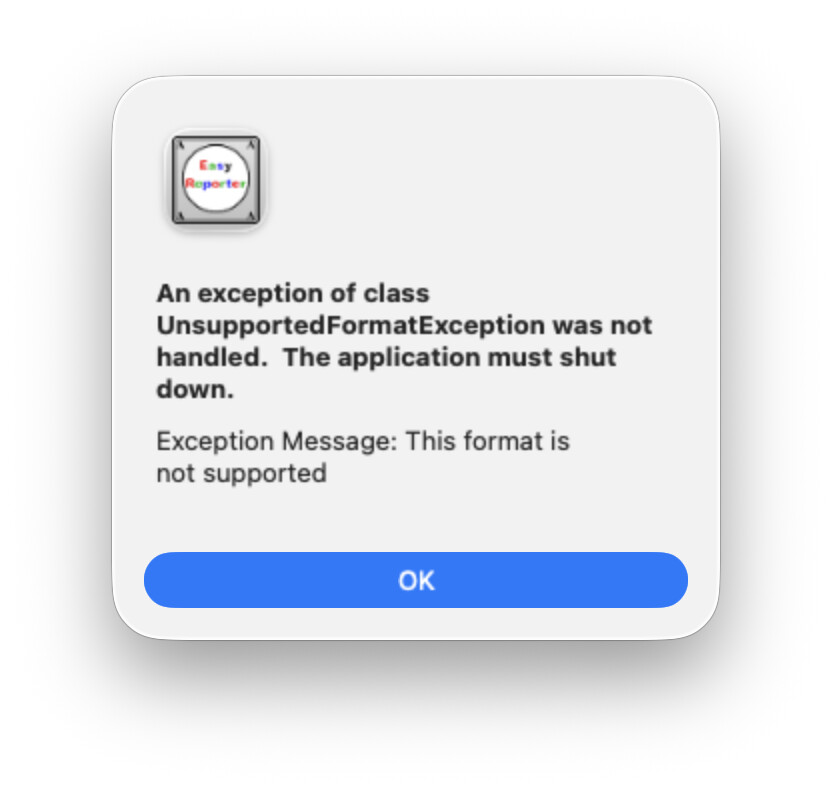
I do not understand why the error arise. Here’s the error:

I set a break point in the scaledImage.Save, and the error is there.

To avoid the error, I add:

If Cover_Name = "" Then
  Cover_Name = File_FI.Name + " - ERROR.png"
End If

Then, the original image is saved resized under this file name:
The Atom 001.jpg - ERROR.png

instead of The Atom 001.png

The issue number (in the case above: 001) change depending on the file.

An error still is in Xojo.

You’re getting that exception on the line that creates the FolderItem, not the line that actually does the saving. Since it isn’t inside the Try block, the exception isn’t caught.

Thanks Eric. Yes, I am capable of doing what you wrote below, but…

No, it is IN the TRY BLOCK.

And the Exception is fired when the debuger runs the SAVE line.

The debug point is in the Save line and the error arise when I click to the Step line, not whan the debug line stop on the Save line. Look at the top of the original post, far above.

I do not inspect carefully what the FolderItem is (it certainly ends with ‘/’ followed by nothing since the file name is… “”. That nothing is my bug (and I do not understand yet why)

I add a If Cover_Name = “” test and add some text: everything is OK (excepted the file name, but at this point, I do not care: search and replace in the Finder = OK, temporary).

Ah, I missed that in your original post.

As we can’t see your code is hard to guess if you are catching the exception or not, by the screenshot you shared it looks like you don’t.

If you want more help, please share a sample project and I’m sure someone will review your code and will point on what needs to be changed.

Show the whole try block. It’s possible there’s something about the catch statements?

The code is correct, Xojo is faultive.

I already explain:
a. where the bug is,
b. how to create it
c. how to avoid it

The full Try block:

Var saveFile As FolderItem = Image_FI.Child(Cover_Name)

Try
  scaledImage.Save(saveFile, Picture.Formats.PNG)
Catch err As IOException
  // Gérer l'erreur
  System.DebugLog "Impossible d’enregistrer l’image."
End Try

You are not catching UnsupportedFormatException.

A Try block is not a catch-all if you specify only IOException.

Edit: try this code and see what happens:

Try
  scaledImage.Save(saveFile, Picture.Formats.PNG)
Catch 
  // Gérer l'erreur
  System.DebugLog "Impossible d’enregistrer l’image."
End Try

You are adding code to make Cover_name avoid the UnsupportedFormatException. You needed that because your try block was not handling that.

Hope this is clear and helps you.

2 Likes

Well, if the variable is empty, you’re trying to access Image_FI.Child(“”), which means your saveFile variable stays at the enclosing folder. Then you try to save a picture to a folderitem that points to a folder; this can’t work anyway.

1 Like

Exactly as I thought, you are not catching the exception that is being raised. A try block will only catch the exceptions you catch. Any other exceptions continue to operation as if the try block didn’t exist. Try the following:

Var saveFile As FolderItem = Image_FI.Child(Cover_Name)

Try
  scaledImage.Save(saveFile, Picture.Formats.PNG)
Catch err As IOException
  // Gérer l'erreur
  System.DebugLog "Impossible d’enregistrer l’image."
Catch err As UnsupportedFormatException
  // Format not supported
  System.DebugLog "Unsupported format exception has occurred."
End Try

For example:

Try
   // This try block will behave as if it didn't even exist
   // as it doesn't catch anything
   scaledImage.Save(saveFile, Picture.Formats.PNG)
End Try

This should be all you need to figure it out. Cover_Name is empty. You probably intended to set Cover_Name to File_FI.Name at some point prior. As others have explained, you’re trying to get a FolderItem to Image_FI.Child("") which will not be valid. Your catch block does not catch the exception being thrown because it’s not been coded to.
mabe you try was saving the filename with extension jpg as png format?